提示词模板
AI 视频提示词模板:AI Face Symmetry Test 图片 提示词模板
适合 AI Face Symmetry Test 变体、参考图编辑 的 VisioArt 可复用提示词模板,包含清晰生成方向、对应工具入口和本地预览图。
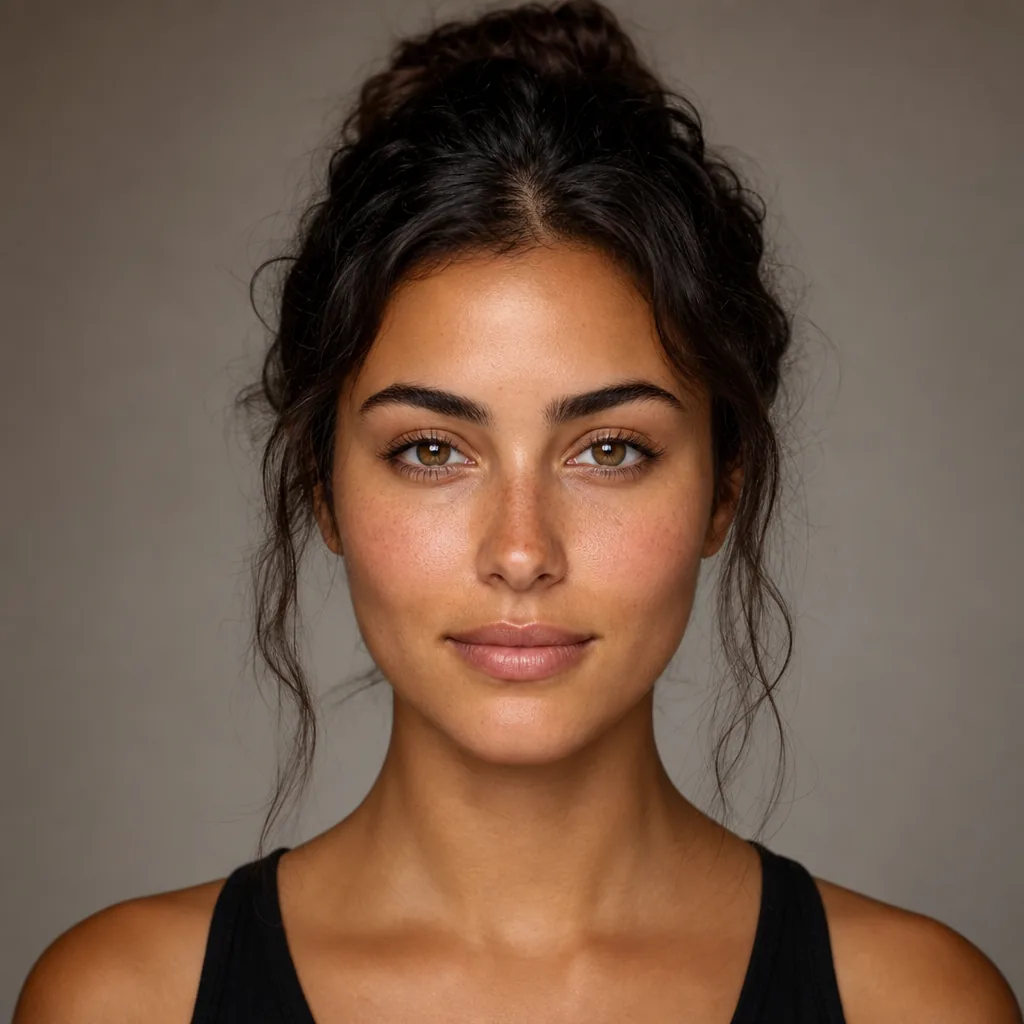
图片图片编辑外观风格参考图
提示词
替换方括号中的占位符,再根据渠道调整镜头、灯光、格式和输出约束。
Create a 1:1 AI face analysis result poster in a clean premium mobile-app UI style for mode: {MODE}. First, analyze the uploaded portrait:
- infer whether the face is female-presenting or male-presenting
- estimate a realistic facial age (display as “Estimated Facial Age: XX”) This is an analysis visualization task, NOT a beauty retouch task.
Do not change the person’s identity, face shape, skin texture, hair, expression, lighting, or background.
Keep the original portrait unchanged and overlay only UI elements. ==================================================
LAYOUT (STRICT — FIXED SINGLE CARD)
==================================================
Use ONE unified rounded result card only.
Do NOT split the content into multiple cards.
Do NOT create any floating metric box. MAIN RESULT CARD
- Place one large rounded white card in the center of the canvas
- Card width: 84–88% of canvas width
- Card height: 54–62% of canvas height
- Soft shadow + very subtle border
- All content must remain inside this single card Inside the MAIN RESULT CARD, use a compact vertical 2-section layout: SECTION A — TOP INFO AREA (portrait + score info)
- Occupies the upper ~62–68% of the card
- Use a 2-column layout: LEFT COLUMN (portrait) - Rounded-corner portrait frame - Single-person portrait only - Front-facing or slightly front-facing - No distortion, no stylization, no cropping errors RIGHT COLUMN (text content) - All text left-aligned - Vertically centered relative to portrait - Content order is fixed: 1) Score number (largest element) 2) Result phrase (bold) 3) Subtitle (smaller neutral text) 4) Purple rounded age pill: “Estimated Facial Age: XX” SECTION DIVIDER
- Add a subtle horizontal divider line between SECTION A and SECTION B
- Divider should be light gray and clean
- Keep the divider inside the same card
- No large empty gap (tight, connected layout) SECTION B — BOTTOM METRIC AREA (embedded, not separate)
- Occupies the lower ~32–38% of the card
- Must be visually attached to the top section
- Same left/right padding alignment as SECTION A
- Include: - Top row: - Left: metric label (e.g. “Facial Symmetry”) - Right: metric percentage (e.g. “85%”) - Bottom row: - One long rounded progress bar - Light gray track - Purple-to-blue gradient fill
- Keep the metric row and progress bar clearly inside the same card ALIGNMENT RULES (STRICT)
- Top and bottom sections must share the same left/right content edges
- No misalignment between portrait area and metric area
- No extra blank space between sections
- The whole card should feel like one unified result component ==================================================
SCORING RULES (STRICT — CONSERVATIVE)
==================================================
Use realistic, conservative scoring. Avoid inflated or “marketing-style” scores. For score-style modes (Beauty / Handsomeness / Cuteness):
- Score scale: 0.0–10.0
- Typical range: 6.4–8.5
- Strong portraits: 7.4–8.6
- Only rare exceptional portraits: 8.7–8.9
- Avoid 9.0+ by default
- Prefer believable values like 7.3, 7.8, 8.1, 8.4 For percentage metrics (Facial Symmetry / Skin Smoothness / etc.):
- Typical range: 70%–88%
- Rarely exceed 90%
- Avoid 95%–100% unless explicitly required
- Prefer believable values like 76%, 82%, 85%, 88% If image quality is low, face is angled, partially covered, or blurry:
- lower the displayed score slightly
- avoid high-confidence wording ==================================================
TEXT QUALITY RULES (STRICT)
==================================================
- Use correct English spelling only
- Avoid awkward phrasing or unnatural wording
- Keep labels short and product-like
- Do not generate typo variants (example: always use “Facial Symmetry”, never misspell it) Recommended subtitle styles by mode:
- Beauty: “Beauty Score” or “Attractiveness Score”
- Handsomeness: “Handsomeness Score”
- Cuteness: “Cuteness Score”
- Face Shape: “Face Shape Analysis”
- Skin Smoothness: “Skin Smoothness Score”
- Facial Symmetry: “Facial Symmetry Score” ==================================================
RESULT PHRASE STYLE (NATURAL, NOT OVERHYPED)
==================================================
Use short, natural result phrases that match the selected mode and presentation style.
Avoid exaggerated praise. Examples:
- Beauty: “Radiant Beauty”, “Naturally Elegant”, “Beautifully Balanced”
- Handsomeness: “Naturally Handsome”, “Strong Facial Harmony”, “Well-Balanced Features”
- Cuteness: “Warm and Charming”, “Sweet and Natural”, “Friendly Features”
- Facial Symmetry: “Well Balanced”, “Strong Symmetry”, “Balanced Features”
- Skin Smoothness: “Smooth and Even-Looking”, “Healthy Skin Texture”
- Face Shape: “Oval Face Shape”, “Heart-Shaped Face”, “Round Face Shape” ==================================================
VISUAL STYLE
==================================================
- Background: white/light-gray with subtle lavender-purpl
适合场景
AI Face Symmetry Test 变体
参考图编辑
可复用图片工作流
模型起点
GPT Image 2Nano Banana 2Seedream 4Seedream 4.5
相关模板
让活动继续推进
当同一活动需要更多素材格式时,可以继续使用这些相邻提示词模式。

图片merch文字提示词
AI Patch 生成器 图片 模板
适合 AI Patch Generator 变体、文生图起点 的 VisioArt 可复用提示词模板,包含清晰生成方向、对应工具入口和本地预览图。
打开模板

图片图片编辑外观风格
AI Age Change Filter 图片 模板
适合 AI Age Change Filter 变体、参考图编辑 的 VisioArt 可复用提示词模板,包含清晰生成方向、对应工具入口和本地预览图。
打开模板

图片图片编辑外观风格
AI Body Editor 图片 模板
适合 AI Body Editor 变体、参考图编辑 的 VisioArt 可复用提示词模板,包含清晰生成方向、对应工具入口和本地预览图。
打开模板
常见问题
AI Face Symmetry Test 图片 模板 常见问题
围绕工作流、模型选择、价格和生产适配给出清晰回答。
适合 AI Face Symmetry Test 变体、参考图编辑 的 VisioArt 可复用提示词模板,包含清晰生成方向、对应工具入口和本地预览图。
可以。替换方括号中的占位符,再根据渠道调整镜头、灯光、比例、产品细节和输出约束。
从页面推荐的工具开始最稳妥。如果运动、真实感或风格需要不同模型优势,再测试相邻模型路径。