Skip to content

提示词模板

AI 视频提示词模板:AI Attractiveness Test 提示词模板

适合 AI Attractiveness Test 变体、参考图编辑 的 VisioArt 可复用提示词模板,包含清晰生成方向、对应工具入口和本地预览图。
开始创作查看价格
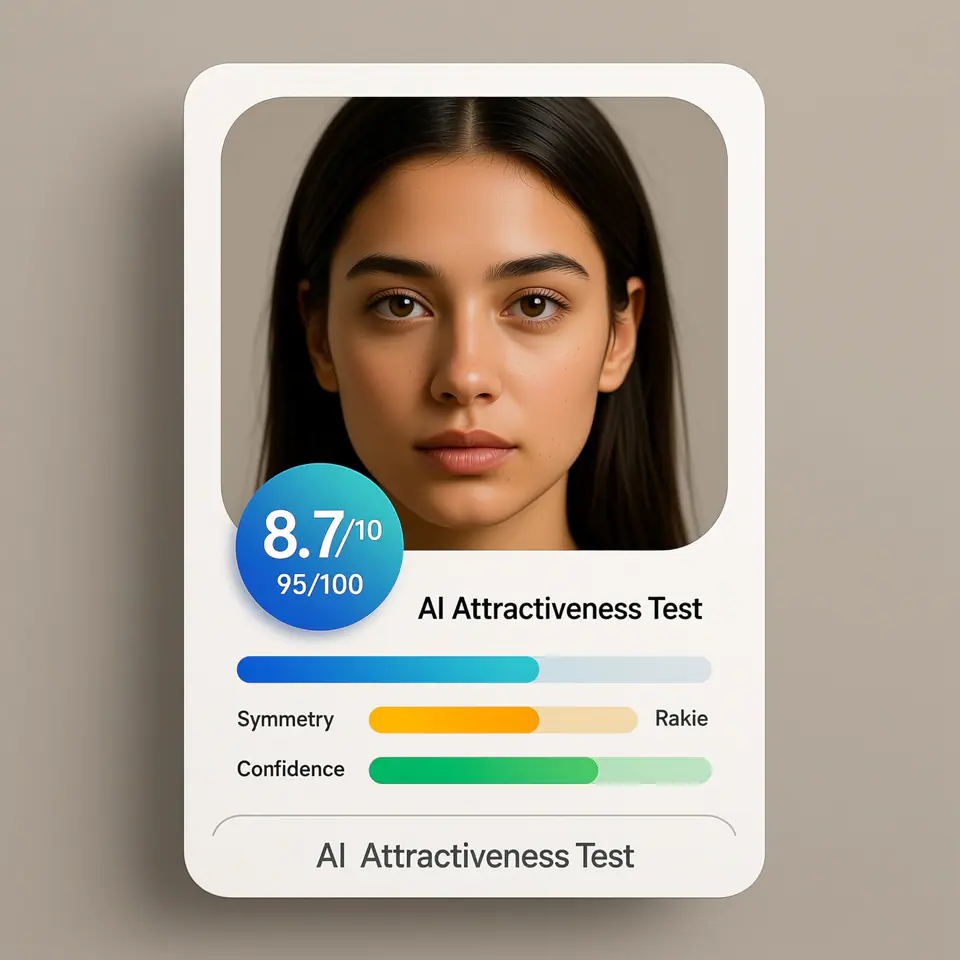
AI Attractiveness Test 提示词模板视觉示例
图片图片编辑外观风格参考图
提示词
替换方括号中的占位符,再根据渠道调整镜头、灯光、格式和输出约束。
Create a modern AI attractiveness test result card UI using the uploaded photo as the subject. The image should look like a real web app product interface screenshot, not a standalone portrait. Subject: - Use the uploaded photo as the analyzed face - Preserve the same identity, facial structure, and proportions - Natural appearance, no over-beautification, no face reshaping Layout & Composition: - Square (1:1) ratio - Clean, modern SaaS UI card design - Portrait photo placed inside a rounded rectangle frame - UI elements clearly separated from the face Score Display: - Prominent overall score badge (e.g. 8.7 / 10 or 95 / 100) - Horizontal progress bars for the following attributes: - Symmetry - Golden Ratio - Confidence - Use modern UI colors (blue, green, soft gradients) Text Style: - Clean sans-serif font - Professional product UI typography - Clear hierarchy (score > labels > details) - No handwritten or decorative fonts Branding / Footer: - If any branding text is shown, use ONLY the product name: "AI Attractiveness Test" - Branding should appear subtle and minimal, similar to a web app title or footer label - Do NOT show analyst names, system names, timestamps, or generation dates Background & Card Style: - Light gradient or soft neutral background - Rounded corners and subtle shadows - Web app / SaaS dashboard aesthetic Lighting & Photo Style: - Neutral studio lighting - Soft, even illumination - No dramatic or cinematic effects Overall Look: - AI analysis report interface - Beauty test app result card - Professional, trustworthy, shareable - Looks like a real AI product UI Do NOT: - Do not add text such as "Analysis by", "Generated by", dates, or system credits - Do not overlay text directly on the face - Do not create a fashion or beauty photoshoot - Do not exaggerate facial perfection - Do not use poster-style typography
适合场景
AI Attractiveness Test 变体
参考图编辑
可复用图片工作流
模型起点
Qwen ImageGPT-4o ImageGPT Image 2GPT Image 1.5

相关模板

让活动继续推进

当同一活动需要更多素材格式时,可以继续使用这些相邻提示词模式。

前后对比图片编辑提示词示例
图片编辑活动素材修图
前后对比
在保留主体的前提下,把粗糙图片打磨成活动素材的结构化编辑模板。
打开模板
GPT Image 2 图片编辑提示词示例
GPT Image 2 提示词图片编辑文生图
GPT Image 2 提示词
结构化 GPT Image 2 提示词模板,适合干净图片生成、参考图编辑、产品视觉、文字布局和活动静帧。
打开模板
参考图服装编辑提示词示例
图片编辑时装服装编辑
服装编辑
在保留人物身份、姿势和光线的前提下,更换服装与造型方向的图片编辑模板。
打开模板

常见问题

AI Attractiveness Test 模板 常见问题

围绕工作流、模型选择、价格和生产适配给出清晰回答。

适合 AI Attractiveness Test 变体、参考图编辑 的 VisioArt 可复用提示词模板,包含清晰生成方向、对应工具入口和本地预览图。

在 VisioArt 中使用这个提示词。

从推荐工具开始,粘贴提示词,替换占位符,并测试最强模型路径。

打开推荐工具浏览全部模板
