Skip to content

提示詞範本

AI 影片提示詞範本:AI Muscle 生成器 圖片 提示詞範本

適合 AI Muscle Generator 變體、參考圖編輯 的 VisioArt 可複用提示詞範本,包含清晰生成方向、對應工具入口和本地预覽圖。
開始創作查看價格
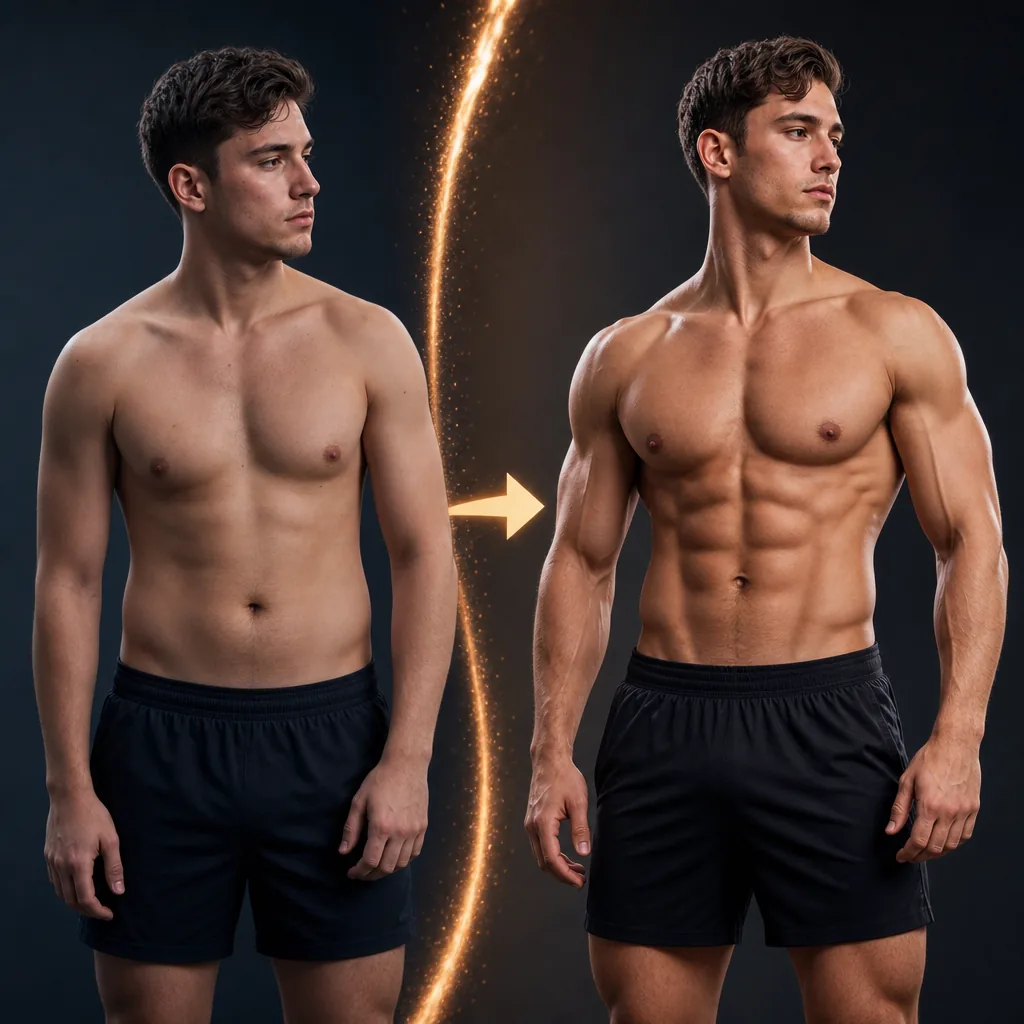
AI Muscle 生成器 圖片 提示詞範本視覺示例
圖片圖片編輯外觀風格參考圖
提示詞
替換方括號中的佔位符,再根據渠道調整鏡頭、燈光、格式和輸出限制。
Transform the person in the uploaded image into a more muscular, lean, and aesthetically sculpted version of themselves, as if they have trained seriously for years. Keep the same face, identity, pose, clothing, background, camera angle, and lighting. Apply a realistic full-body fitness transformation: broader shoulders, fuller chest, more muscular arms, a leaner waist, clearly defined abs, visible obliques, stronger back and lats where visible, and more toned legs and glutes if visible. Lower body fat slightly so the muscle definition is obvious but still natural. Target a physique similar to a fitness influencer or commercial fitness model: noticeably more muscular and attractive, clearly trained, camera-ready, and well-proportioned, but not an extreme bodybuilder. Make the transformation obvious at first glance while keeping anatomy realistic, skin texture natural, and lighting fully consistent with the original image. Avoid fake-looking abs, oversized muscles, extreme veins, distorted proportions, plastic skin, changed identity, warped clothing, or any background changes.
適合場景
AI Muscle Generator 變體
參考圖編輯
可複用圖片工作流
模型起點
GPT Image 2Nano Banana 2Seedream 4Seedream 4.5

相關範本

讓活動繼續推進

當同一活動需要更多素材格式時,可以繼續使用這些相鄰提示詞模式。

AI Patch 生成器 圖片 提示詞範本示例
圖片merch文字提示詞
AI Patch 生成器 圖片 範本
適合 AI Patch Generator 變體、文生圖起點 的 VisioArt 可複用提示詞範本,包含清晰生成方向、對應工具入口和本地预覽圖。
開啟範本
AI Age Change Filter 圖片 提示詞範本示例
圖片圖片編輯外觀風格
AI Age Change Filter 圖片 範本
適合 AI Age Change Filter 變體、參考圖編輯 的 VisioArt 可複用提示詞範本,包含清晰生成方向、對應工具入口和本地预覽圖。
開啟範本

AI Body Editor 圖片 提示詞範本示例
圖片圖片編輯外觀風格
AI Body Editor 圖片 範本
適合 AI Body Editor 變體、參考圖編輯 的 VisioArt 可複用提示詞範本,包含清晰生成方向、對應工具入口和本地预覽圖。
開啟範本

常見問題

AI Muscle 生成器 圖片 範本 常見問題

圍繞工作流程、模型選擇、價格和生產適配給出清晰回答。

適合 AI Muscle Generator 變體、參考圖編輯 的 VisioArt 可複用提示詞範本,包含清晰生成方向、對應工具入口和本地预覽圖。

可以。替換方括號中的佔位符,再根據渠道調整鏡頭、燈光、比例、產品細節和輸出限制。

從頁面推薦的工具開始最穩妥。如果動態、真實感或風格需要不同模型優勢,再測試相鄰模型路徑。

在 VisioArt 中使用這個提示詞。

從推薦工具開始,貼上提示詞,替換佔位符,並測試最強模型路徑。

開啟推薦工具瀏覽全部範本