Skip to content

Modelo de prompt

Modelo de prompt para vídeo com IA: Prompt de AI look Rater imagem

Modelo pronto para produção para AI look Rater imagem, indicado para AI look Rater variants e referência guided edits e fluxos claros no VisioArt.
Começar a criarVer preços
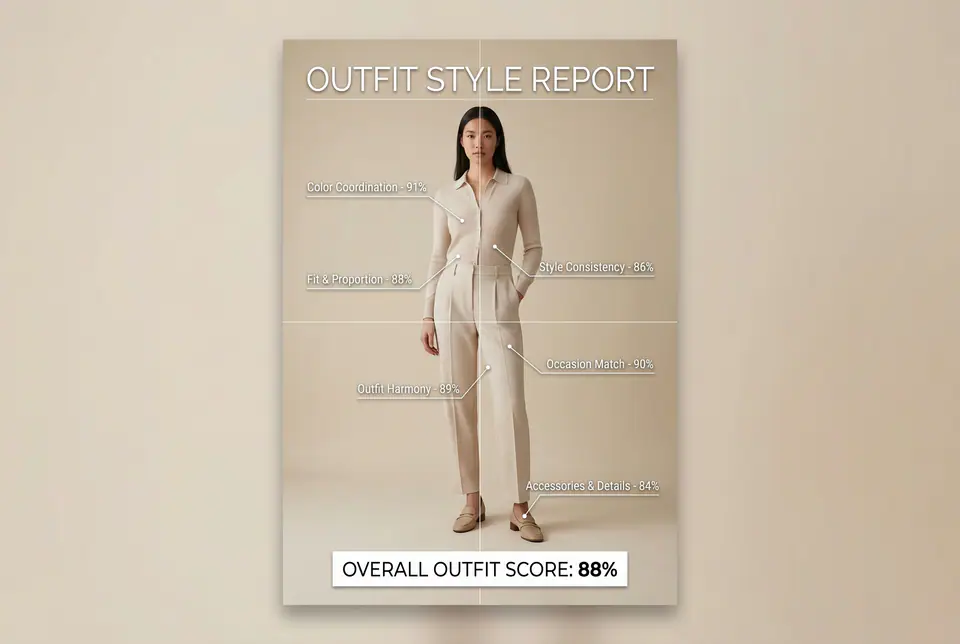
Exemplo visual de Prompt de AI look Rater imagem
imagemimagem ediçãoappearancereferência imagem
Instrução
Substitua os espaços entre colchetes e ajuste câmera, iluminação, formato e restrições de saída para o canal exato.
Use the provided full-body or half-body outfit photo as the base. Do NOT change the person, pose, face, body shape, height, skin tone, gender, or outfit itself. Do NOT beautify, replace, recolor, or redesign the clothing. Only overlay a clean, minimal outfit evaluation infographic on top of the original photo. Create a high-resolution vertical "OUTFIT STYLE REPORT" poster, studio lighting, soft neutral or beige background, premium fashion stylist / luxury image-consulting style. The subject can be MALE or FEMALE - keep them exactly as in the original photo. Add thin white lines and labels pointing to the REAL outfit areas, with percentage scores based on global fashion principles, including proportions, color coordination, silhouette balance, and overall styling harmony (without modifying the outfit). Outfit Evaluation Sections: 1. Color Coordination Label near the upper torso or chest area with a line pointing to the outfit: "Color Coordination - 0-100%" Example: "Color Coordination - 91%" 2. Fit & Proportion Label near the waist or full outfit silhouette: "Fit & Proportion - 0-100%" Example: "Fit & Proportion - 88%" 3. Style Consistency Label near the center of the outfit: "Style Consistency - 0-100%" Example: "Style Consistency - 86%" 4. Occasion Appropriateness Label near the mid or lower body: "Occasion Match - 0-100%" Example: "Occasion Match - 90%" 5. Accessories & Details Label pointing toward shoes, bag, jewelry, or visible accessories: "Accessories & Details - 0-100%" Example: "Accessories & Details - 84%" 6. Overall Outfit Harmony Label near the center of the body: "Outfit Harmony - 0-100%" Example: "Outfit Harmony - 89%" At the bottom center of the poster, add a BIG, bold number inside a circle or rectangle: "OVERALL OUTFIT SCORE: XX%" This represents the total outfit aesthetic score from 1-100%. Design Style Requirements: - clean, professional, fashion-consultant or luxury styling report aesthetic - minimal, style-focused infographic layout (similar to aesthetic analysis reports) - modern thin sans-serif typography - white text and white guideline strokes - subtle shadows for readability - no logos, no brand names, no decorative graphics - no additional text other than the labels and scores above - visually balanced, editorial-quality layout
Indicado para
AI look Rater variants
referência guided edits
Reusable imagem workflows
Pontos de partida dos modelos
GPT Image 2Nano Banana 2Seedream 4Seedream 4.5

Modelos relacionados

Continue a campanha

Use estes padrões próximos quando a mesma campanha precisar de outro formato de asset.

Exemplo de Prompt de AI Patch prompt generator imagem
imagemmerchtexto prompt
AI Patch prompt generator imagem
Modelo pronto para produção para AI Patch prompt generator imagem, indicado para AI Patch Generator variants e texto to imagem starts e fluxos claros no VisioArt.
Abrir modelo
Exemplo de Prompt de AI Age Change Filter prompt imagem
imagemimagem ediçãoappearance
AI Age Change Filter prompt imagem
Modelo pronto para produção para AI Age Change Filter prompt imagem, indicado para AI Age Change Filter variants e referência guided edits e fluxos claros no VisioArt.
Abrir modelo

Exemplo de Prompt de AI Body Editor prompt imagem
imagemimagem ediçãoappearance
AI Body Editor prompt imagem
Modelo pronto para produção para AI Body Editor prompt imagem, indicado para AI Body Editor variants e referência guided edits e fluxos claros no VisioArt.
Abrir modelo

Perguntas frequentes

Perguntas frequentes sobre AI look Rater imagem

Respostas claras sobre fluxos, modelos, preços e encaixe de produção.

Modelo pronto para produção para AI look Rater imagem, indicado para AI look Rater variants e referência guided edits e fluxos claros no VisioArt.

Sim. Substitua os marcadores entre colchetes e ajuste câmera, luz, formato, detalhes e restrições de saída para o canal.

Comece pela ferramenta recomendada na página. Se movimento, realismo ou estilo exigirem outra força de modelo, teste caminhos próximos.

Use este modelo no VisioArt.

Abra a ferramenta recomendada, cole a instrução, substitua os espaços reservados e teste o melhor caminho de modelo.

Abrir ferramenta recomendadaExplorar modelos