Skip to content

프롬프트 템플릿

AI 비디오 프롬프트 템플릿: Raincoat 효과 이미지 프롬프트

Raincoat 효과 이미지에 바로 쓸 수 있는 제작용 템플릿입니다. Raincoat 효과 variants 및 레퍼런스 guided edits에 맞게 VisioArt 워크플로를 구조화합니다.
제작 시작가격 보기
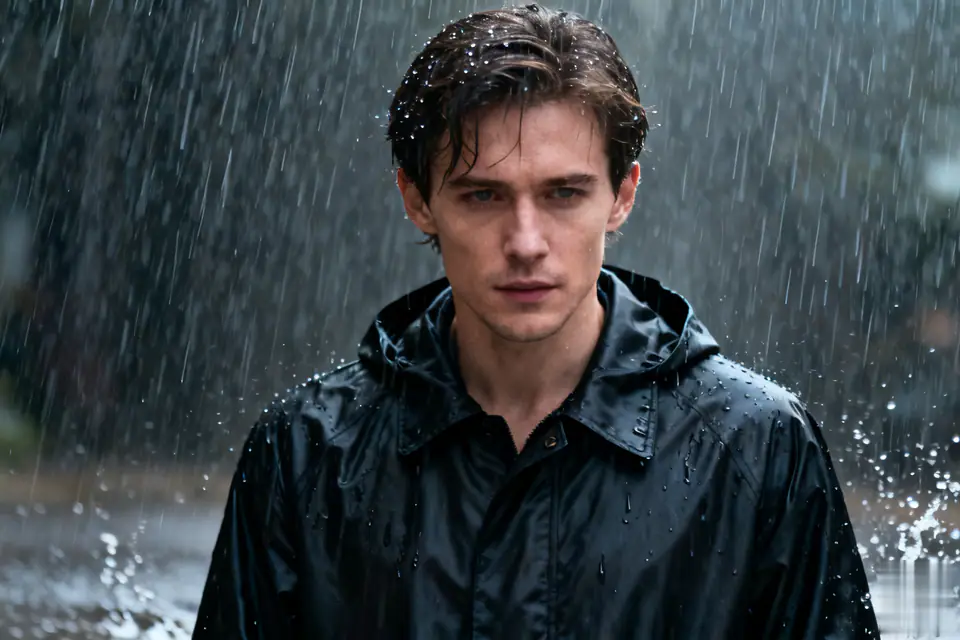
Raincoat 효과 이미지 프롬프트 시각 예시
이미지이미지 편집appearance레퍼런스 이미지
프롬프트
대괄호 안의 자리표시자를 바꾼 뒤 채널에 맞게 카메라, 조명, 형식, 출력 조건을 조정하세요.
Transform the uploaded single-person photo into a realistic close-up portrait with the following key elements: The person must be wearing a well-fitted black raincoat (with visible texture details like fabric wrinkles, possible slight water absorption effects, and natural collar/hem shapes). The scene must depict a heavy downpour-show distinct, dense rain streaks falling around the person, splashes of rain on the ground (if lower body is visible), and subtle water droplets on the raincoat surface, hair, or shoulders to enhance authenticity. Maintain the original person's core facial features, posture, and basic appearance (avoid altering key identifiers like facial structure, hairstyle length/color, or obvious accessories) while integrating them naturally into the rainy environment. Adjust the lighting to match a heavy rain scenario: soft, diffused ambient light (simulate overcast weather), possible subtle highlights on wet surfaces (e.g., raincoat fabric, skin), and avoid harsh shadows. Ensure the close-up framing focuses on the upper body (at least from shoulders up, or extending to mid-torso if appropriate) to highlight the raincoat details and the interaction between the person and the rain. Keep the overall tone realistic and immersive-avoid overly stylized or cartoonish effects; prioritize natural rain dynamics and realistic material textures of the raincoat.
적합한 용도
Raincoat 효과 variants
레퍼런스 guided edits
Reusable 이미지 workflows
모델 시작점
Seedream 4GPT Image 2Seedream 4.5Seedream50 Lite

관련 템플릿

캠페인을 계속 진행하기

같은 캠페인에 다른 에셋 형식이 필요할 때 가까운 프롬프트 패턴으로 이어가세요.

AI Patch 프롬프트 generator 이미지 프롬프트 예시
이미지merch텍스트 프롬프트
AI Patch 프롬프트 generator 이미지
AI Patch 프롬프트 generator 이미지에 바로 쓸 수 있는 제작용 템플릿입니다. AI Patch Generator variants 및 텍스트 to 이미지 starts에 맞게 VisioArt 워크플로를 구조화합니다.
템플릿 열기
AI Age Change Filter 프롬프트 이미지 프롬프트 예시
이미지이미지 편집appearance
AI Age Change Filter 프롬프트 이미지
AI Age Change Filter 프롬프트 이미지에 바로 쓸 수 있는 제작용 템플릿입니다. AI Age Change Filter variants 및 레퍼런스 guided edits에 맞게 VisioArt 워크플로를 구조화합니다.
템플릿 열기

AI Body Editor 프롬프트 이미지 프롬프트 예시
이미지이미지 편집appearance
AI Body Editor 프롬프트 이미지
AI Body Editor 프롬프트 이미지에 바로 쓸 수 있는 제작용 템플릿입니다. AI Body Editor variants 및 레퍼런스 guided edits에 맞게 VisioArt 워크플로를 구조화합니다.
템플릿 열기

자주 묻는 질문

Raincoat 효과 이미지 FAQ

워크플로, 모델 선택, 가격, 제작 적합도에 대한 답을 빠르게 확인하세요.

Raincoat 효과 이미지에 바로 쓸 수 있는 제작용 템플릿입니다. Raincoat 효과 variants 및 레퍼런스 guided edits에 맞게 VisioArt 워크플로를 구조화합니다.

가능합니다. 대괄호 안의 자리표시자를 바꾸고 채널에 맞춰 카메라, 조명, 비율, 세부 정보, 출력 조건을 조정하세요.

페이지의 추천 도구에서 시작하세요. 움직임, 사실감, 스타일에 다른 모델 강점이 필요하면 인접한 모델 경로를 테스트하세요.

이 템플릿을 VisioArt에서 사용하세요.

추천 도구를 열고 프롬프트를 붙여 넣은 뒤 자리표시자를 바꾸고 가장 알맞은 모델 경로를 테스트하세요.

추천 도구 열기템플릿 둘러보기