Skip to content

프롬프트 템플릿

AI 비디오 프롬프트 템플릿: Blythe Doll 프롬프트 generator 이미지 프롬프트

Blythe Doll 프롬프트 generator 이미지에 바로 쓸 수 있는 제작용 템플릿입니다. Blythe Doll Generator variants 및 레퍼런스 guided edits에 맞게 VisioArt 워크플로를 구조화합니다.
제작 시작가격 보기
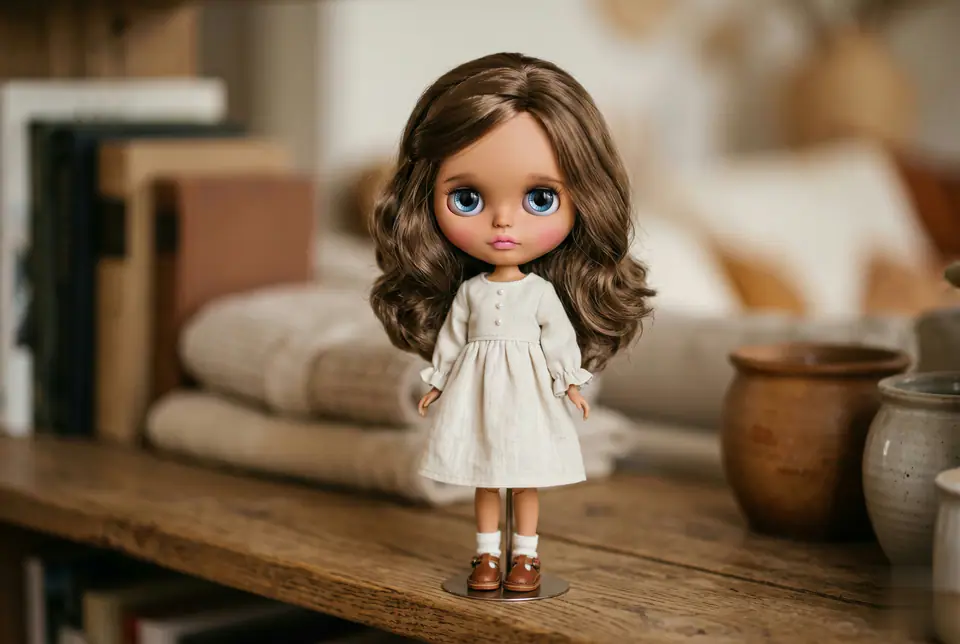
Blythe Doll 프롬프트 generator 이미지 프롬프트 시각 예시
이미지이미지 편집appearance레퍼런스 이미지
프롬프트
대괄호 안의 자리표시자를 바꾼 뒤 채널에 맞게 카메라, 조명, 형식, 출력 조건을 조정하세요.
Use the uploaded photo as the single identity reference. Transform the person into a collectible Blythe doll figure while preserving the person's identity, face shape, hairstyle, hair parting, and clothing (same outfit, color, neckline). Blythe doll proportions: oversized round head (Blythe-accurate), small chin, tiny nose, tiny lips. Very large glossy glass eyes with strong reflections/catchlights, slightly melancholic dreamy expression, long delicate eyelashes, subtle lower lash line. Skin: smooth porcelain-like doll skin with realistic vinyl/resin material feel, soft blush on cheeks, gentle pastel makeup; IMPORTANT: match the doll's skin tone to the reference photo's skin tone (do not whiten or change ethnicity), keep natural undertone. Hair: keep the same hair length, color, volume, and texture from the reference photo; silky doll hair fibers with realistic strand detail. Aesthetic: cute, dreamy, handcrafted Blythe figure, high detail, soft studio lighting, pastel color palette, shallow depth of field, photography-style finish, realistic doll materials (vinyl/resin head, glass eyes), crisp focus on eyes, subtle film grain. Background: simple indoor neutral background bokeh, not distracting. "extra cute pastel blush, gentle gradient lips, warm soft light, subtle sparkle in eyes, kawaii handcrafted collectible figure look"
적합한 용도
Blythe Doll Generator variants
레퍼런스 guided edits
Reusable 이미지 workflows
모델 시작점
GPT Image 2Nano Banana 2Seedream 4Seedream 4.5

관련 템플릿

캠페인을 계속 진행하기

같은 캠페인에 다른 에셋 형식이 필요할 때 가까운 프롬프트 패턴으로 이어가세요.

AI Patch 프롬프트 generator 이미지 프롬프트 예시
이미지merch텍스트 프롬프트
AI Patch 프롬프트 generator 이미지
AI Patch 프롬프트 generator 이미지에 바로 쓸 수 있는 제작용 템플릿입니다. AI Patch Generator variants 및 텍스트 to 이미지 starts에 맞게 VisioArt 워크플로를 구조화합니다.
템플릿 열기
AI Age Change Filter 프롬프트 이미지 프롬프트 예시
이미지이미지 편집appearance
AI Age Change Filter 프롬프트 이미지
AI Age Change Filter 프롬프트 이미지에 바로 쓸 수 있는 제작용 템플릿입니다. AI Age Change Filter variants 및 레퍼런스 guided edits에 맞게 VisioArt 워크플로를 구조화합니다.
템플릿 열기

AI Body Editor 프롬프트 이미지 프롬프트 예시
이미지이미지 편집appearance
AI Body Editor 프롬프트 이미지
AI Body Editor 프롬프트 이미지에 바로 쓸 수 있는 제작용 템플릿입니다. AI Body Editor variants 및 레퍼런스 guided edits에 맞게 VisioArt 워크플로를 구조화합니다.
템플릿 열기

자주 묻는 질문

Blythe Doll 프롬프트 generator 이미지 FAQ

워크플로, 모델 선택, 가격, 제작 적합도에 대한 답을 빠르게 확인하세요.

Blythe Doll 프롬프트 generator 이미지에 바로 쓸 수 있는 제작용 템플릿입니다. Blythe Doll Generator variants 및 레퍼런스 guided edits에 맞게 VisioArt 워크플로를 구조화합니다.

가능합니다. 대괄호 안의 자리표시자를 바꾸고 채널에 맞춰 카메라, 조명, 비율, 세부 정보, 출력 조건을 조정하세요.

페이지의 추천 도구에서 시작하세요. 움직임, 사실감, 스타일에 다른 모델 강점이 필요하면 인접한 모델 경로를 테스트하세요.

이 템플릿을 VisioArt에서 사용하세요.

추천 도구를 열고 프롬프트를 붙여 넣은 뒤 자리표시자를 바꾸고 가장 알맞은 모델 경로를 테스트하세요.

추천 도구 열기템플릿 둘러보기