Skip to content

프롬프트 템플릿

AI 비디오 프롬프트 템플릿: AI Sway Dance Filter 프롬프트 비디오 프롬프트

AI Sway Dance Filter 프롬프트 비디오에 바로 쓸 수 있는 제작용 템플릿입니다. AI Sway Dance Filter clips 및 entertainment effects에 맞게 VisioArt 워크플로를 구조화합니다.
제작 시작가격 보기
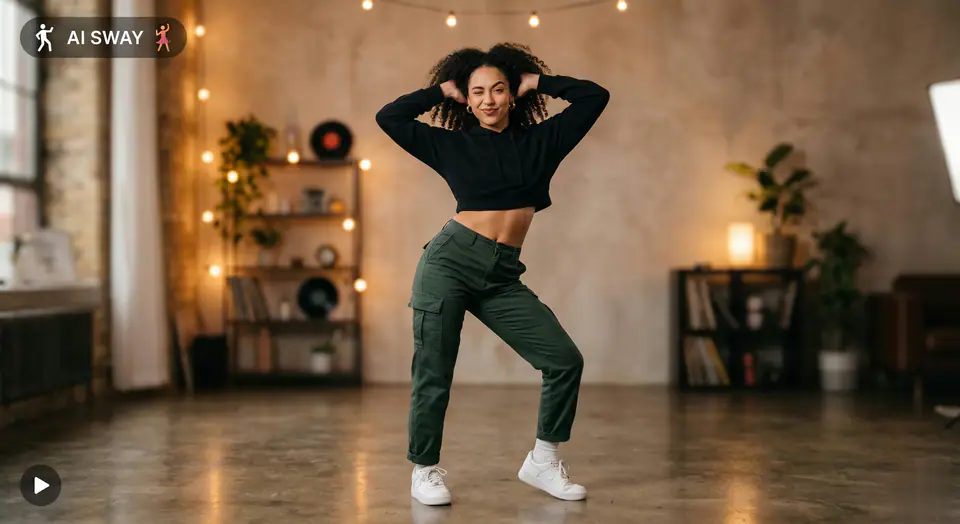
AI Sway Dance Filter 프롬프트 비디오 프롬프트 시각 예시
비디오비디오 효과entertainment이미지 to 비디오
프롬프트
대괄호 안의 자리표시자를 바꾼 뒤 채널에 맞게 카메라, 조명, 형식, 출력 조건을 조정하세요.
Generate a TikTok-style sway dance animation from the uploaded image. The characters stand still in the original scene. They lift their arms and places both hands behind heads with elbows outward, holding that confident pose for the full loop. They perform a rhythmic sway dance with strong hip movement: hips swing side-to-side in a smooth repeating loop while her upper body follows with a clear body wave, giving the motion a sensual yet relaxed rhythm. The movement should be continuous and loop-friendly. Their faces show a playful expression with a teasing raised eyebrow. Near the end of the loop, they give a quick flirty wink and a subtle smile, then seamlessly returns to the neutral playful expression for a smooth loop effect. Keep proportions consistent, maintain realistic motion, and avoid distortion. No camera movement, stable framing, warm soft lighting.
적합한 용도
AI Sway Dance Filter clips
entertainment effects
Reusable 비디오 workflows
모델 시작점
Seedance

관련 템플릿

캠페인을 계속 진행하기

같은 캠페인에 다른 에셋 형식이 필요할 때 가까운 프롬프트 패턴으로 이어가세요.

제품 리빌 프롬프트 예시
이커머스제품 비디오유료 소셜
제품 리빌
제품 리빌에 바로 쓸 수 있는 제작용 템플릿입니다. 제품 launches 및 유료 소셜 tests에 맞게 VisioArt 워크플로를 구조화합니다.
템플릿 열기

인물 후킹 프롬프트 예시
인물소셜 contentcreator
인물 후킹
인물 후킹에 바로 쓸 수 있는 제작용 템플릿입니다. Creator posts 및 창업자 content에 맞게 VisioArt 워크플로를 구조화합니다.
템플릿 열기

Lookbook 모션 프롬프트 예시
패션Lookbook이미지 to 비디오
Lookbook 모션
Lookbook 모션에 바로 쓸 수 있는 제작용 템플릿입니다. 패션 drops 및 Lookbooks에 맞게 VisioArt 워크플로를 구조화합니다.
템플릿 열기

자주 묻는 질문

AI Sway Dance Filter 프롬프트 비디오 FAQ

워크플로, 모델 선택, 가격, 제작 적합도에 대한 답을 빠르게 확인하세요.

AI Sway Dance Filter 프롬프트 비디오에 바로 쓸 수 있는 제작용 템플릿입니다. AI Sway Dance Filter clips 및 entertainment effects에 맞게 VisioArt 워크플로를 구조화합니다.

가능합니다. 대괄호 안의 자리표시자를 바꾸고 채널에 맞춰 카메라, 조명, 비율, 세부 정보, 출력 조건을 조정하세요.

페이지의 추천 도구에서 시작하세요. 움직임, 사실감, 스타일에 다른 모델 강점이 필요하면 인접한 모델 경로를 테스트하세요.

이 템플릿을 VisioArt에서 사용하세요.

추천 도구를 열고 프롬프트를 붙여 넣은 뒤 자리표시자를 바꾸고 가장 알맞은 모델 경로를 테스트하세요.

추천 도구 열기템플릿 둘러보기