Skip to content

프롬프트 템플릿

AI 비디오 프롬프트 템플릿: AI Shibuya Crossing 비디오 비디오 프롬프트

AI Shibuya Crossing 비디오 비디오에 바로 쓸 수 있는 제작용 템플릿입니다. AI Shibuya Crossing 비디오 clips 및 entertainment effects에 맞게 VisioArt 워크플로를 구조화합니다.
제작 시작가격 보기
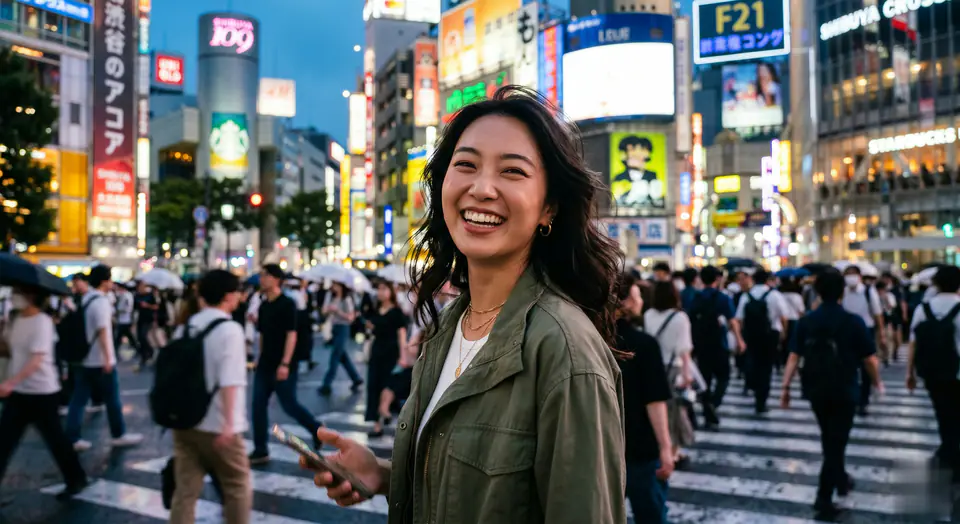
AI Shibuya Crossing 비디오 비디오 프롬프트 시각 예시
비디오비디오 효과entertainment이미지 to 비디오
프롬프트
대괄호 안의 자리표시자를 바꾼 뒤 채널에 맞게 카메라, 조명, 형식, 출력 조건을 조정하세요.
Animate the reference person and the scene from the still image into a high-energy viral social media video clip, ensuring perfect facial consistency throughout. 0-2s: The camera, acting as a handheld smartphone or smooth gimbal, closely follows the reference person from behind as they joyfully run forward onto the iconic crowded Shibuya zebra crossing. The massive crowd around them moves naturally. 2-5s: The person suddenly slows down, gracefully spins around to face the camera, and gives a beaming, confident, and hopeful "main character" smile. The camera stabilizes into a tight medium shot of their face. In the background, the bustling Tokyo crosswalk is alive with motion, and a few other pedestrians on the opposite side can be seen holding up phones filming themselves in a similar fashion. Style: handheld camera movement, organic camera shake, raw lifestyle realism, uplifting and positive atmosphere, vibrant cinematic Tokyo street lighting, realistic clothing physics, shallow depth of field, full of life and positive energy.
적합한 용도
AI Shibuya Crossing 비디오 clips
entertainment effects
Reusable 비디오 workflows
모델 시작점
Seedance 2 Fast

관련 템플릿

캠페인을 계속 진행하기

같은 캠페인에 다른 에셋 형식이 필요할 때 가까운 프롬프트 패턴으로 이어가세요.

제품 리빌 프롬프트 예시
이커머스제품 비디오유료 소셜
제품 리빌
제품 리빌에 바로 쓸 수 있는 제작용 템플릿입니다. 제품 launches 및 유료 소셜 tests에 맞게 VisioArt 워크플로를 구조화합니다.
템플릿 열기

인물 후킹 프롬프트 예시
인물소셜 contentcreator
인물 후킹
인물 후킹에 바로 쓸 수 있는 제작용 템플릿입니다. Creator posts 및 창업자 content에 맞게 VisioArt 워크플로를 구조화합니다.
템플릿 열기

Lookbook 모션 프롬프트 예시
패션Lookbook이미지 to 비디오
Lookbook 모션
Lookbook 모션에 바로 쓸 수 있는 제작용 템플릿입니다. 패션 drops 및 Lookbooks에 맞게 VisioArt 워크플로를 구조화합니다.
템플릿 열기

자주 묻는 질문

AI Shibuya Crossing 비디오 비디오 FAQ

워크플로, 모델 선택, 가격, 제작 적합도에 대한 답을 빠르게 확인하세요.

AI Shibuya Crossing 비디오 비디오에 바로 쓸 수 있는 제작용 템플릿입니다. AI Shibuya Crossing 비디오 clips 및 entertainment effects에 맞게 VisioArt 워크플로를 구조화합니다.

가능합니다. 대괄호 안의 자리표시자를 바꾸고 채널에 맞춰 카메라, 조명, 비율, 세부 정보, 출력 조건을 조정하세요.

페이지의 추천 도구에서 시작하세요. 움직임, 사실감, 스타일에 다른 모델 강점이 필요하면 인접한 모델 경로를 테스트하세요.

이 템플릿을 VisioArt에서 사용하세요.

추천 도구를 열고 프롬프트를 붙여 넣은 뒤 자리표시자를 바꾸고 가장 알맞은 모델 경로를 테스트하세요.

추천 도구 열기템플릿 둘러보기