Skip to content

프롬프트 템플릿

AI 비디오 프롬프트 템플릿: AI 폴라로이드 사진 이미지 프롬프트

AI 폴라로이드 사진 이미지에 바로 쓸 수 있는 제작용 템플릿입니다. AI 폴라로이드 사진 variants 및 레퍼런스 guided edits에 맞게 VisioArt 워크플로를 구조화합니다.
제작 시작가격 보기
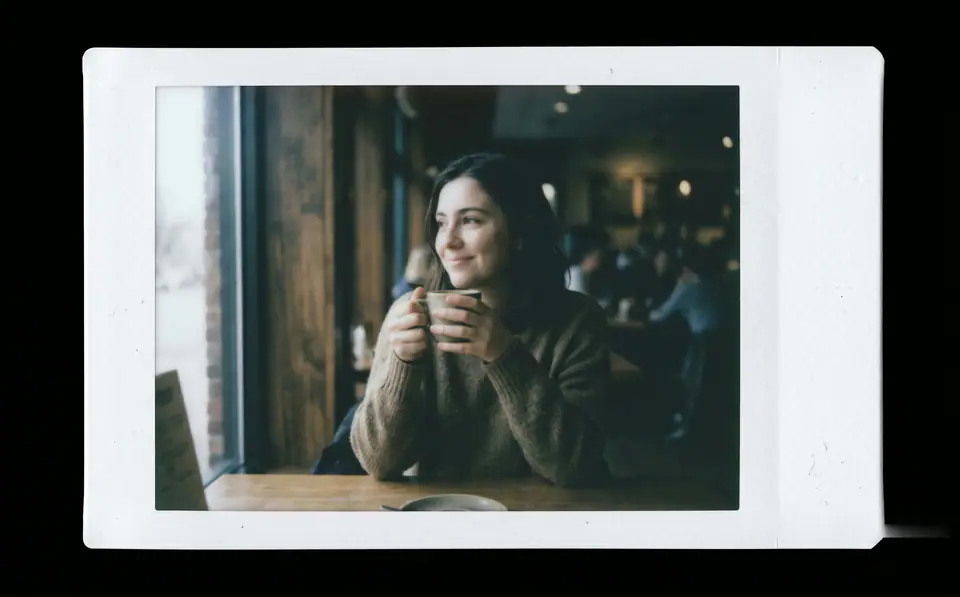
AI 폴라로이드 사진 이미지 프롬프트 시각 예시
이미지이미지 편집appearance레퍼런스 이미지
프롬프트
대괄호 안의 자리표시자를 바꾼 뒤 채널에 맞게 카메라, 조명, 형식, 출력 조건을 조정하세요.
Create a print-ready Fujifilm Instax-style instant film photo from the uploaded image. The entire output must be a single standalone Instax Mini print sheet-no external background, desk, or scene. Design as a real Instax film sheet: - Clean white borders integrated into the image, with a noticeably thicker bottom margin. - Soft rounded corners on all edges. - Subtle matte paper texture across the entire surface. Center the original photo precisely within the film area without cropping key content. Apply authentic Fujifilm Instax Mini color and tone response (ISO 800, 5500K daylight balance): - Overall exposure slightly underexposed by 1/3 to 1/2 stop for a subtly dim, moody feel. - Midtones shifted downward for a gently suppressed, hazy atmosphere. - Softened contrast: highlights bloom softly with diffusion; shadows lifted slightly but impure (not pure black). - Muted, subdued colors with realistic Instax impurities: reds/oranges dulled and slightly dirty; magentas light and undersaturated; yellows leaning cool/lemony; subtle greenish tint in shadows and midtones. - Skin tones naturally imperfect-slightly yellowish or greenish, not idealized. - Gentle light diffusion softens all transitions, especially in bright areas, creating a foggy non-digital haze. Add perceptible non-digital Instax characteristics (mild, natural-looking): - Visible brightness falloff from center to edges (film exposure effect). - Slight sharpness reduction toward edges (camera optics). - Very subtle uneven exposure and color shifts across the surface for organic inconsistency. The result must evoke a genuine Fujifilm Instax Mini print-dimmer, hazier, with imperfect color rendering that feels authentic and nostalgic, not a clean digital photo. Preserve original composition, subject identity, and details. Strictly avoid: - Digital sharpness/clarity/HDR perfection. - Uniform brightness or even lighting. - Vibrant/rich/perfect colors. - Heavy vignettes, aging, dust, scratches, text, logos, or watermarks. - Any mockup staging, shadows, or environments.
적합한 용도
AI 폴라로이드 사진 variants
레퍼런스 guided edits
Reusable 이미지 workflows
모델 시작점
GPT Image 2Nano Banana 2Seedream 4Seedream 4.5

관련 템플릿

캠페인을 계속 진행하기

같은 캠페인에 다른 에셋 형식이 필요할 때 가까운 프롬프트 패턴으로 이어가세요.

AI Patch 프롬프트 generator 이미지 프롬프트 예시
이미지merch텍스트 프롬프트
AI Patch 프롬프트 generator 이미지
AI Patch 프롬프트 generator 이미지에 바로 쓸 수 있는 제작용 템플릿입니다. AI Patch Generator variants 및 텍스트 to 이미지 starts에 맞게 VisioArt 워크플로를 구조화합니다.
템플릿 열기
AI Age Change Filter 프롬프트 이미지 프롬프트 예시
이미지이미지 편집appearance
AI Age Change Filter 프롬프트 이미지
AI Age Change Filter 프롬프트 이미지에 바로 쓸 수 있는 제작용 템플릿입니다. AI Age Change Filter variants 및 레퍼런스 guided edits에 맞게 VisioArt 워크플로를 구조화합니다.
템플릿 열기

AI Body Editor 프롬프트 이미지 프롬프트 예시
이미지이미지 편집appearance
AI Body Editor 프롬프트 이미지
AI Body Editor 프롬프트 이미지에 바로 쓸 수 있는 제작용 템플릿입니다. AI Body Editor variants 및 레퍼런스 guided edits에 맞게 VisioArt 워크플로를 구조화합니다.
템플릿 열기

자주 묻는 질문

AI 폴라로이드 사진 이미지 FAQ

워크플로, 모델 선택, 가격, 제작 적합도에 대한 답을 빠르게 확인하세요.

AI 폴라로이드 사진 이미지에 바로 쓸 수 있는 제작용 템플릿입니다. AI 폴라로이드 사진 variants 및 레퍼런스 guided edits에 맞게 VisioArt 워크플로를 구조화합니다.

가능합니다. 대괄호 안의 자리표시자를 바꾸고 채널에 맞춰 카메라, 조명, 비율, 세부 정보, 출력 조건을 조정하세요.

페이지의 추천 도구에서 시작하세요. 움직임, 사실감, 스타일에 다른 모델 강점이 필요하면 인접한 모델 경로를 테스트하세요.

이 템플릿을 VisioArt에서 사용하세요.

추천 도구를 열고 프롬프트를 붙여 넣은 뒤 자리표시자를 바꾸고 가장 알맞은 모델 경로를 테스트하세요.

추천 도구 열기템플릿 둘러보기