Skip to content

프롬프트 템플릿

AI 비디오 프롬프트 템플릿: AI Eye Zoom 프롬프트 비디오 프롬프트

AI Eye Zoom 프롬프트 비디오에 바로 쓸 수 있는 제작용 템플릿입니다. AI Eye Zoom clips 및 appearance effects에 맞게 VisioArt 워크플로를 구조화합니다.
제작 시작가격 보기
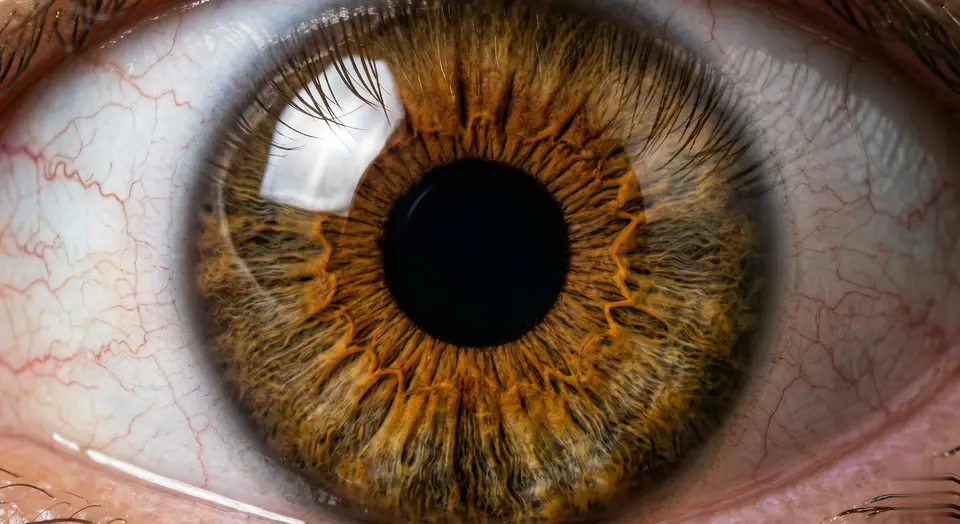
AI Eye Zoom 프롬프트 비디오 프롬프트 시각 예시
비디오비디오 효과appearance이미지 to 비디오
프롬프트
대괄호 안의 자리표시자를 바꾼 뒤 채널에 맞게 카메라, 조명, 형식, 출력 조건을 조정하세요.
Videos are generated from user-uploaded close-up photos of a single person to create hyper-realistic eye zooms. Start with a natural eye framing (eyelids, eyelashes, facial contours, lifelike). Then transition to a seamless, ultra-smooth zoom - linear motion, no speed changes/jumps, like a gentle breath. Hyper-realistic textures are preserved: clear iris striations, thin eyelashes (hair follicles are clearly visible), faint scleral veins, eyelid curves - all sharp and clear, no blur. Surrounding features (brows, cheeks) naturally recede without distortion. Final focus: pupil details are sharp and clear. As the zoom progresses, the pupil is centered in the frame. At the climax of the zoom, the pupil comes into focus - iris patterns, pupil edges, and corneal highlights are sharp and clear (no blur, perfect sharpness). Motion rules: Each frame is seamless (no noticeable cuts), and the motion curve is continuous (like liquid flow). Lighting/shadows are automatically adjusted based on zoom (e.g. corneal highlights move naturally, no sudden changes in brightness). Make sure every detail (even tiny textures) is sharp during the zoom, especially in the last frame centered on the pupil. Avoid: Unnatural motion (jumps, speed spikes), distorted facial features, blurred textures (especially at the end). Prioritize pupil-centered clarity and ultra-realistic, smooth zooms without any artifacts. The effect should feel like a slow, hypnotic dive into the core of the eyeball, eventually focusing on a single pupil in sharp and detailed focus - no blur, perfectly centered.
적합한 용도
AI Eye Zoom clips
appearance effects
Reusable 비디오 workflows
모델 시작점
Seedance

관련 템플릿

캠페인을 계속 진행하기

같은 캠페인에 다른 에셋 형식이 필요할 때 가까운 프롬프트 패턴으로 이어가세요.

제품 리빌 프롬프트 예시
이커머스제품 비디오유료 소셜
제품 리빌
제품 리빌에 바로 쓸 수 있는 제작용 템플릿입니다. 제품 launches 및 유료 소셜 tests에 맞게 VisioArt 워크플로를 구조화합니다.
템플릿 열기

인물 후킹 프롬프트 예시
인물소셜 contentcreator
인물 후킹
인물 후킹에 바로 쓸 수 있는 제작용 템플릿입니다. Creator posts 및 창업자 content에 맞게 VisioArt 워크플로를 구조화합니다.
템플릿 열기

Lookbook 모션 프롬프트 예시
패션Lookbook이미지 to 비디오
Lookbook 모션
Lookbook 모션에 바로 쓸 수 있는 제작용 템플릿입니다. 패션 drops 및 Lookbooks에 맞게 VisioArt 워크플로를 구조화합니다.
템플릿 열기

자주 묻는 질문

AI Eye Zoom 프롬프트 비디오 FAQ

워크플로, 모델 선택, 가격, 제작 적합도에 대한 답을 빠르게 확인하세요.

AI Eye Zoom 프롬프트 비디오에 바로 쓸 수 있는 제작용 템플릿입니다. AI Eye Zoom clips 및 appearance effects에 맞게 VisioArt 워크플로를 구조화합니다.

가능합니다. 대괄호 안의 자리표시자를 바꾸고 채널에 맞춰 카메라, 조명, 비율, 세부 정보, 출력 조건을 조정하세요.

페이지의 추천 도구에서 시작하세요. 움직임, 사실감, 스타일에 다른 모델 강점이 필요하면 인접한 모델 경로를 테스트하세요.

이 템플릿을 VisioArt에서 사용하세요.

추천 도구를 열고 프롬프트를 붙여 넣은 뒤 자리표시자를 바꾸고 가장 알맞은 모델 경로를 테스트하세요.

추천 도구 열기템플릿 둘러보기