Skip to content

프롬프트 템플릿

AI 비디오 프롬프트 템플릿: AI Dog Diving Olympics 프롬프트 비디오 프롬프트

AI Dog Diving Olympics 프롬프트 비디오에 바로 쓸 수 있는 제작용 템플릿입니다. AI Dog Diving Olympics clips 및 pets effects에 맞게 VisioArt 워크플로를 구조화합니다.
제작 시작가격 보기
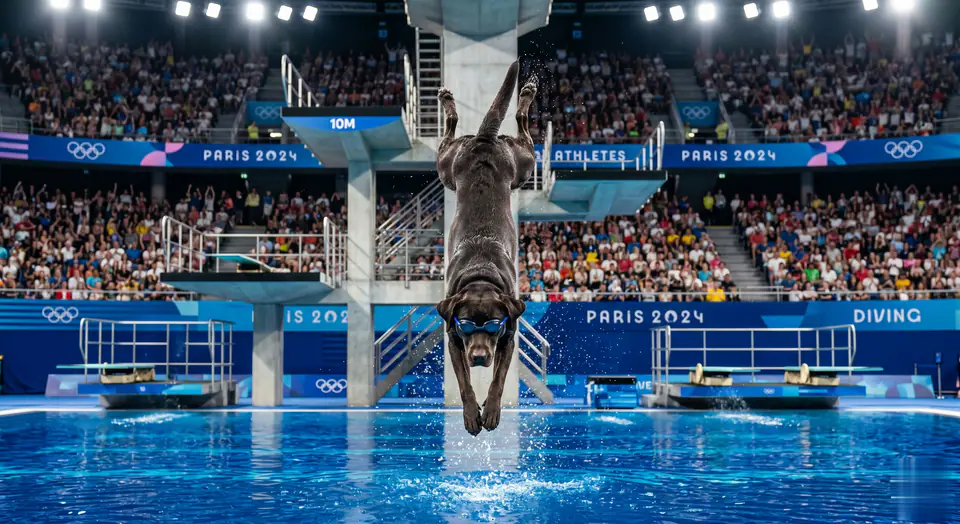
AI Dog Diving Olympics 프롬프트 비디오 프롬프트 시각 예시
비디오비디오 효과pets이미지 to 비디오
프롬프트
대괄호 안의 자리표시자를 바꾼 뒤 채널에 맞게 카메라, 조명, 형식, 출력 조건을 조정하세요.
In the Olympic diving scene, the character in the photo wears hydrodynamic diving goggles, stands on a 10-meter diving board, sprints forward with his strong short legs, rushes down the diving board, overcomes gravity, and then completes an amazing two-week front flip in mid-air - completing two full 360-degree flips while maintaining the dog diving posture. At the top of the second flip, the character in the photo stretches his body precisely and enters the water vertically with a nearly perfect ripple-free entry posture. Key action flow: explosive sprint parabolic jump two consecutive front flips vertical entry. From take-off to landing, every action is synchronized, eliminating any lateral rotation. Professional sports cameras capture the arc of the athlete's body in slow motion, highlighting the smoothness of each flip, and the audience burst into thunderous applause for this unprecedented dog diving feat.
적합한 용도
AI Dog Diving Olympics clips
pets effects
Reusable 비디오 workflows
모델 시작점
Seedance

관련 템플릿

캠페인을 계속 진행하기

같은 캠페인에 다른 에셋 형식이 필요할 때 가까운 프롬프트 패턴으로 이어가세요.

제품 리빌 프롬프트 예시
이커머스제품 비디오유료 소셜
제품 리빌
제품 리빌에 바로 쓸 수 있는 제작용 템플릿입니다. 제품 launches 및 유료 소셜 tests에 맞게 VisioArt 워크플로를 구조화합니다.
템플릿 열기

인물 후킹 프롬프트 예시
인물소셜 contentcreator
인물 후킹
인물 후킹에 바로 쓸 수 있는 제작용 템플릿입니다. Creator posts 및 창업자 content에 맞게 VisioArt 워크플로를 구조화합니다.
템플릿 열기

Lookbook 모션 프롬프트 예시
패션Lookbook이미지 to 비디오
Lookbook 모션
Lookbook 모션에 바로 쓸 수 있는 제작용 템플릿입니다. 패션 drops 및 Lookbooks에 맞게 VisioArt 워크플로를 구조화합니다.
템플릿 열기

자주 묻는 질문

AI Dog Diving Olympics 프롬프트 비디오 FAQ

워크플로, 모델 선택, 가격, 제작 적합도에 대한 답을 빠르게 확인하세요.

AI Dog Diving Olympics 프롬프트 비디오에 바로 쓸 수 있는 제작용 템플릿입니다. AI Dog Diving Olympics clips 및 pets effects에 맞게 VisioArt 워크플로를 구조화합니다.

가능합니다. 대괄호 안의 자리표시자를 바꾸고 채널에 맞춰 카메라, 조명, 비율, 세부 정보, 출력 조건을 조정하세요.

페이지의 추천 도구에서 시작하세요. 움직임, 사실감, 스타일에 다른 모델 강점이 필요하면 인접한 모델 경로를 테스트하세요.

이 템플릿을 VisioArt에서 사용하세요.

추천 도구를 열고 프롬프트를 붙여 넣은 뒤 자리표시자를 바꾸고 가장 알맞은 모델 경로를 테스트하세요.

추천 도구 열기템플릿 둘러보기