Skip to content

프롬프트 템플릿

AI 비디오 프롬프트 템플릿: AI Christmas 반려동물 비디오 비디오 프롬프트

AI Christmas 반려동물 비디오 비디오에 바로 쓸 수 있는 제작용 템플릿입니다. AI Christmas 반려동물 비디오 clips 및 festivals effects에 맞게 VisioArt 워크플로를 구조화합니다.
제작 시작가격 보기
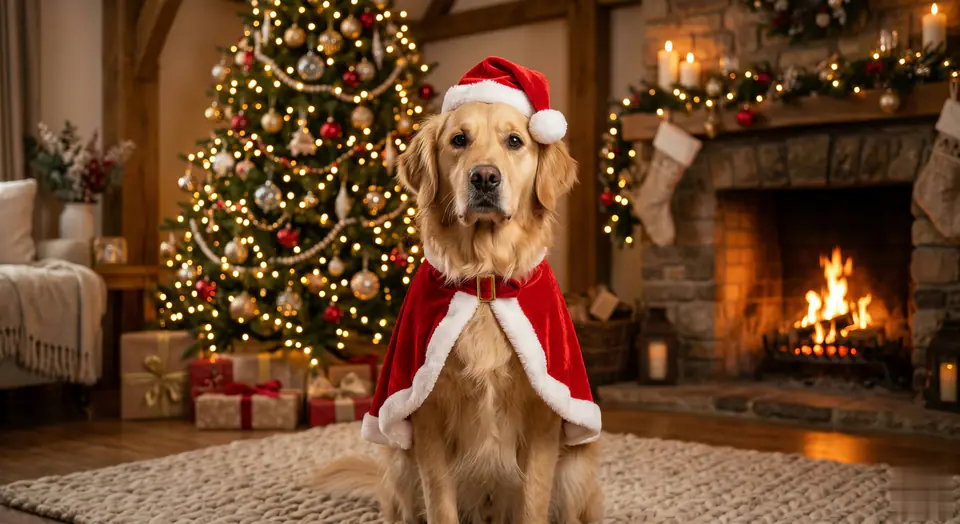
AI Christmas 반려동물 비디오 비디오 프롬프트 시각 예시
비디오비디오 효과festivals이미지 to 비디오
프롬프트
대괄호 안의 자리표시자를 바꾼 뒤 채널에 맞게 카메라, 조명, 형식, 출력 조건을 조정하세요.
MAIN TASK: Add Christmas attire to the existing pet while preserving 100% true identity. Generate a 5-second photorealistic video. INPUT: [User Uploaded Pet Image] SUBJECT IDENTITY LOCK (MAXIMUM PRIORITY): The pet in the video MUST be the EXACT SAME individual as the input image. Use the original image as a hard identity reference. The model is FORBIDDEN from regenerating, redesigning, beautifying, or re-interpreting the pet's face. FACE & EXPRESSION PRESERVATION WITH NATURAL LIFE: The original facial structure, proportions, fur pattern, nose color, and eye shape MUST remain unchanged. The original expression must be preserved as the baseline expression. ALLOWED NATURAL MICRO-MOVEMENTS: Natural blinking is allowed. Subtle eye movement is allowed. Very slight head micro-adjustment (no more than 3-5 degrees) is allowed. Gentle breathing motion is allowed. Small ear twitches are allowed. NOT ALLOWED: No head turning beyond 5 degrees. No expression switching (e.g. neutral to smiling). No widening of eyes. No face reshaping. No emotion exaggeration. PIXEL-LEVEL ID CONSISTENCY: The facial identity must remain pixel-consistent with the input image throughout the video. No identity drift between frames. POSE & BODY LOCK (SOFT LOCK): The pet must maintain the original body pose and position. No posture change such as sitting up, standing, or rotating the body. Only breathing-related micro motion is permitted. CLOTHING APPLICATION (OVERLAY ONLY): Apply a soft Red Velvet Santa CAPE that gently drapes over the existing body. The cape must follow the original body shape. NO sleeves. NO buttons. NO forcing posture change. Add a Santa Hat resting naturally on the head without shifting head position or facial proportions. BACKGROUND CONTROL: Place the pet into a cozy indoor Christmas environment with: - Christmas tree - Fireplace - Warm ambient lighting The background must remain behind the pet. The background must NEVER overlap, obscure, or replace the pet's face. TRANSFORMATION EFFECT (MASKED): Soft golden magical particles manifest ONLY the clothing. STRICT FACE SAFETY ZONE: No particle, glow, blur, shadow, or light ray may pass over the face. MOTION QUALITY: The pet must feel ALIVE, not frozen. All motion must be subtle, organic, and physically natural. No stiff animation. No mannequin effect. VISUAL STYLE: Ultra-photorealistic 8K detail Original image fidelity Seamless VFX overlay Warm Christmas lighting NEGATIVE PROMPT: anime cartoon cute style big eyes eye enlargement face reshaping expression change smiling when original is neutral beauty filter fur recolor nose recolor different pet face morphing identity drift head rotation over 5 degrees
적합한 용도
AI Christmas 반려동물 비디오 clips
festivals effects
Reusable 비디오 workflows
모델 시작점
Kling Standard

관련 템플릿

캠페인을 계속 진행하기

같은 캠페인에 다른 에셋 형식이 필요할 때 가까운 프롬프트 패턴으로 이어가세요.

제품 리빌 프롬프트 예시
이커머스제품 비디오유료 소셜
제품 리빌
제품 리빌에 바로 쓸 수 있는 제작용 템플릿입니다. 제품 launches 및 유료 소셜 tests에 맞게 VisioArt 워크플로를 구조화합니다.
템플릿 열기

인물 후킹 프롬프트 예시
인물소셜 contentcreator
인물 후킹
인물 후킹에 바로 쓸 수 있는 제작용 템플릿입니다. Creator posts 및 창업자 content에 맞게 VisioArt 워크플로를 구조화합니다.
템플릿 열기

Lookbook 모션 프롬프트 예시
패션Lookbook이미지 to 비디오
Lookbook 모션
Lookbook 모션에 바로 쓸 수 있는 제작용 템플릿입니다. 패션 drops 및 Lookbooks에 맞게 VisioArt 워크플로를 구조화합니다.
템플릿 열기

자주 묻는 질문

AI Christmas 반려동물 비디오 비디오 FAQ

워크플로, 모델 선택, 가격, 제작 적합도에 대한 답을 빠르게 확인하세요.

AI Christmas 반려동물 비디오 비디오에 바로 쓸 수 있는 제작용 템플릿입니다. AI Christmas 반려동물 비디오 clips 및 festivals effects에 맞게 VisioArt 워크플로를 구조화합니다.

가능합니다. 대괄호 안의 자리표시자를 바꾸고 채널에 맞춰 카메라, 조명, 비율, 세부 정보, 출력 조건을 조정하세요.

페이지의 추천 도구에서 시작하세요. 움직임, 사실감, 스타일에 다른 모델 강점이 필요하면 인접한 모델 경로를 테스트하세요.

이 템플릿을 VisioArt에서 사용하세요.

추천 도구를 열고 프롬프트를 붙여 넣은 뒤 자리표시자를 바꾸고 가장 알맞은 모델 경로를 테스트하세요.

추천 도구 열기템플릿 둘러보기