Skip to content

프롬프트 템플릿

AI 비디오 프롬프트 템플릿: AI Bloom 비디오 비디오 프롬프트

AI Bloom 비디오 비디오에 바로 쓸 수 있는 제작용 템플릿입니다. AI Bloom 비디오 clips 및 entertainment effects에 맞게 VisioArt 워크플로를 구조화합니다.
제작 시작가격 보기
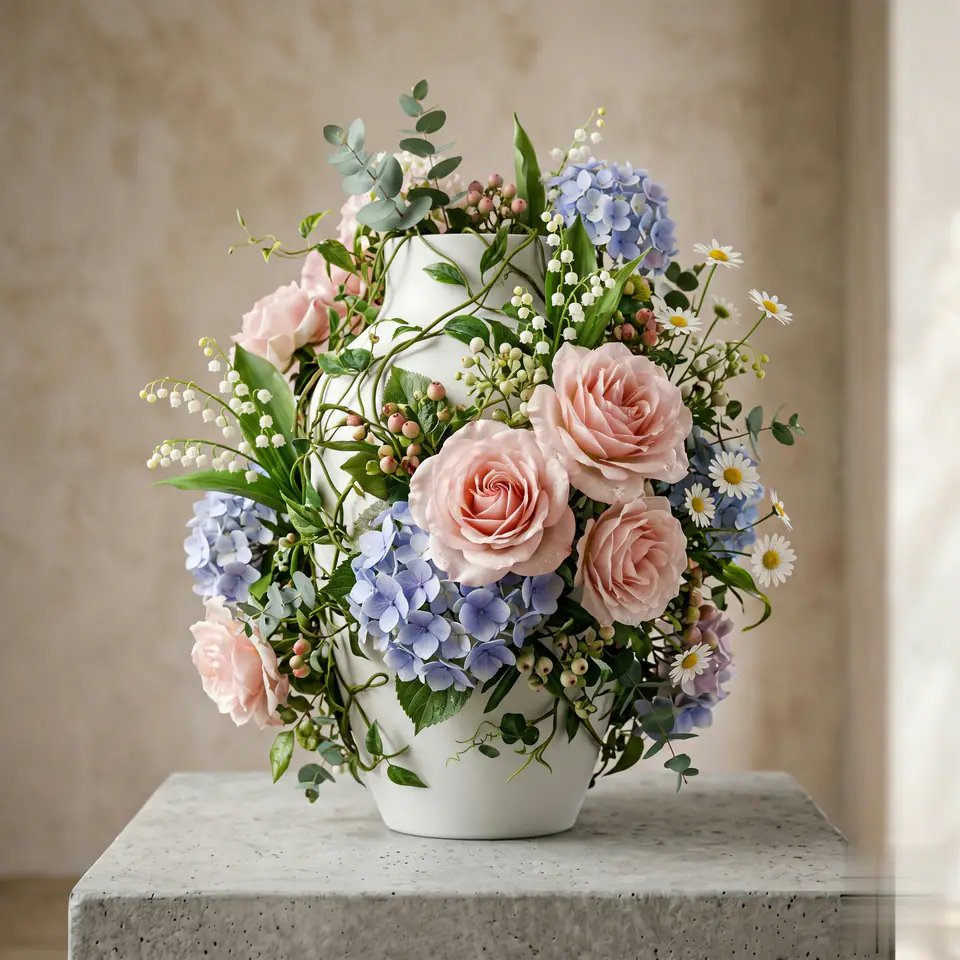
AI Bloom 비디오 비디오 프롬프트 시각 예시
비디오비디오 효과entertainment이미지 to 비디오
프롬프트
대괄호 안의 자리표시자를 바꾼 뒤 채널에 맞게 카메라, 조명, 형식, 출력 조건을 조정하세요.
Cover all objects in the photo with natural layers of flowers. Vines extend from the surface of the object, petals stretch along the outline, and different types of flowers (such as roses, lily of the valley, hydrangeas, daisies, etc.) bloom in a staggered manner, with both delicate small flowers dotting the gaps and large blooms highlighting the outlines. The flowers should naturally blend with the original texture and form of the object, as if growing from the inside. Light and shadow should rise and fall with the flowers to form a realistic texture (the translucent sheen of the petals and the natural transition of shadows). The overall atmosphere should be both magical and realistic, with harmonious yet layered colors, making the viewer feel like they have entered a fantasy world where everything is in bloom and full of vitality. Every detail conveys a sense of "real magic."
적합한 용도
AI Bloom 비디오 clips
entertainment effects
Reusable 비디오 workflows
모델 시작점
Seedance

관련 템플릿

캠페인을 계속 진행하기

같은 캠페인에 다른 에셋 형식이 필요할 때 가까운 프롬프트 패턴으로 이어가세요.

제품 리빌 프롬프트 예시
이커머스제품 비디오유료 소셜
제품 리빌
제품 리빌에 바로 쓸 수 있는 제작용 템플릿입니다. 제품 launches 및 유료 소셜 tests에 맞게 VisioArt 워크플로를 구조화합니다.
템플릿 열기

인물 후킹 프롬프트 예시
인물소셜 contentcreator
인물 후킹
인물 후킹에 바로 쓸 수 있는 제작용 템플릿입니다. Creator posts 및 창업자 content에 맞게 VisioArt 워크플로를 구조화합니다.
템플릿 열기

Lookbook 모션 프롬프트 예시
패션Lookbook이미지 to 비디오
Lookbook 모션
Lookbook 모션에 바로 쓸 수 있는 제작용 템플릿입니다. 패션 drops 및 Lookbooks에 맞게 VisioArt 워크플로를 구조화합니다.
템플릿 열기

자주 묻는 질문

AI Bloom 비디오 비디오 FAQ

워크플로, 모델 선택, 가격, 제작 적합도에 대한 답을 빠르게 확인하세요.

AI Bloom 비디오 비디오에 바로 쓸 수 있는 제작용 템플릿입니다. AI Bloom 비디오 clips 및 entertainment effects에 맞게 VisioArt 워크플로를 구조화합니다.

가능합니다. 대괄호 안의 자리표시자를 바꾸고 채널에 맞춰 카메라, 조명, 비율, 세부 정보, 출력 조건을 조정하세요.

페이지의 추천 도구에서 시작하세요. 움직임, 사실감, 스타일에 다른 모델 강점이 필요하면 인접한 모델 경로를 테스트하세요.

이 템플릿을 VisioArt에서 사용하세요.

추천 도구를 열고 프롬프트를 붙여 넣은 뒤 자리표시자를 바꾸고 가장 알맞은 모델 경로를 테스트하세요.

추천 도구 열기템플릿 둘러보기