Skip to content

프롬프트 템플릿

AI 비디오 프롬프트 템플릿: AI Attractiveness Test 프롬프트 이미지 프롬프트

AI Attractiveness Test 프롬프트 이미지에 바로 쓸 수 있는 제작용 템플릿입니다. AI Attractiveness Test variants 및 레퍼런스 guided edits에 맞게 VisioArt 워크플로를 구조화합니다.
제작 시작가격 보기
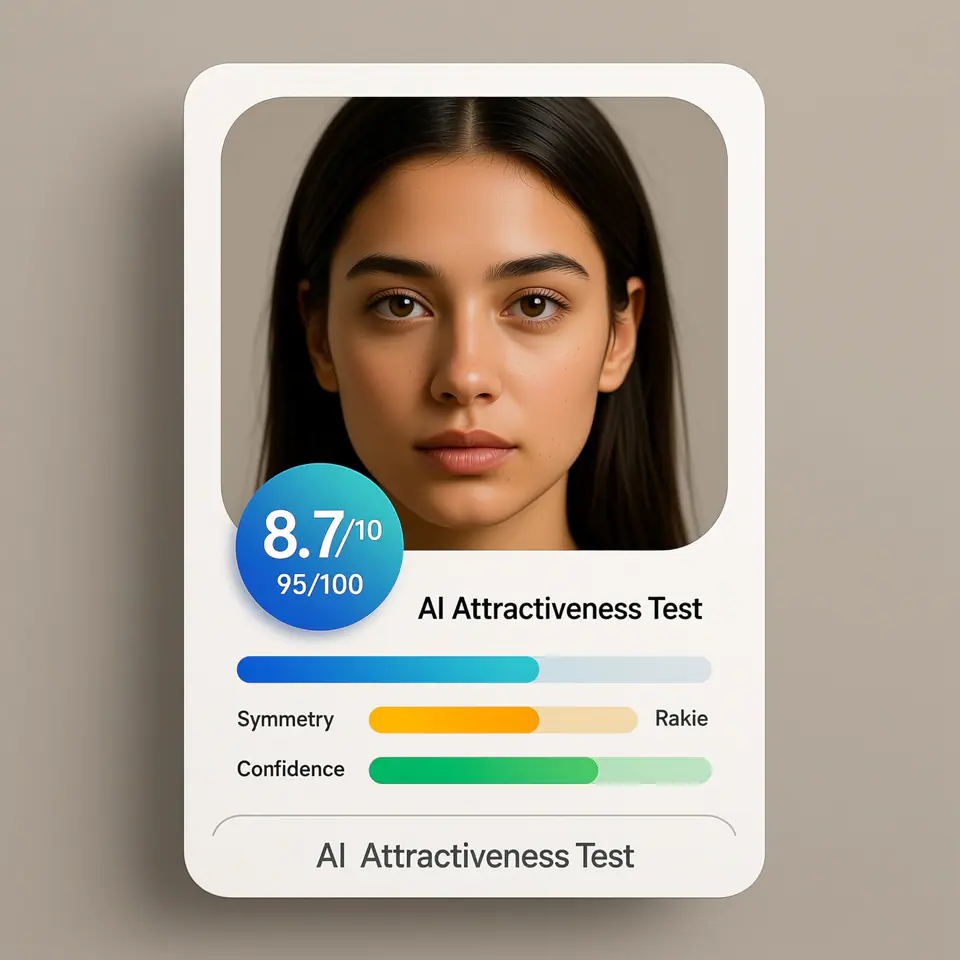
AI Attractiveness Test 프롬프트 이미지 프롬프트 시각 예시
이미지이미지 편집appearance레퍼런스 이미지
프롬프트
대괄호 안의 자리표시자를 바꾼 뒤 채널에 맞게 카메라, 조명, 형식, 출력 조건을 조정하세요.
Create a modern AI attractiveness test result card UI using the uploaded photo as the subject. The image should look like a real web app product interface screenshot, not a standalone portrait. Subject: - Use the uploaded photo as the analyzed face - Preserve the same identity, facial structure, and proportions - Natural appearance, no over-beautification, no face reshaping Layout & Composition: - Square (1:1) ratio - Clean, modern SaaS UI card design - Portrait photo placed inside a rounded rectangle frame - UI elements clearly separated from the face Score Display: - Prominent overall score badge (e.g. 8.7 / 10 or 95 / 100) - Horizontal progress bars for the following attributes: - Symmetry - Golden Ratio - Confidence - Use modern UI colors (blue, green, soft gradients) Text Style: - Clean sans-serif font - Professional product UI typography - Clear hierarchy (score > labels > details) - No handwritten or decorative fonts Branding / Footer: - If any branding text is shown, use ONLY the product name: "AI Attractiveness Test" - Branding should appear subtle and minimal, similar to a web app title or footer label - Do NOT show analyst names, system names, timestamps, or generation dates Background & Card Style: - Light gradient or soft neutral background - Rounded corners and subtle shadows - Web app / SaaS dashboard aesthetic Lighting & Photo Style: - Neutral studio lighting - Soft, even illumination - No dramatic or cinematic effects Overall Look: - AI analysis report interface - Beauty test app result card - Professional, trustworthy, shareable - Looks like a real AI product UI Do NOT: - Do not add text such as "Analysis by", "Generated by", dates, or system credits - Do not overlay text directly on the face - Do not create a fashion or beauty photoshoot - Do not exaggerate facial perfection - Do not use poster-style typography
적합한 용도
AI Attractiveness Test variants
레퍼런스 guided edits
Reusable 이미지 workflows
모델 시작점
Qwen ImageGPT Image 2Seedream 4Seedream 4.5

관련 템플릿

캠페인을 계속 진행하기

같은 캠페인에 다른 에셋 형식이 필요할 때 가까운 프롬프트 패턴으로 이어가세요.

AI Patch 프롬프트 generator 이미지 프롬프트 예시
이미지merch텍스트 프롬프트
AI Patch 프롬프트 generator 이미지
AI Patch 프롬프트 generator 이미지에 바로 쓸 수 있는 제작용 템플릿입니다. AI Patch Generator variants 및 텍스트 to 이미지 starts에 맞게 VisioArt 워크플로를 구조화합니다.
템플릿 열기
AI Age Change Filter 프롬프트 이미지 프롬프트 예시
이미지이미지 편집appearance
AI Age Change Filter 프롬프트 이미지
AI Age Change Filter 프롬프트 이미지에 바로 쓸 수 있는 제작용 템플릿입니다. AI Age Change Filter variants 및 레퍼런스 guided edits에 맞게 VisioArt 워크플로를 구조화합니다.
템플릿 열기

AI Body Editor 프롬프트 이미지 프롬프트 예시
이미지이미지 편집appearance
AI Body Editor 프롬프트 이미지
AI Body Editor 프롬프트 이미지에 바로 쓸 수 있는 제작용 템플릿입니다. AI Body Editor variants 및 레퍼런스 guided edits에 맞게 VisioArt 워크플로를 구조화합니다.
템플릿 열기

자주 묻는 질문

AI Attractiveness Test 프롬프트 이미지 FAQ

워크플로, 모델 선택, 가격, 제작 적합도에 대한 답을 빠르게 확인하세요.

AI Attractiveness Test 프롬프트 이미지에 바로 쓸 수 있는 제작용 템플릿입니다. AI Attractiveness Test variants 및 레퍼런스 guided edits에 맞게 VisioArt 워크플로를 구조화합니다.

가능합니다. 대괄호 안의 자리표시자를 바꾸고 채널에 맞춰 카메라, 조명, 비율, 세부 정보, 출력 조건을 조정하세요.

페이지의 추천 도구에서 시작하세요. 움직임, 사실감, 스타일에 다른 모델 강점이 필요하면 인접한 모델 경로를 테스트하세요.

이 템플릿을 VisioArt에서 사용하세요.

추천 도구를 열고 프롬프트를 붙여 넣은 뒤 자리표시자를 바꾸고 가장 알맞은 모델 경로를 테스트하세요.

추천 도구 열기템플릿 둘러보기