Skip to content

プロンプトテンプレート

AI動画プロンプトテンプレート: StrayHairRemover画像プロンプト

StrayHairRemover画像向けの制作対応テンプレート。StrayHairRemovervariantsと参照guidededitsに使いやすく、VisioArtで構造化された制作フローを組めます。
作成を開始料金を見る
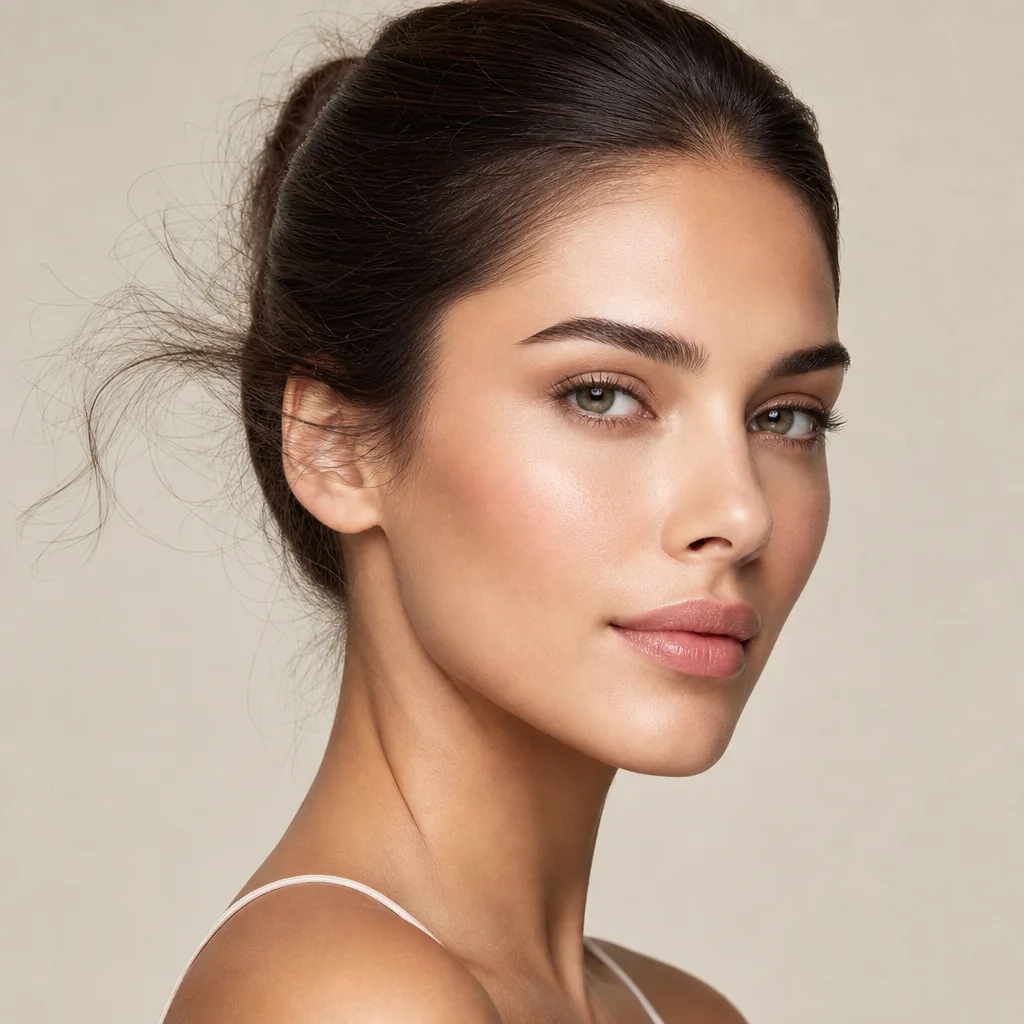
StrayHairRemover画像プロンプトのビジュアル例
画像画像編集appearance参照画像
プロンプト
角括弧内のプレースホルダーを差し替え、配信先に合わせてカメラ、照明、形式、出力条件を調整します。
Clean up stray hairs, baby hairs, and frizzy flyaways only. Keep the oRemove stray hairs, flyaways, and frizzy hair from the subject while preserving the original hairstyle, hair volume, hairline, facial features, skin texture, pose, clothing, background, lighting, framing, and overall color tone. Smooth the hair naturally, improve neatness and subtle shine, and refine the hair texture for a polished, realistic look. Keep all non-hair areas unchanged. Avoid over-smoothing, plastic texture, blur, repainting, or changing identity.riginal hairstyle, hair shape, density, and natural texture intact. Make the hair look smoother, tidier, and slightly more glossy in a realistic way. Preserve identity, face, skin, clothing, background, lighting, composition, and color grading exactly. Do not alter non-hair regions. Avoid artificial shine, waxy texture, blur, or over-retouching.
向いている用途
StrayHairRemovervariants
参照guidededits
Reusable画像workflows
モデルの出発点
GPT Image 2Nano Banana 2Seedream 4Seedream 4.5

関連テンプレート

制作を続ける

同じキャンペーンで別形式の素材が必要なときは、近いプロンプト型から続けられます。

AIPatchgenerator画像プロンプトの例
画像merchテキストプロンプト
AIPatchgenerator画像
AIPatchgenerator画像向けの制作対応テンプレート。AIPatchGeneratorvariantsとテキストto画像startsに使いやすく、VisioArtで構造化された制作フローを組めます。
テンプレートを開く
AIAgeChangeFilter画像プロンプトの例
画像画像編集appearance
AIAgeChangeFilter画像
AIAgeChangeFilter画像向けの制作対応テンプレート。AIAgeChangeFiltervariantsと参照guidededitsに使いやすく、VisioArtで構造化された制作フローを組めます。
テンプレートを開く

AIBodyEditor画像プロンプトの例
画像画像編集appearance
AIBodyEditor画像
AIBodyEditor画像向けの制作対応テンプレート。AIBodyEditorvariantsと参照guidededitsに使いやすく、VisioArtで構造化された制作フローを組めます。
テンプレートを開く

よくある質問

StrayHairRemover画像のよくある質問

ワークフロー、モデル選択、料金、制作適合について短く確認できます。

StrayHairRemover画像向けの制作対応テンプレート。StrayHairRemovervariantsと参照guidededitsに使いやすく、VisioArtで構造化された制作フローを組めます。

はい。角括弧のプレースホルダーを置き換え、配信先に合わせてカメラ、照明、比率、細部、出力条件を調整できます。

ページで推奨されているツールから始めてください。動き、リアリズム、スタイルで別のモデル特性が必要な場合は、近いモデル経路を試します。

このテンプレートをVisioArtで使う。

推奨ツールを開き、プロンプトを貼り付け、プレースホルダーを差し替えて、最も合うモデル経路を試します。

推奨ツールを開くテンプレートを見る