Skip to content

プロンプトテンプレート

AI動画プロンプトテンプレート: AIShibuyaCrossing動画動画プロンプト

AIShibuyaCrossing動画動画向けの制作対応テンプレート。AIShibuyaCrossing動画clipsとentertainmenteffectsに使いやすく、VisioArtで構造化された制作フローを組めます。
作成を開始料金を見る
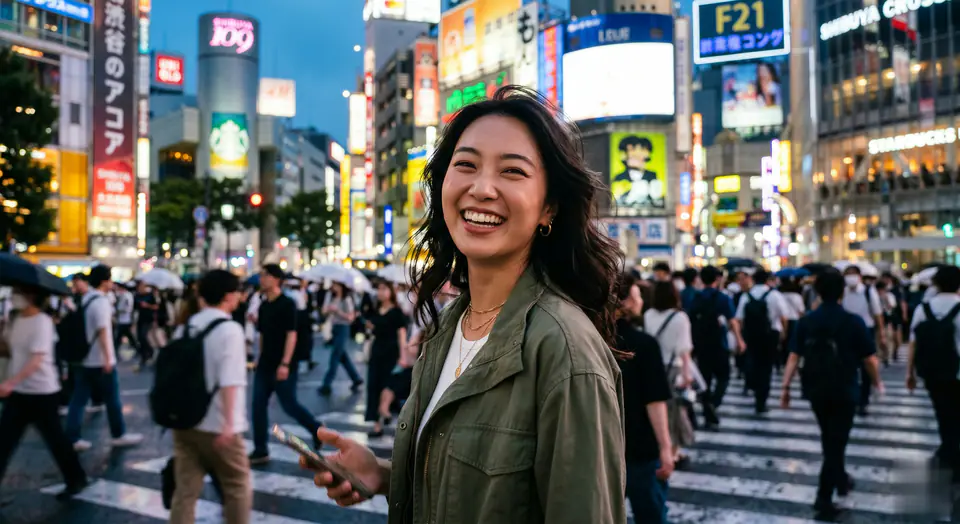
AIShibuyaCrossing動画動画プロンプトのビジュアル例
動画動画エフェクトentertainment画像to動画
プロンプト
角括弧内のプレースホルダーを差し替え、配信先に合わせてカメラ、照明、形式、出力条件を調整します。
Animate the reference person and the scene from the still image into a high-energy viral social media video clip, ensuring perfect facial consistency throughout. 0-2s: The camera, acting as a handheld smartphone or smooth gimbal, closely follows the reference person from behind as they joyfully run forward onto the iconic crowded Shibuya zebra crossing. The massive crowd around them moves naturally. 2-5s: The person suddenly slows down, gracefully spins around to face the camera, and gives a beaming, confident, and hopeful "main character" smile. The camera stabilizes into a tight medium shot of their face. In the background, the bustling Tokyo crosswalk is alive with motion, and a few other pedestrians on the opposite side can be seen holding up phones filming themselves in a similar fashion. Style: handheld camera movement, organic camera shake, raw lifestyle realism, uplifting and positive atmosphere, vibrant cinematic Tokyo street lighting, realistic clothing physics, shallow depth of field, full of life and positive energy.
向いている用途
AIShibuyaCrossing動画clips
entertainmenteffects
Reusable動画workflows
モデルの出発点
Seedance 2 Fast

関連テンプレート

制作を続ける

同じキャンペーンで別形式の素材が必要なときは、近いプロンプト型から続けられます。

商品リビールプロンプトの例
EC商品動画有料ソーシャル
商品リビール
商品リビール向けの制作対応テンプレート。商品launchesと有料ソーシャルtestsに使いやすく、VisioArtで構造化された制作フローを組めます。
テンプレートを開く

ポートレートフックプロンプトの例
ポートレートソーシャルcontentcreator
ポートレートフック
ポートレートフック向けの制作対応テンプレート。Creatorpostsと創業者contentに使いやすく、VisioArtで構造化された制作フローを組めます。
テンプレートを開く

Lookbookモーションプロンプトの例
ファッションLookbook画像to動画
Lookbookモーション
Lookbookモーション向けの制作対応テンプレート。ファッションdropsとLookbooksに使いやすく、VisioArtで構造化された制作フローを組めます。
テンプレートを開く

よくある質問

AIShibuyaCrossing動画動画のよくある質問

ワークフロー、モデル選択、料金、制作適合について短く確認できます。

AIShibuyaCrossing動画動画向けの制作対応テンプレート。AIShibuyaCrossing動画clipsとentertainmenteffectsに使いやすく、VisioArtで構造化された制作フローを組めます。

はい。角括弧のプレースホルダーを置き換え、配信先に合わせてカメラ、照明、比率、細部、出力条件を調整できます。

ページで推奨されているツールから始めてください。動き、リアリズム、スタイルで別のモデル特性が必要な場合は、近いモデル経路を試します。

このテンプレートをVisioArtで使う。

推奨ツールを開き、プロンプトを貼り付け、プレースホルダーを差し替えて、最も合うモデル経路を試します。

推奨ツールを開くテンプレートを見る