Skip to content

プロンプトテンプレート

AI動画プロンプトテンプレート: AIOutofFrameエフェクト動画プロンプト

AIOutofFrameエフェクト動画向けの制作対応テンプレート。AIOutofFrameエフェクトclipsとentertainmenteffectsに使いやすく、VisioArtで構造化された制作フローを組めます。
作成を開始料金を見る
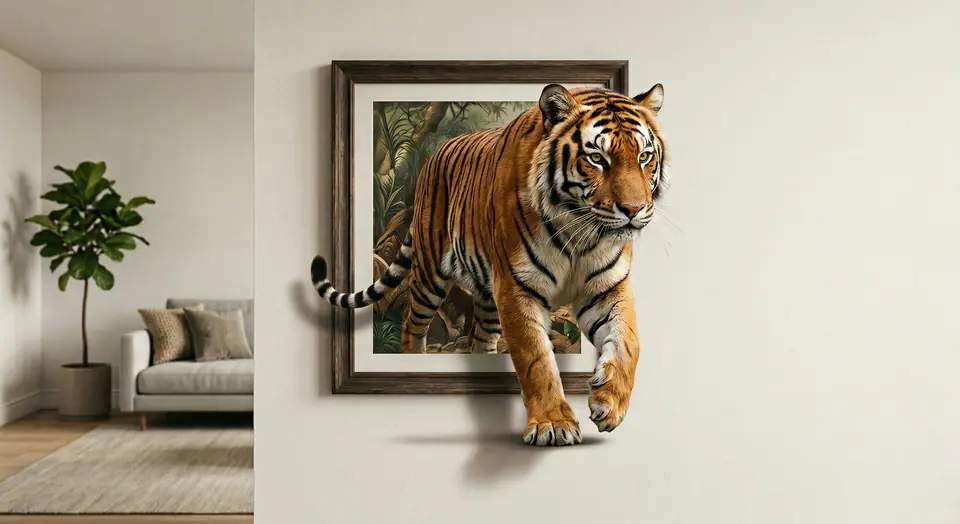
AIOutofFrameエフェクト動画プロンプトのビジュアル例
動画動画エフェクトentertainment画像to動画
プロンプト
角括弧内のプレースホルダーを差し替え、配信先に合わせてカメラ、照明、形式、出力条件を調整します。
Use the input image as the FIRST FRAME and keep it consistent. LOCK the camera completely (no zoom, no pan, no tilt). Keep the background, lighting, and environment perfectly static across the entire video. Replace the frame rule with an AUTO-FIT FRAME rule: the picture frame MUST always fully contain the entire subject at the start, no matter how large or tall the subject is. If needed, the frame automatically expands or adjusts its aspect ratio to fit the whole subject inside WITHOUT cropping. The frame MUST remain a rigid, perfectly rectangular frame (no bending, no warping, no melting), fixed on the wall, same material and style throughout. The frame can only resize ONCE at the very beginning (0-10%) to fit the subject, then stays completely unchanged afterward. The subject MUST remain exactly the same as the input (same identity, texture, colors, proportions). No stylization. No redesign. No duplicates. Animation: the subject slowly climbs OUT of the frame while the frame stays on the wall. 0-25%: the subject leans forward and places ONE limb/edge over the bottom frame border, clearly in front of the frame. 25-55%: a second contact point crosses the frame edge; the torso/upper body moves forward with natural anatomy. 55-85%: more of the subject emerges while the frame remains behind it; add realistic contact shadows where the subject touches the wall surface and the frame edge. 85-100%: the subject pauses half-out, looking toward camera, still attached to the framed image (do NOT fully leave the frame). Clean edges, stable background, no scene change, no transitions.
向いている用途
AIOutofFrameエフェクトclips
entertainmenteffects
Reusable動画workflows
モデルの出発点
Seedance 2 Fast

関連テンプレート

制作を続ける

同じキャンペーンで別形式の素材が必要なときは、近いプロンプト型から続けられます。

商品リビールプロンプトの例
EC商品動画有料ソーシャル
商品リビール
商品リビール向けの制作対応テンプレート。商品launchesと有料ソーシャルtestsに使いやすく、VisioArtで構造化された制作フローを組めます。
テンプレートを開く

ポートレートフックプロンプトの例
ポートレートソーシャルcontentcreator
ポートレートフック
ポートレートフック向けの制作対応テンプレート。Creatorpostsと創業者contentに使いやすく、VisioArtで構造化された制作フローを組めます。
テンプレートを開く

Lookbookモーションプロンプトの例
ファッションLookbook画像to動画
Lookbookモーション
Lookbookモーション向けの制作対応テンプレート。ファッションdropsとLookbooksに使いやすく、VisioArtで構造化された制作フローを組めます。
テンプレートを開く

よくある質問

AIOutofFrameエフェクト動画のよくある質問

ワークフロー、モデル選択、料金、制作適合について短く確認できます。

AIOutofFrameエフェクト動画向けの制作対応テンプレート。AIOutofFrameエフェクトclipsとentertainmenteffectsに使いやすく、VisioArtで構造化された制作フローを組めます。

はい。角括弧のプレースホルダーを置き換え、配信先に合わせてカメラ、照明、比率、細部、出力条件を調整できます。

ページで推奨されているツールから始めてください。動き、リアリズム、スタイルで別のモデル特性が必要な場合は、近いモデル経路を試します。

このテンプレートをVisioArtで使う。

推奨ツールを開き、プロンプトを貼り付け、プレースホルダーを差し替えて、最も合うモデル経路を試します。

推奨ツールを開くテンプレートを見る