Skip to content

プロンプトテンプレート

AI動画プロンプトテンプレート: AIAttractivenessTest画像プロンプト

AIAttractivenessTest画像向けの制作対応テンプレート。AIAttractivenessTestvariantsと参照guidededitsに使いやすく、VisioArtで構造化された制作フローを組めます。
作成を開始料金を見る
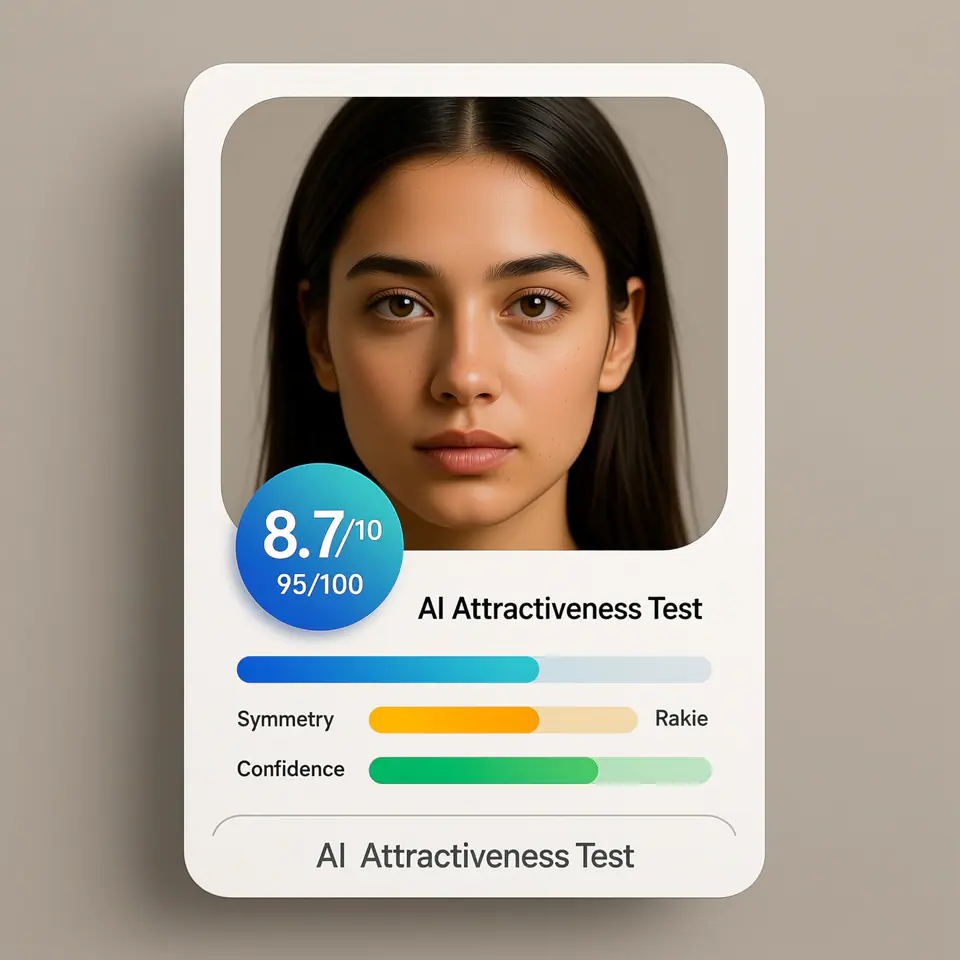
AIAttractivenessTest画像プロンプトのビジュアル例
画像画像編集appearance参照画像
プロンプト
角括弧内のプレースホルダーを差し替え、配信先に合わせてカメラ、照明、形式、出力条件を調整します。
Create a modern AI attractiveness test result card UI using the uploaded photo as the subject. The image should look like a real web app product interface screenshot, not a standalone portrait. Subject: - Use the uploaded photo as the analyzed face - Preserve the same identity, facial structure, and proportions - Natural appearance, no over-beautification, no face reshaping Layout & Composition: - Square (1:1) ratio - Clean, modern SaaS UI card design - Portrait photo placed inside a rounded rectangle frame - UI elements clearly separated from the face Score Display: - Prominent overall score badge (e.g. 8.7 / 10 or 95 / 100) - Horizontal progress bars for the following attributes: - Symmetry - Golden Ratio - Confidence - Use modern UI colors (blue, green, soft gradients) Text Style: - Clean sans-serif font - Professional product UI typography - Clear hierarchy (score > labels > details) - No handwritten or decorative fonts Branding / Footer: - If any branding text is shown, use ONLY the product name: "AI Attractiveness Test" - Branding should appear subtle and minimal, similar to a web app title or footer label - Do NOT show analyst names, system names, timestamps, or generation dates Background & Card Style: - Light gradient or soft neutral background - Rounded corners and subtle shadows - Web app / SaaS dashboard aesthetic Lighting & Photo Style: - Neutral studio lighting - Soft, even illumination - No dramatic or cinematic effects Overall Look: - AI analysis report interface - Beauty test app result card - Professional, trustworthy, shareable - Looks like a real AI product UI Do NOT: - Do not add text such as "Analysis by", "Generated by", dates, or system credits - Do not overlay text directly on the face - Do not create a fashion or beauty photoshoot - Do not exaggerate facial perfection - Do not use poster-style typography
向いている用途
AIAttractivenessTestvariants
参照guidededits
Reusable画像workflows
モデルの出発点
Qwen ImageGPT Image 2Seedream 4Seedream 4.5

関連テンプレート

制作を続ける

同じキャンペーンで別形式の素材が必要なときは、近いプロンプト型から続けられます。

AIPatchgenerator画像プロンプトの例
画像merchテキストプロンプト
AIPatchgenerator画像
AIPatchgenerator画像向けの制作対応テンプレート。AIPatchGeneratorvariantsとテキストto画像startsに使いやすく、VisioArtで構造化された制作フローを組めます。
テンプレートを開く
AIAgeChangeFilter画像プロンプトの例
画像画像編集appearance
AIAgeChangeFilter画像
AIAgeChangeFilter画像向けの制作対応テンプレート。AIAgeChangeFiltervariantsと参照guidededitsに使いやすく、VisioArtで構造化された制作フローを組めます。
テンプレートを開く

AIBodyEditor画像プロンプトの例
画像画像編集appearance
AIBodyEditor画像
AIBodyEditor画像向けの制作対応テンプレート。AIBodyEditorvariantsと参照guidededitsに使いやすく、VisioArtで構造化された制作フローを組めます。
テンプレートを開く

よくある質問

AIAttractivenessTest画像のよくある質問

ワークフロー、モデル選択、料金、制作適合について短く確認できます。

AIAttractivenessTest画像向けの制作対応テンプレート。AIAttractivenessTestvariantsと参照guidededitsに使いやすく、VisioArtで構造化された制作フローを組めます。

はい。角括弧のプレースホルダーを置き換え、配信先に合わせてカメラ、照明、比率、細部、出力条件を調整できます。

ページで推奨されているツールから始めてください。動き、リアリズム、スタイルで別のモデル特性が必要な場合は、近いモデル経路を試します。

このテンプレートをVisioArtで使う。

推奨ツールを開き、プロンプトを貼り付け、プレースホルダーを差し替えて、最も合うモデル経路を試します。

推奨ツールを開くテンプレートを見る