Skip to content

Template prompt

Template prompt video AI: Prompt AI outfit creativo

Template pronto per la produzione per AI outfit creativo, adatto a AI outfit creativo creativo e riferimento creativo creativo e a workflow VisioArt ordinati.

Inizia a creareVedi prezzi
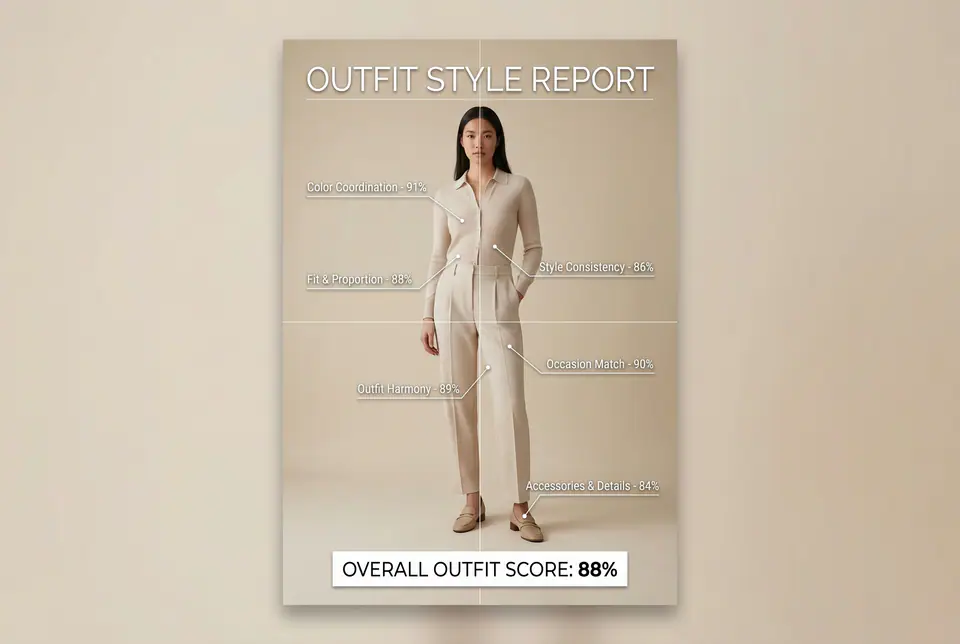
Prompt AI outfit creativo visual example
immagineimmagine editingcreativoriferimento immagine
Prompt
Replace the bracketed placeholders, then tune camera, lighting, format, and output constraints for the exact channel.
Use the provided full-body or half-body outfit photo as the base. Do NOT change the person, pose, face, body shape, height, skin tone, gender, or outfit itself. Do NOT beautify, replace, recolor, or redesign the clothing. Only overlay a clean, minimal outfit evaluation infographic on top of the original photo. Create a high-resolution vertical "OUTFIT STYLE REPORT" poster, studio lighting, soft neutral or beige background, premium fashion stylist / luxury image-consulting style. The subject can be MALE or FEMALE - keep them exactly as in the original photo. Add thin white lines and labels pointing to the REAL outfit areas, with percentage scores based on global fashion principles, including proportions, color coordination, silhouette balance, and overall styling harmony (without modifying the outfit). Outfit Evaluation Sections: 1. Color Coordination Label near the upper torso or chest area with a line pointing to the outfit: "Color Coordination - 0-100%" Example: "Color Coordination - 91%" 2. Fit & Proportion Label near the waist or full outfit silhouette: "Fit & Proportion - 0-100%" Example: "Fit & Proportion - 88%" 3. Style Consistency Label near the center of the outfit: "Style Consistency - 0-100%" Example: "Style Consistency - 86%" 4. Occasion Appropriateness Label near the mid or lower body: "Occasion Match - 0-100%" Example: "Occasion Match - 90%" 5. Accessories & Details Label pointing toward shoes, bag, jewelry, or visible accessories: "Accessories & Details - 0-100%" Example: "Accessories & Details - 84%" 6. Overall Outfit Harmony Label near the center of the body: "Outfit Harmony - 0-100%" Example: "Outfit Harmony - 89%" At the bottom center of the poster, add a BIG, bold number inside a circle or rectangle: "OVERALL OUTFIT SCORE: XX%" This represents the total outfit aesthetic score from 1-100%. Design Style Requirements: - clean, professional, fashion-consultant or luxury styling report aesthetic - minimal, medical-grade infographic layout (similar to aesthetic analysis reports) - modern thin sans-serif typography - white text and white guideline strokes - subtle shadows for readability - no logos, no brand names, no decorative graphics - no additional text other than the labels and scores above - visually balanced, editorial-quality layout
Best for
AI outfit creativo creativo
riferimento creativo creativo
creativo immagine creativo
Model starting points
Nano Banana 2GPT-4o ImageGPT Image 2GPT Image 1.5

Related templates

Keep the campaign moving

Use these adjacent prompt patterns when the same campaign needs another asset format.

Prompt paid social annuncio example
annuncicreativosocial video
paid social annuncio
Template pronto per la produzione per paid social annuncio, adatto a Meta annunci e TikTok creativo e a workflow VisioArt ordinati.
Open template
Prompt ritratto hook example
ritrattosocial creativocreativo
ritratto hook
Template pronto per la produzione per ritratto hook, adatto a creativo creativo e fondatore creativo e a workflow VisioArt ordinati.
Open template
Prompt auto hero loop example
automotivehero videocreativo
auto hero loop
Template pronto per la produzione per auto hero loop, adatto a creativo creativo e automotive creativo e a workflow VisioArt ordinati.
Open template

FAQ

AI outfit creativo FAQ

Clear answers for buyers comparing workflows, model choices, pricing, and production fit.

Template pronto per la produzione per AI outfit creativo, adatto a AI outfit creativo creativo e riferimento creativo creativo e a workflow VisioArt ordinati.

Use this prompt inside VisioArt.

Start from the recommended tool, paste the prompt, replace the placeholders, and test the strongest model path.

Open recommended toolBrowse templates