Skip to content

Template di prompt

Template di prompt video AI: Prompt AI Eye Zoom prompt video

Template pronto per la produzione per AI Eye Zoom prompt video, adatto a AI Eye Zoom clips e appearance effects e a workflow VisioArt ordinati.
Inizia a creareVedi prezzi
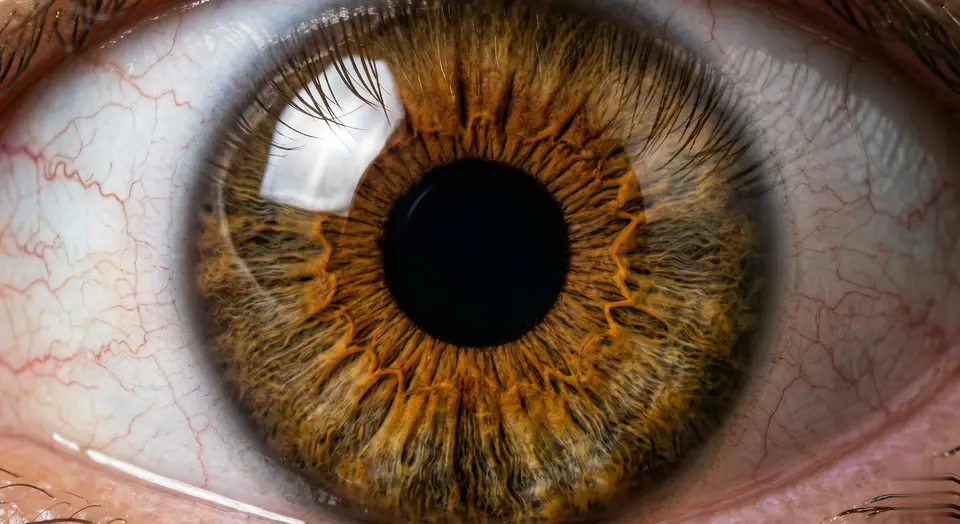
Esempio visuale di Prompt AI Eye Zoom prompt video
videovideo effettoappearanceimmagine to video
Istruzione
Sostituisci i segnaposto tra parentesi e regola camera, luce, formato e vincoli di output per il canale specifico.
Videos are generated from user-uploaded close-up photos of a single person to create hyper-realistic eye zooms. Start with a natural eye framing (eyelids, eyelashes, facial contours, lifelike). Then transition to a seamless, ultra-smooth zoom - linear motion, no speed changes/jumps, like a gentle breath. Hyper-realistic textures are preserved: clear iris striations, thin eyelashes (hair follicles are clearly visible), faint scleral veins, eyelid curves - all sharp and clear, no blur. Surrounding features (brows, cheeks) naturally recede without distortion. Final focus: pupil details are sharp and clear. As the zoom progresses, the pupil is centered in the frame. At the climax of the zoom, the pupil comes into focus - iris patterns, pupil edges, and corneal highlights are sharp and clear (no blur, perfect sharpness). Motion rules: Each frame is seamless (no noticeable cuts), and the motion curve is continuous (like liquid flow). Lighting/shadows are automatically adjusted based on zoom (e.g. corneal highlights move naturally, no sudden changes in brightness). Make sure every detail (even tiny textures) is sharp during the zoom, especially in the last frame centered on the pupil. Avoid: Unnatural motion (jumps, speed spikes), distorted facial features, blurred textures (especially at the end). Prioritize pupil-centered clarity and ultra-realistic, smooth zooms without any artifacts. The effect should feel like a slow, hypnotic dive into the core of the eyeball, eventually focusing on a single pupil in sharp and detailed focus - no blur, perfectly centered.
Ideale per
AI Eye Zoom clips
appearance effects
Reusable video workflows
Punti di partenza dei modelli
Seedance

Template correlati

Porta avanti la campagna

Usa questi schemi vicini quando la stessa campagna richiede un altro formato di asset.

Esempio Prompt prodotto reveal
ecommerceprodotto videopaid social
prodotto reveal
Template pronto per la produzione per prodotto reveal, adatto a prodotto launches e paid social tests e a workflow VisioArt ordinati.
Apri template

Esempio Prompt ritratto hook
ritrattosocial contentcreator
ritratto hook
Template pronto per la produzione per ritratto hook, adatto a Creator posts e fondatore content e a workflow VisioArt ordinati.
Apri template

Esempio Prompt Lookbook motion prompt
modaLookbookimmagine to video
Lookbook motion prompt
Template pronto per la produzione per Lookbook motion prompt, adatto a moda drops e Lookbooks e a workflow VisioArt ordinati.
Apri template

FAQ

FAQ AI Eye Zoom prompt video

Risposte chiare su flussi, modelli, prezzi e fit di produzione.

Template pronto per la produzione per AI Eye Zoom prompt video, adatto a AI Eye Zoom clips e appearance effects e a workflow VisioArt ordinati.

Sì. Sostituisci i segnaposto tra parentesi, poi regola camera, luce, formato, dettagli e vincoli di output per il canale.

Parti dallo strumento consigliato nella pagina. Se movimento, realismo o stile richiedono un altro punto di forza, prova i percorsi modello vicini.

Usa questo template in VisioArt.

Apri lo strumento consigliato, incolla l’istruzione, sostituisci i segnaposto e prova il percorso modello più forte.

Apri lo strumento consigliatoSfoglia i template