Skip to content

Template di prompt

Template di prompt video AI: Prompt AI Bloom effetto video video

Template pronto per la produzione per AI Bloom effetto video video, adatto a AI Bloom effetto video clips e interactions effects e a workflow VisioArt ordinati.
Inizia a creareVedi prezzi
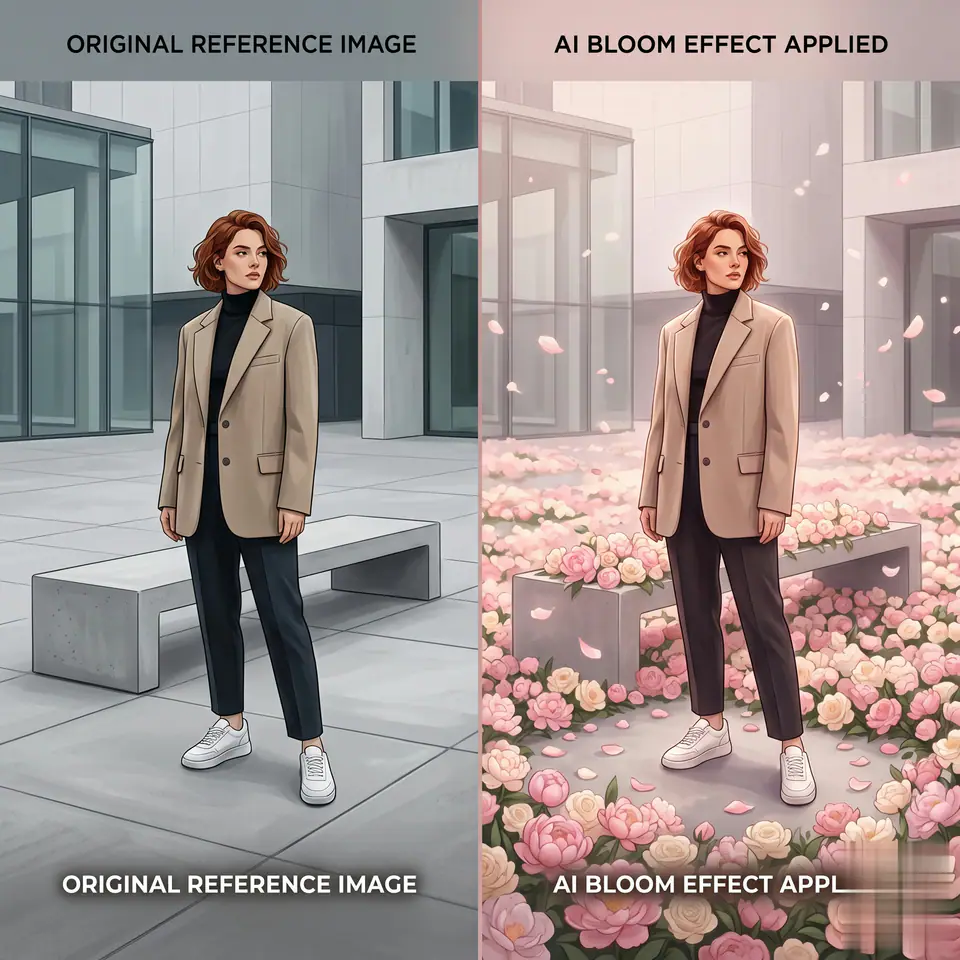
Esempio visuale di Prompt AI Bloom effetto video video
videovideo effettointeractionsimmagine to video
Istruzione
Sostituisci i segnaposto tra parentesi e regola camera, luce, formato e vincoli di output per il canale specifico.
[MAIN TASK] Transform the uploaded image into a cinematic "Bloom Effect" video where flowers progressively appear and spread across the original scene without changing the environment. [INPUT] User uploaded image (single photo, any subject) [CORE STYLE] Dreamy, romantic, cinematic, soft glow, high aesthetic quality [SCENE PROGRESSION - CONTROLLED BLOOM] 1. Start from the original image (unchanged) 2. Subtle camera push-in or slight parallax 3. Soft light begins to spread across the ground and surfaces 4. Flowers begin to appear in small clusters 5. Flowers rapidly multiply and spread across the scene 6. FINAL STATE: flowers densely cover the visible ground and surfaces [STRICT ENVIRONMENT PRESERVATION - VERY IMPORTANT] - Keep the original location, background, and scene structure EXACTLY the same - Do NOT replace the environment - Do NOT transform the scene into a different place (no fantasy landscape swap) - All flowers must grow ON TOP OF the existing ground/surfaces [FLOWER CONTROL - VERY IMPORTANT] - ONLY generate flowers - NO grass - NO leaves - NO vines - NO bushes - NO extra plants - Flowers should be clean, soft, and visually aesthetic (rose, cherry blossom, peony, etc.) - Petals are allowed, but must match the flowers [FINAL BLOOM STATE - KEY] - Flowers should be dense and abundant - Cover the ground, floor, or visible surfaces naturally - No large empty gaps - Subject remains surrounded by flowers, not buried or distorted - Maintain depth (foreground / midground / background layering) [MOTION DESIGN] - Smooth, slow slightly faster bloom expansion - Gentle floating petals - No chaotic or aggressive motion [SUBJECT PRESERVATION - TOP PRIORITY] - Preserve face, identity, pose exactly - No facial change - No body distortion - Keep original clothing and details [LIGHTING] - Soft, warm, diffused glow - Subtle highlights on flowers - Maintain natural lighting consistency with original image [COLOR STYLE] - Soft pastel tones (pink, cream, light purple, warm gold) - Harmonized with original scene colors [VIDEO SPEC] - Duration: 4-6 seconds - Smooth motion - Hold final frame briefly [NEGATIVE PROMPT] - No background replacement - No environment change - No grass or green vegetation - No vines or leaves - No forest or garden transformation - No face change - No distortion - No cartoon style - No sparse flowers [OUTPUT] A cinematic bloom video where flowers naturally appear and spread across the original scene, covering surfaces with dense blossoms while fully preserving the original environment and subject.
Ideale per
AI Bloom effetto video clips
interactions effects
Reusable video workflows
Punti di partenza dei modelli
Kling Standard

Template correlati

Porta avanti la campagna

Usa questi schemi vicini quando la stessa campagna richiede un altro formato di asset.

Esempio Prompt prodotto reveal
ecommerceprodotto videopaid social
prodotto reveal
Template pronto per la produzione per prodotto reveal, adatto a prodotto launches e paid social tests e a workflow VisioArt ordinati.
Apri template

Esempio Prompt ritratto hook
ritrattosocial contentcreator
ritratto hook
Template pronto per la produzione per ritratto hook, adatto a Creator posts e fondatore content e a workflow VisioArt ordinati.
Apri template

Esempio Prompt Lookbook motion prompt
modaLookbookimmagine to video
Lookbook motion prompt
Template pronto per la produzione per Lookbook motion prompt, adatto a moda drops e Lookbooks e a workflow VisioArt ordinati.
Apri template

FAQ

FAQ AI Bloom effetto video video

Risposte chiare su flussi, modelli, prezzi e fit di produzione.

Template pronto per la produzione per AI Bloom effetto video video, adatto a AI Bloom effetto video clips e interactions effects e a workflow VisioArt ordinati.

Sì. Sostituisci i segnaposto tra parentesi, poi regola camera, luce, formato, dettagli e vincoli di output per il canale.

Parti dallo strumento consigliato nella pagina. Se movimento, realismo o stile richiedono un altro punto di forza, prova i percorsi modello vicini.

Usa questo template in VisioArt.

Apri lo strumento consigliato, incolla l’istruzione, sostituisci i segnaposto e prova il percorso modello più forte.

Apri lo strumento consigliatoSfoglia i template