Skip to content

Template di prompt

Template di prompt video AI: Prompt AI Attractiveness Test prompt immagine

Template pronto per la produzione per AI Attractiveness Test prompt immagine, adatto a AI Attractiveness Test variants e riferimento guided edits e a workflow VisioArt ordinati.
Inizia a creareVedi prezzi
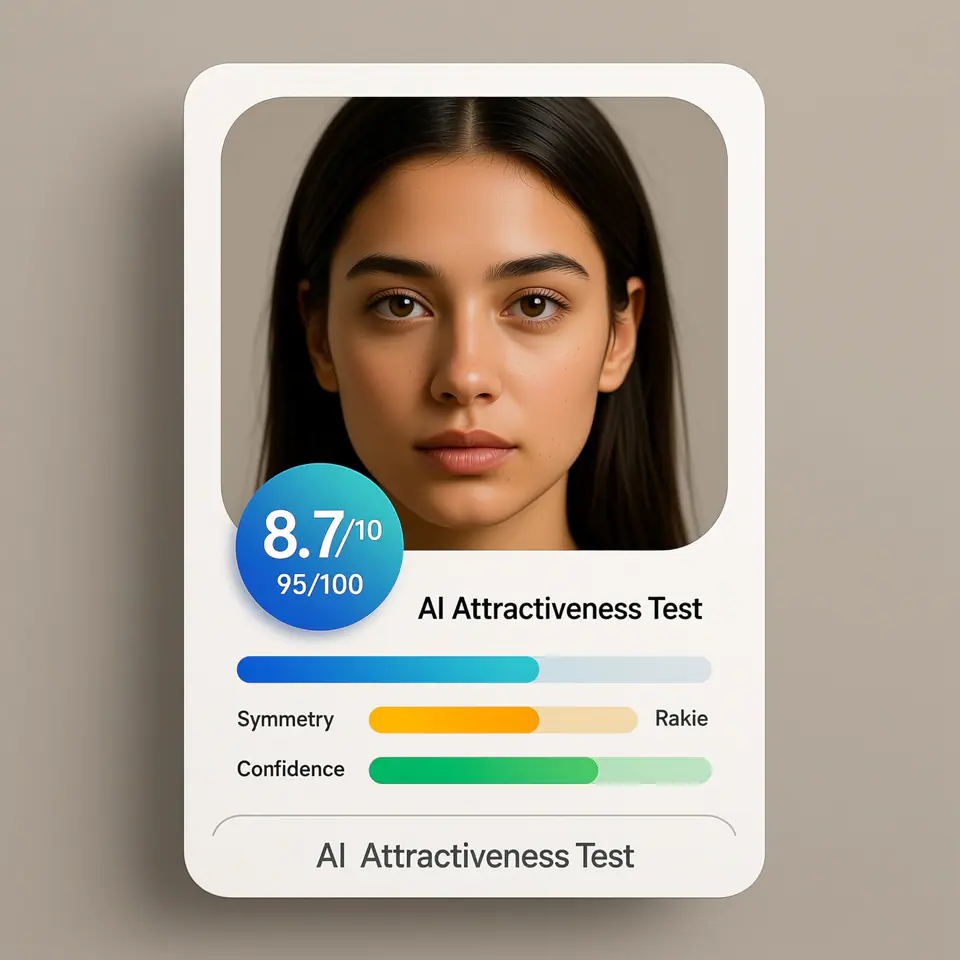
Esempio visuale di Prompt AI Attractiveness Test prompt immagine
immagineimmagine editingappearanceriferimento immagine
Istruzione
Sostituisci i segnaposto tra parentesi e regola camera, luce, formato e vincoli di output per il canale specifico.
Create a modern AI attractiveness test result card UI using the uploaded photo as the subject. The image should look like a real web app product interface screenshot, not a standalone portrait. Subject: - Use the uploaded photo as the analyzed face - Preserve the same identity, facial structure, and proportions - Natural appearance, no over-beautification, no face reshaping Layout & Composition: - Square (1:1) ratio - Clean, modern SaaS UI card design - Portrait photo placed inside a rounded rectangle frame - UI elements clearly separated from the face Score Display: - Prominent overall score badge (e.g. 8.7 / 10 or 95 / 100) - Horizontal progress bars for the following attributes: - Symmetry - Golden Ratio - Confidence - Use modern UI colors (blue, green, soft gradients) Text Style: - Clean sans-serif font - Professional product UI typography - Clear hierarchy (score > labels > details) - No handwritten or decorative fonts Branding / Footer: - If any branding text is shown, use ONLY the product name: "AI Attractiveness Test" - Branding should appear subtle and minimal, similar to a web app title or footer label - Do NOT show analyst names, system names, timestamps, or generation dates Background & Card Style: - Light gradient or soft neutral background - Rounded corners and subtle shadows - Web app / SaaS dashboard aesthetic Lighting & Photo Style: - Neutral studio lighting - Soft, even illumination - No dramatic or cinematic effects Overall Look: - AI analysis report interface - Beauty test app result card - Professional, trustworthy, shareable - Looks like a real AI product UI Do NOT: - Do not add text such as "Analysis by", "Generated by", dates, or system credits - Do not overlay text directly on the face - Do not create a fashion or beauty photoshoot - Do not exaggerate facial perfection - Do not use poster-style typography
Ideale per
AI Attractiveness Test variants
riferimento guided edits
Reusable immagine workflows
Punti di partenza dei modelli
Qwen ImageGPT Image 2Seedream 4Seedream 4.5

Template correlati

Porta avanti la campagna

Usa questi schemi vicini quando la stessa campagna richiede un altro formato di asset.

Esempio Prompt AI Patch prompt generator immagine
immaginemerchtesto prompt
AI Patch prompt generator immagine
Template pronto per la produzione per AI Patch prompt generator immagine, adatto a AI Patch Generator variants e testo to immagine starts e a workflow VisioArt ordinati.
Apri template
Esempio Prompt AI Age Change Filter prompt immagine
immagineimmagine editingappearance
AI Age Change Filter prompt immagine
Template pronto per la produzione per AI Age Change Filter prompt immagine, adatto a AI Age Change Filter variants e riferimento guided edits e a workflow VisioArt ordinati.
Apri template

Esempio Prompt AI Body Editor prompt immagine
immagineimmagine editingappearance
AI Body Editor prompt immagine
Template pronto per la produzione per AI Body Editor prompt immagine, adatto a AI Body Editor variants e riferimento guided edits e a workflow VisioArt ordinati.
Apri template

FAQ

FAQ AI Attractiveness Test prompt immagine

Risposte chiare su flussi, modelli, prezzi e fit di produzione.

Template pronto per la produzione per AI Attractiveness Test prompt immagine, adatto a AI Attractiveness Test variants e riferimento guided edits e a workflow VisioArt ordinati.

Sì. Sostituisci i segnaposto tra parentesi, poi regola camera, luce, formato, dettagli e vincoli di output per il canale.

Parti dallo strumento consigliato nella pagina. Se movimento, realismo o stile richiedono un altro punto di forza, prova i percorsi modello vicini.

Usa questo template in VisioArt.

Apri lo strumento consigliato, incolla l’istruzione, sostituisci i segnaposto e prova il percorso modello più forte.

Apri lo strumento consigliatoSfoglia i template