Skip to content

Modèle de prompt

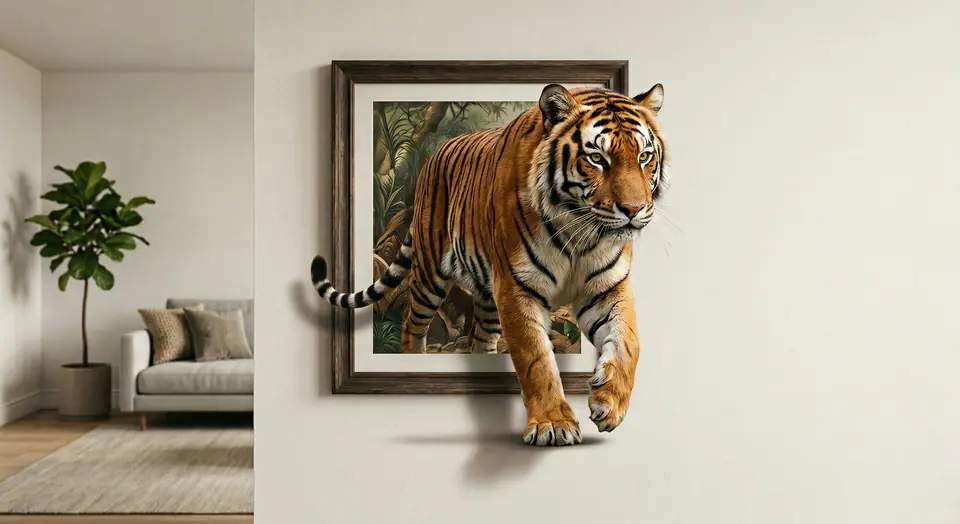
Modèle de prompt vidéo IA : Prompt AI Out of Frame effet vidéo

Modèle prêt pour la production pour AI Out of Frame effet vidéo, pensé pour AI Out of Frame effet clips et entertainment effects et des workflows VisioArt structurés.
Créer maintenantVoir les prix
Exemple visuel Prompt AI Out of Frame effet vidéo
vidéovidéo effetentertainmentimage to vidéo
Consigne
Remplacez les variables entre crochets, puis ajustez la caméra, la lumière, le format et les contraintes de sortie selon le canal.
Use the input image as the FIRST FRAME and keep it consistent. LOCK the camera completely (no zoom, no pan, no tilt). Keep the background, lighting, and environment perfectly static across the entire video. Replace the frame rule with an AUTO-FIT FRAME rule: the picture frame MUST always fully contain the entire subject at the start, no matter how large or tall the subject is. If needed, the frame automatically expands or adjusts its aspect ratio to fit the whole subject inside WITHOUT cropping. The frame MUST remain a rigid, perfectly rectangular frame (no bending, no warping, no melting), fixed on the wall, same material and style throughout. The frame can only resize ONCE at the very beginning (0-10%) to fit the subject, then stays completely unchanged afterward. The subject MUST remain exactly the same as the input (same identity, texture, colors, proportions). No stylization. No redesign. No duplicates. Animation: the subject slowly climbs OUT of the frame while the frame stays on the wall. 0-25%: the subject leans forward and places ONE limb/edge over the bottom frame border, clearly in front of the frame. 25-55%: a second contact point crosses the frame edge; the torso/upper body moves forward with natural anatomy. 55-85%: more of the subject emerges while the frame remains behind it; add realistic contact shadows where the subject touches the wall surface and the frame edge. 85-100%: the subject pauses half-out, looking toward camera, still attached to the framed image (do NOT fully leave the frame). Clean edges, stable background, no scene change, no transitions.
Idéal pour
AI Out of Frame effet clips
entertainment effects
Reusable vidéo workflows
Points de départ des modèles
Seedance 2 Fast

Modèles liés

Poursuivre la campagne

Utilisez ces modèles proches lorsque la même campagne a besoin d’un autre format d’asset.

Exemple Prompt produit révélation
e-commerceproduit vidéopaid social
produit révélation
Modèle prêt pour la production pour produit révélation, pensé pour produit launches et paid social tests et des workflows VisioArt structurés.
Ouvrir le modèle

Exemple Prompt portrait accroche
portraitsocial contentcreator
portrait accroche
Modèle prêt pour la production pour portrait accroche, pensé pour Creator posts et fondateur content et des workflows VisioArt structurés.
Ouvrir le modèle

Exemple Prompt lookbook motion
modelookbookimage to vidéo
lookbook motion
Modèle prêt pour la production pour lookbook motion, pensé pour mode drops et Lookbooks et des workflows VisioArt structurés.
Ouvrir le modèle

FAQ

FAQ AI Out of Frame effet vidéo

Réponses claires sur les workflows, modèles, tarifs et fit de production.

Modèle prêt pour la production pour AI Out of Frame effet vidéo, pensé pour AI Out of Frame effet clips et entertainment effects et des workflows VisioArt structurés.

Oui. Remplacez les éléments entre crochets, puis ajustez caméra, lumière, format, détails et contraintes de sortie selon le canal.

Commencez par l’outil recommandé sur la page. Si le mouvement, le réalisme ou le style demandent une autre force de modèle, testez les chemins voisins.

Utilisez ce modèle dans VisioArt.

Ouvrez l’outil recommandé, collez la consigne, remplacez les variables, puis testez le meilleur chemin de modèle.

Ouvrir l’outil recommandéParcourir les modèles