Skip to content

Plantilla de prompt

Plantilla de prompt para video IA: Prompt de AI Out of Frame efecto video

Plantilla lista para producción para AI Out of Frame efecto video, pensada para AI Out of Frame efecto clips y entertainment effects y flujos creativos claros en VisioArt.
Crear ahoraVer precios
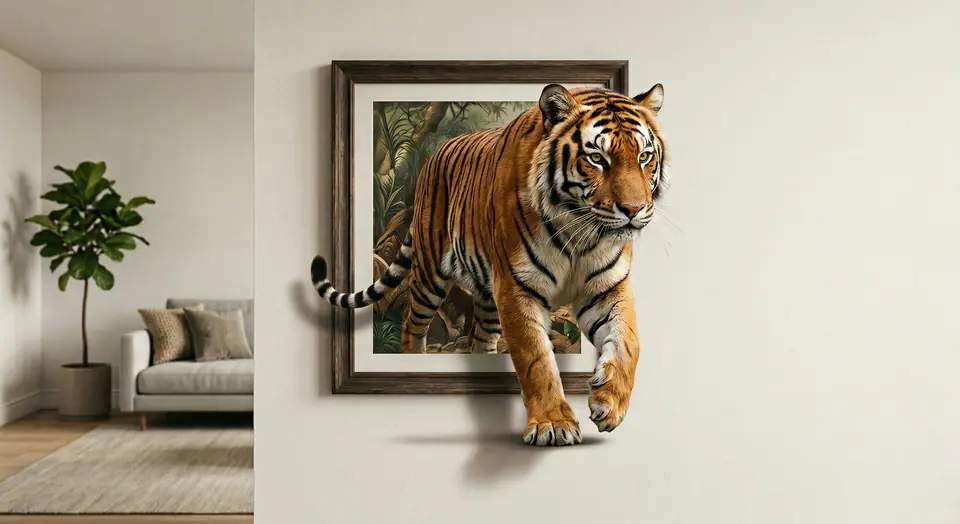
Ejemplo visual de Prompt de AI Out of Frame efecto video
videovideo efectoentertainmentimagen to video
Instrucción
Reemplaza los marcadores entre corchetes y ajusta cámara, iluminación, formato y restricciones de salida para el canal exacto.
Use the input image as the FIRST FRAME and keep it consistent. LOCK the camera completely (no zoom, no pan, no tilt). Keep the background, lighting, and environment perfectly static across the entire video. Replace the frame rule with an AUTO-FIT FRAME rule: the picture frame MUST always fully contain the entire subject at the start, no matter how large or tall the subject is. If needed, the frame automatically expands or adjusts its aspect ratio to fit the whole subject inside WITHOUT cropping. The frame MUST remain a rigid, perfectly rectangular frame (no bending, no warping, no melting), fixed on the wall, same material and style throughout. The frame can only resize ONCE at the very beginning (0-10%) to fit the subject, then stays completely unchanged afterward. The subject MUST remain exactly the same as the input (same identity, texture, colors, proportions). No stylization. No redesign. No duplicates. Animation: the subject slowly climbs OUT of the frame while the frame stays on the wall. 0-25%: the subject leans forward and places ONE limb/edge over the bottom frame border, clearly in front of the frame. 25-55%: a second contact point crosses the frame edge; the torso/upper body moves forward with natural anatomy. 55-85%: more of the subject emerges while the frame remains behind it; add realistic contact shadows where the subject touches the wall surface and the frame edge. 85-100%: the subject pauses half-out, looking toward camera, still attached to the framed image (do NOT fully leave the frame). Clean edges, stable background, no scene change, no transitions.
Ideal para
AI Out of Frame efecto clips
entertainment effects
Reusable video workflows
Modelos de partida
Seedance 2 Fast

Plantillas relacionadas

Mantén la campaña en marcha

Usa estos patrones cercanos cuando la misma campaña necesite otro formato de pieza.

Ejemplo de Prompt de producto revelacion
ecommerceproducto videopaid social
producto revelacion
Plantilla lista para producción para producto revelacion, pensada para producto launches y paid social tests y flujos creativos claros en VisioArt.
Abrir plantilla

Ejemplo de Prompt de retrato gancho
retratosocial contentcreator
retrato gancho
Plantilla lista para producción para retrato gancho, pensada para Creator posts y fundador content y flujos creativos claros en VisioArt.
Abrir plantilla

Ejemplo de Prompt de Lookbook movimiento
modaLookbookimagen to video
Lookbook movimiento
Plantilla lista para producción para Lookbook movimiento, pensada para moda drops y Lookbooks y flujos creativos claros en VisioArt.
Abrir plantilla

Preguntas frecuentes

Preguntas frecuentes de AI Out of Frame efecto video

Respuestas claras sobre flujos, modelos, precios y encaje de producción.

Plantilla lista para producción para AI Out of Frame efecto video, pensada para AI Out of Frame efecto clips y entertainment effects y flujos creativos claros en VisioArt.

Sí. Sustituye los marcadores entre corchetes y ajusta cámara, luz, formato, detalles y restricciones de salida según el canal.

Empieza con la herramienta recomendada en la página. Si necesitas otra ventaja de movimiento, realismo o estilo, prueba los modelos cercanos.

Usa esta plantilla en VisioArt.

Abre la herramienta recomendada, pega la instrucción, reemplaza los marcadores y prueba la ruta de modelo más fuerte.

Abrir herramienta recomendadaExplorar plantillas