Skip to content

Prompt-Vorlage

AI-Video-Prompt-Vorlage: WPAP Art Direction generator Bild Prompt

Produktionsreife Vorlage für WPAP Art Direction generator Bild, geeignet für WPAP Art Direction Generator variants und Referenz guided edits und klare VisioArt-Workflows.
Jetzt erstellenPreise ansehen
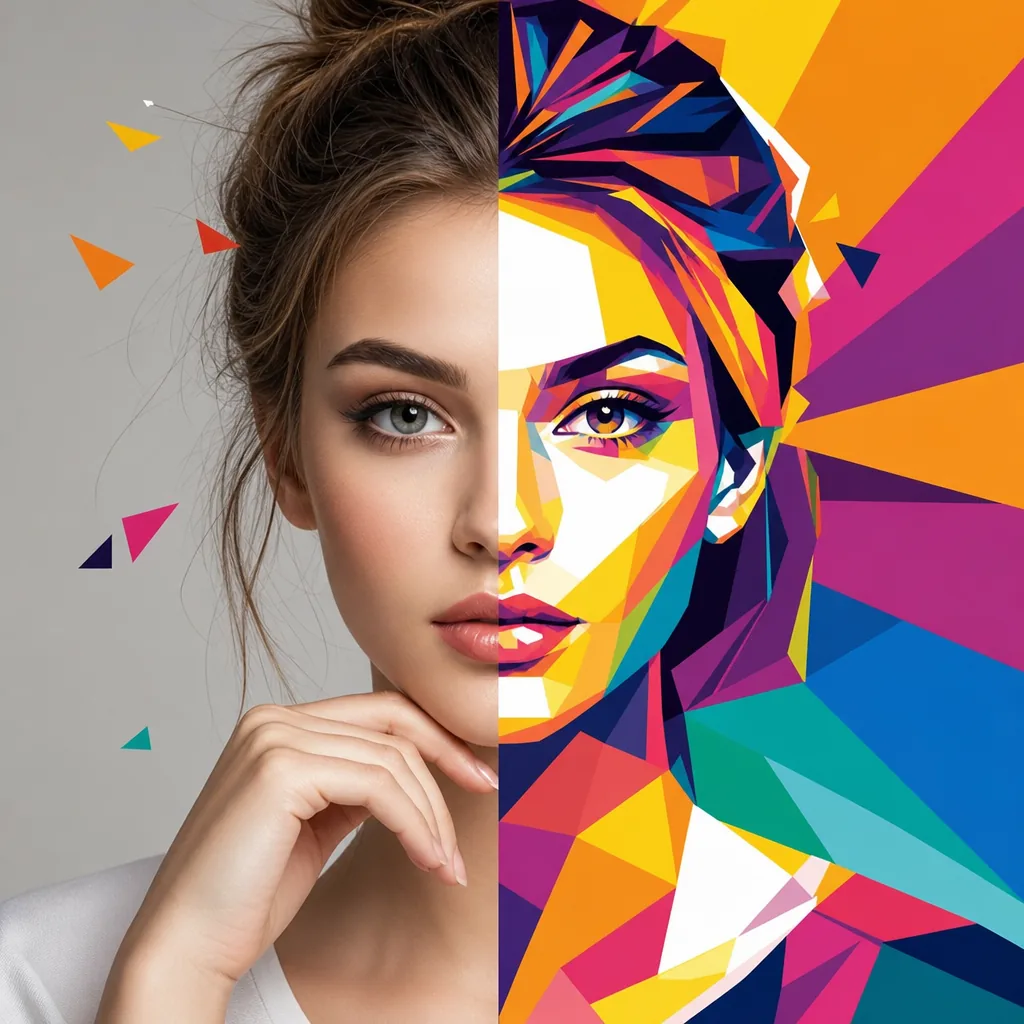
Visuelles Beispiel für WPAP Art Direction generator Bild Prompt
BildBild BearbeitungappearanceReferenz Bild
Eingabe
Ersetze die Platzhalter in Klammern und passe Kamera, Licht, Format und Ausgabegrenzen an den Kanal an.
Create a WPAP (Wedha’s Pop Art Portrait) style transformation of the uploaded photo. Primary goal: convert the image into authentic WPAP pop-art portrait aesthetics while preserving the original identity and composition. Identity & structure rules (must follow): Keep the subject’s face identity exactly the same (same person, same facial proportions, same key features). Preserve the original pose, head angle, gaze direction, hairstyle silhouette, and overall composition. Do NOT beautify, slim, change age, change gender, or change ethnicity. Do NOT add or remove any objects, accessories, text, logos, or watermarks. WPAP style requirements: Render the image using hard-edge geometric polygon shapes (sharp, clean edges). Use flat, solid color fills per shape (no gradients, no airbrushing). Build form and depth using contrasting color planes (light and shadow as distinct color blocks). High-saturation, vibrant pop-art palette with strong contrast. Crisp vector-like look, clean boundaries, no sketch lines, no painterly brush texture. Keep facial features readable and accurate (eyes, nose, lips must remain aligned and recognizable). Avoid muddy colors; keep colors bold and separated. Background handling: Preserve the original background layout and objects, but stylize them into the same WPAP geometric, flat-color treatment. Do NOT replace the background with a new scene. If the background is very complex, simplify it slightly into larger geometric planes while keeping the same setting. Quality: High resolution, sharp details, clean edges, no artifacts, no distortion, no blur. Final output should look like a professional WPAP poster illustration. Output constraints: Single image only. No text, no frames, no borders, no signature.
Am besten geeignet für
WPAP Art Direction Generator variants
Referenz guided edits
Reusable Bild workflows
Modell-Startpunkte
GPT Image 2Nano Banana 2Seedream 4Seedream 4.5

Ähnliche Vorlagen

Die Kampagne weiterführen

Nutze diese benachbarten Eingabemuster, wenn dieselbe Kampagne ein weiteres Asset-Format braucht.

AI Patch Prompt generator Bild Prompt Beispiel
BildmerchText Prompt
AI Patch Prompt generator Bild
Produktionsreife Vorlage für AI Patch Prompt generator Bild, geeignet für AI Patch Generator variants und Text to Bild starts und klare VisioArt-Workflows.
Vorlage öffnen
AI Age Change Filter Prompt Bild Prompt Beispiel
BildBild Bearbeitungappearance
AI Age Change Filter Prompt Bild
Produktionsreife Vorlage für AI Age Change Filter Prompt Bild, geeignet für AI Age Change Filter variants und Referenz guided edits und klare VisioArt-Workflows.
Vorlage öffnen

AI Body Editor Prompt Bild Prompt Beispiel
BildBild Bearbeitungappearance
AI Body Editor Prompt Bild
Produktionsreife Vorlage für AI Body Editor Prompt Bild, geeignet für AI Body Editor variants und Referenz guided edits und klare VisioArt-Workflows.
Vorlage öffnen

FAQ

WPAP Art Direction generator Bild FAQ

Klare Antworten zu Workflows, Modellwahl, Preisen und Produktions-Fit.

Produktionsreife Vorlage für WPAP Art Direction generator Bild, geeignet für WPAP Art Direction Generator variants und Referenz guided edits und klare VisioArt-Workflows.

Ja. Ersetze die Platzhalter in eckigen Klammern und passe Kamera, Licht, Format, Details und Ausgaberegeln an den Kanal an.

Starte mit dem empfohlenen Tool auf der Seite. Wenn Bewegung, Realismus oder Stil andere Modellstärken brauchen, teste die benachbarten Modellpfade.

Nutze diese Vorlage in VisioArt.

Öffne das empfohlene Tool, füge die Eingabe ein, ersetze die Platzhalter und teste den stärksten Modellpfad.

Empfohlenes Tool öffnenVorlagen durchsuchen