Skip to content

Prompt-Vorlage

AI-Video-Prompt-Vorlage: Raincoat Effekt Bild Prompt

Produktionsreife Vorlage für Raincoat Effekt Bild, geeignet für Raincoat Effekt variants und Referenz guided edits und klare VisioArt-Workflows.
Jetzt erstellenPreise ansehen
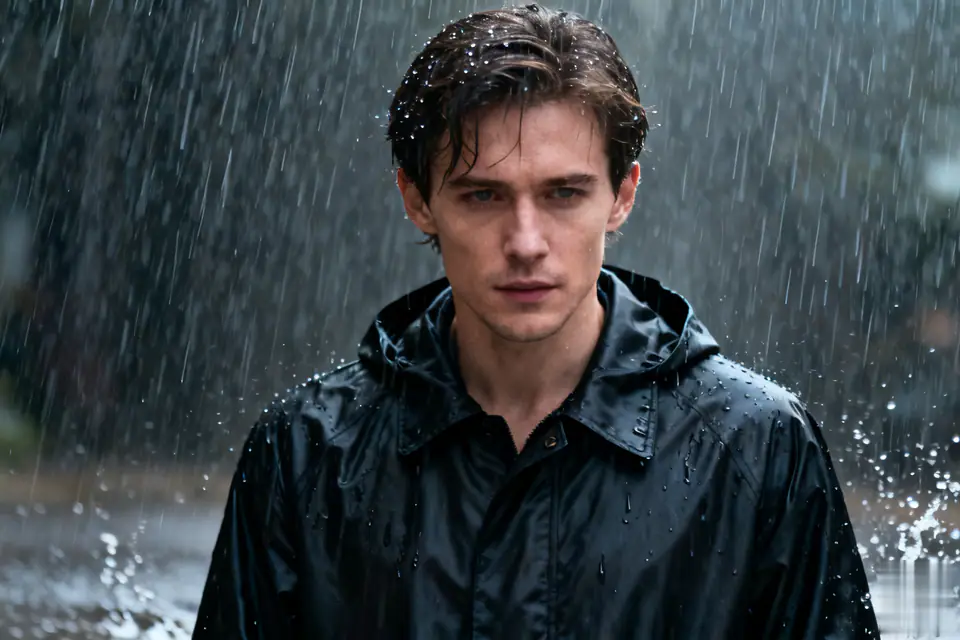
Visuelles Beispiel für Raincoat Effekt Bild Prompt
BildBild BearbeitungappearanceReferenz Bild
Eingabe
Ersetze die Platzhalter in Klammern und passe Kamera, Licht, Format und Ausgabegrenzen an den Kanal an.
Transform the uploaded single-person photo into a realistic close-up portrait with the following key elements: The person must be wearing a well-fitted black raincoat (with visible texture details like fabric wrinkles, possible slight water absorption effects, and natural collar/hem shapes). The scene must depict a heavy downpour-show distinct, dense rain streaks falling around the person, splashes of rain on the ground (if lower body is visible), and subtle water droplets on the raincoat surface, hair, or shoulders to enhance authenticity. Maintain the original person's core facial features, posture, and basic appearance (avoid altering key identifiers like facial structure, hairstyle length/color, or obvious accessories) while integrating them naturally into the rainy environment. Adjust the lighting to match a heavy rain scenario: soft, diffused ambient light (simulate overcast weather), possible subtle highlights on wet surfaces (e.g., raincoat fabric, skin), and avoid harsh shadows. Ensure the close-up framing focuses on the upper body (at least from shoulders up, or extending to mid-torso if appropriate) to highlight the raincoat details and the interaction between the person and the rain. Keep the overall tone realistic and immersive-avoid overly stylized or cartoonish effects; prioritize natural rain dynamics and realistic material textures of the raincoat.
Am besten geeignet für
Raincoat Effekt variants
Referenz guided edits
Reusable Bild workflows
Modell-Startpunkte
Seedream 4GPT Image 2Seedream 4.5Seedream50 Lite

Ähnliche Vorlagen

Die Kampagne weiterführen

Nutze diese benachbarten Eingabemuster, wenn dieselbe Kampagne ein weiteres Asset-Format braucht.

AI Patch Prompt generator Bild Prompt Beispiel
BildmerchText Prompt
AI Patch Prompt generator Bild
Produktionsreife Vorlage für AI Patch Prompt generator Bild, geeignet für AI Patch Generator variants und Text to Bild starts und klare VisioArt-Workflows.
Vorlage öffnen
AI Age Change Filter Prompt Bild Prompt Beispiel
BildBild Bearbeitungappearance
AI Age Change Filter Prompt Bild
Produktionsreife Vorlage für AI Age Change Filter Prompt Bild, geeignet für AI Age Change Filter variants und Referenz guided edits und klare VisioArt-Workflows.
Vorlage öffnen

AI Body Editor Prompt Bild Prompt Beispiel
BildBild Bearbeitungappearance
AI Body Editor Prompt Bild
Produktionsreife Vorlage für AI Body Editor Prompt Bild, geeignet für AI Body Editor variants und Referenz guided edits und klare VisioArt-Workflows.
Vorlage öffnen

FAQ

Raincoat Effekt Bild FAQ

Klare Antworten zu Workflows, Modellwahl, Preisen und Produktions-Fit.

Produktionsreife Vorlage für Raincoat Effekt Bild, geeignet für Raincoat Effekt variants und Referenz guided edits und klare VisioArt-Workflows.

Ja. Ersetze die Platzhalter in eckigen Klammern und passe Kamera, Licht, Format, Details und Ausgaberegeln an den Kanal an.

Starte mit dem empfohlenen Tool auf der Seite. Wenn Bewegung, Realismus oder Stil andere Modellstärken brauchen, teste die benachbarten Modellpfade.

Nutze diese Vorlage in VisioArt.

Öffne das empfohlene Tool, füge die Eingabe ein, ersetze die Platzhalter und teste den stärksten Modellpfad.

Empfohlenes Tool öffnenVorlagen durchsuchen