Skip to content

Prompt-Vorlage

AI-Video-Prompt-Vorlage: Blythe Doll Prompt generator Bild Prompt

Produktionsreife Vorlage für Blythe Doll Prompt generator Bild, geeignet für Blythe Doll Generator variants und Referenz guided edits und klare VisioArt-Workflows.
Jetzt erstellenPreise ansehen
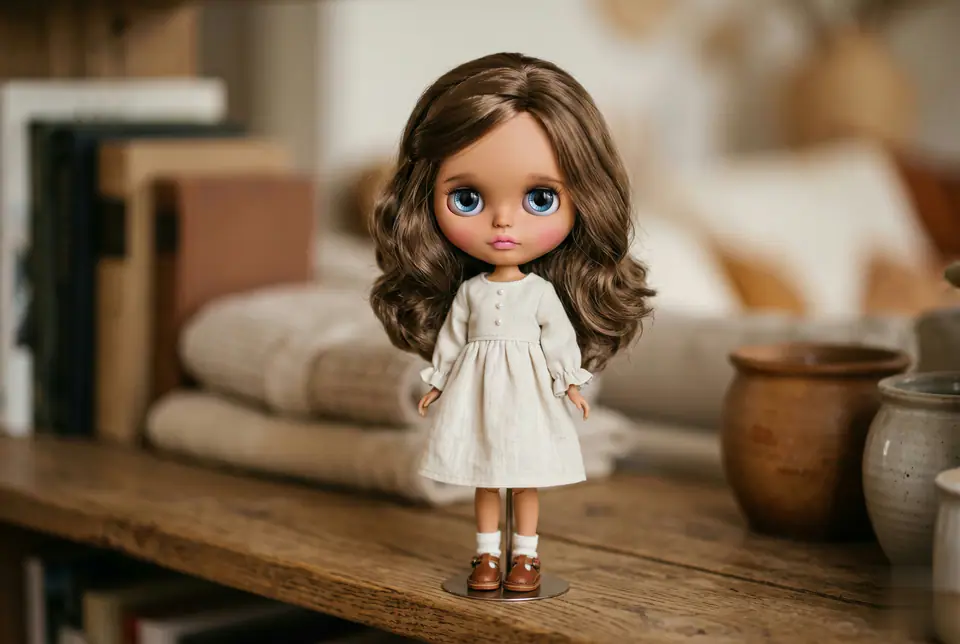
Visuelles Beispiel für Blythe Doll Prompt generator Bild Prompt
BildBild BearbeitungappearanceReferenz Bild
Eingabe
Ersetze die Platzhalter in Klammern und passe Kamera, Licht, Format und Ausgabegrenzen an den Kanal an.
Use the uploaded photo as the single identity reference. Transform the person into a collectible Blythe doll figure while preserving the person's identity, face shape, hairstyle, hair parting, and clothing (same outfit, color, neckline). Blythe doll proportions: oversized round head (Blythe-accurate), small chin, tiny nose, tiny lips. Very large glossy glass eyes with strong reflections/catchlights, slightly melancholic dreamy expression, long delicate eyelashes, subtle lower lash line. Skin: smooth porcelain-like doll skin with realistic vinyl/resin material feel, soft blush on cheeks, gentle pastel makeup; IMPORTANT: match the doll's skin tone to the reference photo's skin tone (do not whiten or change ethnicity), keep natural undertone. Hair: keep the same hair length, color, volume, and texture from the reference photo; silky doll hair fibers with realistic strand detail. Aesthetic: cute, dreamy, handcrafted Blythe figure, high detail, soft studio lighting, pastel color palette, shallow depth of field, photography-style finish, realistic doll materials (vinyl/resin head, glass eyes), crisp focus on eyes, subtle film grain. Background: simple indoor neutral background bokeh, not distracting. "extra cute pastel blush, gentle gradient lips, warm soft light, subtle sparkle in eyes, kawaii handcrafted collectible figure look"
Am besten geeignet für
Blythe Doll Generator variants
Referenz guided edits
Reusable Bild workflows
Modell-Startpunkte
GPT Image 2Nano Banana 2Seedream 4Seedream 4.5

Ähnliche Vorlagen

Die Kampagne weiterführen

Nutze diese benachbarten Eingabemuster, wenn dieselbe Kampagne ein weiteres Asset-Format braucht.

AI Patch Prompt generator Bild Prompt Beispiel
BildmerchText Prompt
AI Patch Prompt generator Bild
Produktionsreife Vorlage für AI Patch Prompt generator Bild, geeignet für AI Patch Generator variants und Text to Bild starts und klare VisioArt-Workflows.
Vorlage öffnen
AI Age Change Filter Prompt Bild Prompt Beispiel
BildBild Bearbeitungappearance
AI Age Change Filter Prompt Bild
Produktionsreife Vorlage für AI Age Change Filter Prompt Bild, geeignet für AI Age Change Filter variants und Referenz guided edits und klare VisioArt-Workflows.
Vorlage öffnen

AI Body Editor Prompt Bild Prompt Beispiel
BildBild Bearbeitungappearance
AI Body Editor Prompt Bild
Produktionsreife Vorlage für AI Body Editor Prompt Bild, geeignet für AI Body Editor variants und Referenz guided edits und klare VisioArt-Workflows.
Vorlage öffnen

FAQ

Blythe Doll Prompt generator Bild FAQ

Klare Antworten zu Workflows, Modellwahl, Preisen und Produktions-Fit.

Produktionsreife Vorlage für Blythe Doll Prompt generator Bild, geeignet für Blythe Doll Generator variants und Referenz guided edits und klare VisioArt-Workflows.

Ja. Ersetze die Platzhalter in eckigen Klammern und passe Kamera, Licht, Format, Details und Ausgaberegeln an den Kanal an.

Starte mit dem empfohlenen Tool auf der Seite. Wenn Bewegung, Realismus oder Stil andere Modellstärken brauchen, teste die benachbarten Modellpfade.

Nutze diese Vorlage in VisioArt.

Öffne das empfohlene Tool, füge die Eingabe ein, ersetze die Platzhalter und teste den stärksten Modellpfad.

Empfohlenes Tool öffnenVorlagen durchsuchen