Skip to content

Prompt-Vorlage

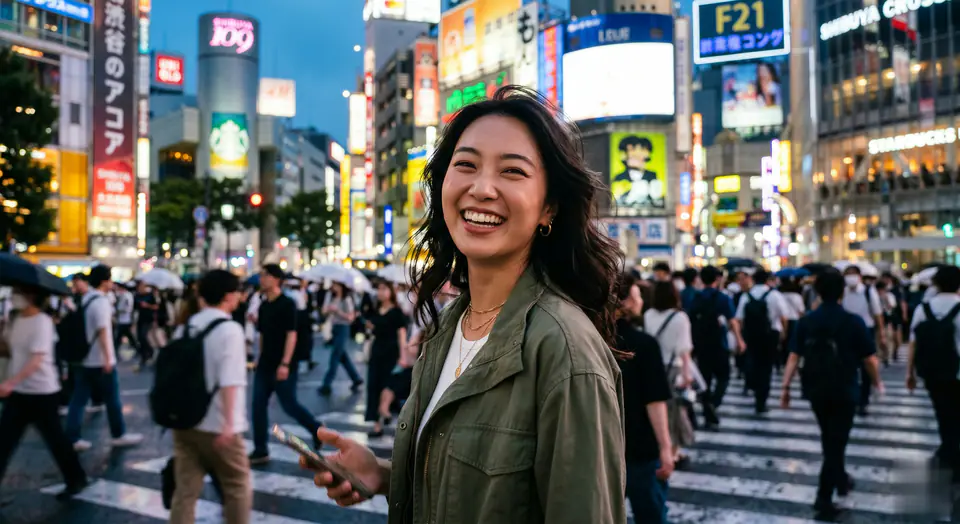
AI-Video-Prompt-Vorlage: AI Shibuya Crossing Video Prompt Video Prompt

Produktionsreife Vorlage für AI Shibuya Crossing Video Prompt Video, geeignet für AI Shibuya Crossing Video clips und entertainment effects und klare VisioArt-Workflows.
Jetzt erstellenPreise ansehen
Visuelles Beispiel für AI Shibuya Crossing Video Prompt Video Prompt
VideoVideo EffektentertainmentBild to Video
Eingabe
Ersetze die Platzhalter in Klammern und passe Kamera, Licht, Format und Ausgabegrenzen an den Kanal an.
Animate the reference person and the scene from the still image into a high-energy viral social media video clip, ensuring perfect facial consistency throughout. 0-2s: The camera, acting as a handheld smartphone or smooth gimbal, closely follows the reference person from behind as they joyfully run forward onto the iconic crowded Shibuya zebra crossing. The massive crowd around them moves naturally. 2-5s: The person suddenly slows down, gracefully spins around to face the camera, and gives a beaming, confident, and hopeful "main character" smile. The camera stabilizes into a tight medium shot of their face. In the background, the bustling Tokyo crosswalk is alive with motion, and a few other pedestrians on the opposite side can be seen holding up phones filming themselves in a similar fashion. Style: handheld camera movement, organic camera shake, raw lifestyle realism, uplifting and positive atmosphere, vibrant cinematic Tokyo street lighting, realistic clothing physics, shallow depth of field, full of life and positive energy.
Am besten geeignet für
AI Shibuya Crossing Video clips
entertainment effects
Reusable Video workflows
Modell-Startpunkte
Seedance 2 Fast

Ähnliche Vorlagen

Die Kampagne weiterführen

Nutze diese benachbarten Eingabemuster, wenn dieselbe Kampagne ein weiteres Asset-Format braucht.

Produkt Reveal Prompt Beispiel
E-CommerceProdukt VideoPaid Social
Produkt Reveal
Produktionsreife Vorlage für Produkt Reveal, geeignet für Produkt launches und Paid Social tests und klare VisioArt-Workflows.
Vorlage öffnen

Portraet Hook Prompt Beispiel
PortraetSocial contentcreator
Portraet Hook
Produktionsreife Vorlage für Portraet Hook, geeignet für Creator posts und Founder content und klare VisioArt-Workflows.
Vorlage öffnen

Lookbook Motion Prompt Beispiel
ModeLookbookBild to Video
Lookbook Motion
Produktionsreife Vorlage für Lookbook Motion, geeignet für Mode drops und Lookbooks und klare VisioArt-Workflows.
Vorlage öffnen

FAQ

AI Shibuya Crossing Video Prompt Video FAQ

Klare Antworten zu Workflows, Modellwahl, Preisen und Produktions-Fit.

Produktionsreife Vorlage für AI Shibuya Crossing Video Prompt Video, geeignet für AI Shibuya Crossing Video clips und entertainment effects und klare VisioArt-Workflows.

Ja. Ersetze die Platzhalter in eckigen Klammern und passe Kamera, Licht, Format, Details und Ausgaberegeln an den Kanal an.

Starte mit dem empfohlenen Tool auf der Seite. Wenn Bewegung, Realismus oder Stil andere Modellstärken brauchen, teste die benachbarten Modellpfade.

Nutze diese Vorlage in VisioArt.

Öffne das empfohlene Tool, füge die Eingabe ein, ersetze die Platzhalter und teste den stärksten Modellpfad.

Empfohlenes Tool öffnenVorlagen durchsuchen