Skip to content

Prompt-Vorlage

AI-Video-Prompt-Vorlage: AI Polaroid Foto Bild Prompt

Produktionsreife Vorlage für AI Polaroid Foto Bild, geeignet für AI Polaroid Foto variants und Referenz guided edits und klare VisioArt-Workflows.
Jetzt erstellenPreise ansehen
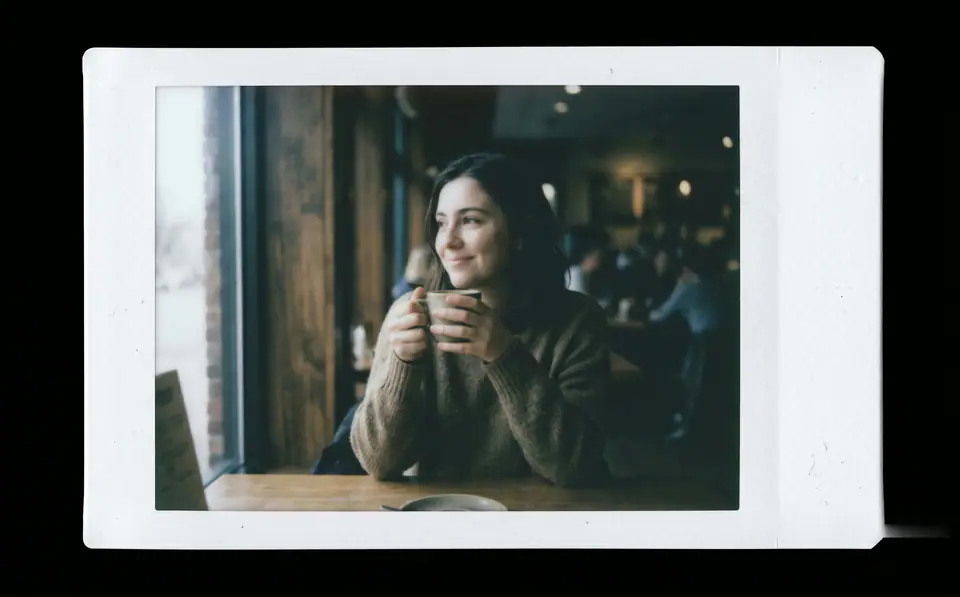
Visuelles Beispiel für AI Polaroid Foto Bild Prompt
BildBild BearbeitungappearanceReferenz Bild
Eingabe
Ersetze die Platzhalter in Klammern und passe Kamera, Licht, Format und Ausgabegrenzen an den Kanal an.
Create a print-ready Fujifilm Instax-style instant film photo from the uploaded image. The entire output must be a single standalone Instax Mini print sheet-no external background, desk, or scene. Design as a real Instax film sheet: - Clean white borders integrated into the image, with a noticeably thicker bottom margin. - Soft rounded corners on all edges. - Subtle matte paper texture across the entire surface. Center the original photo precisely within the film area without cropping key content. Apply authentic Fujifilm Instax Mini color and tone response (ISO 800, 5500K daylight balance): - Overall exposure slightly underexposed by 1/3 to 1/2 stop for a subtly dim, moody feel. - Midtones shifted downward for a gently suppressed, hazy atmosphere. - Softened contrast: highlights bloom softly with diffusion; shadows lifted slightly but impure (not pure black). - Muted, subdued colors with realistic Instax impurities: reds/oranges dulled and slightly dirty; magentas light and undersaturated; yellows leaning cool/lemony; subtle greenish tint in shadows and midtones. - Skin tones naturally imperfect-slightly yellowish or greenish, not idealized. - Gentle light diffusion softens all transitions, especially in bright areas, creating a foggy non-digital haze. Add perceptible non-digital Instax characteristics (mild, natural-looking): - Visible brightness falloff from center to edges (film exposure effect). - Slight sharpness reduction toward edges (camera optics). - Very subtle uneven exposure and color shifts across the surface for organic inconsistency. The result must evoke a genuine Fujifilm Instax Mini print-dimmer, hazier, with imperfect color rendering that feels authentic and nostalgic, not a clean digital photo. Preserve original composition, subject identity, and details. Strictly avoid: - Digital sharpness/clarity/HDR perfection. - Uniform brightness or even lighting. - Vibrant/rich/perfect colors. - Heavy vignettes, aging, dust, scratches, text, logos, or watermarks. - Any mockup staging, shadows, or environments.
Am besten geeignet für
AI Polaroid Foto variants
Referenz guided edits
Reusable Bild workflows
Modell-Startpunkte
GPT Image 2Nano Banana 2Seedream 4Seedream 4.5

Ähnliche Vorlagen

Die Kampagne weiterführen

Nutze diese benachbarten Eingabemuster, wenn dieselbe Kampagne ein weiteres Asset-Format braucht.

AI Patch Prompt generator Bild Prompt Beispiel
BildmerchText Prompt
AI Patch Prompt generator Bild
Produktionsreife Vorlage für AI Patch Prompt generator Bild, geeignet für AI Patch Generator variants und Text to Bild starts und klare VisioArt-Workflows.
Vorlage öffnen
AI Age Change Filter Prompt Bild Prompt Beispiel
BildBild Bearbeitungappearance
AI Age Change Filter Prompt Bild
Produktionsreife Vorlage für AI Age Change Filter Prompt Bild, geeignet für AI Age Change Filter variants und Referenz guided edits und klare VisioArt-Workflows.
Vorlage öffnen

AI Body Editor Prompt Bild Prompt Beispiel
BildBild Bearbeitungappearance
AI Body Editor Prompt Bild
Produktionsreife Vorlage für AI Body Editor Prompt Bild, geeignet für AI Body Editor variants und Referenz guided edits und klare VisioArt-Workflows.
Vorlage öffnen

FAQ

AI Polaroid Foto Bild FAQ

Klare Antworten zu Workflows, Modellwahl, Preisen und Produktions-Fit.

Produktionsreife Vorlage für AI Polaroid Foto Bild, geeignet für AI Polaroid Foto variants und Referenz guided edits und klare VisioArt-Workflows.

Ja. Ersetze die Platzhalter in eckigen Klammern und passe Kamera, Licht, Format, Details und Ausgaberegeln an den Kanal an.

Starte mit dem empfohlenen Tool auf der Seite. Wenn Bewegung, Realismus oder Stil andere Modellstärken brauchen, teste die benachbarten Modellpfade.

Nutze diese Vorlage in VisioArt.

Öffne das empfohlene Tool, füge die Eingabe ein, ersetze die Platzhalter und teste den stärksten Modellpfad.

Empfohlenes Tool öffnenVorlagen durchsuchen