Skip to content

Prompt-Vorlage

AI-Video-Prompt-Vorlage: AI Foto Collage Maker Bild Prompt

Produktionsreife Vorlage für AI Foto Collage Maker Bild, geeignet für AI Foto Collage Maker variants und Referenz guided edits und klare VisioArt-Workflows.
Jetzt erstellenPreise ansehen
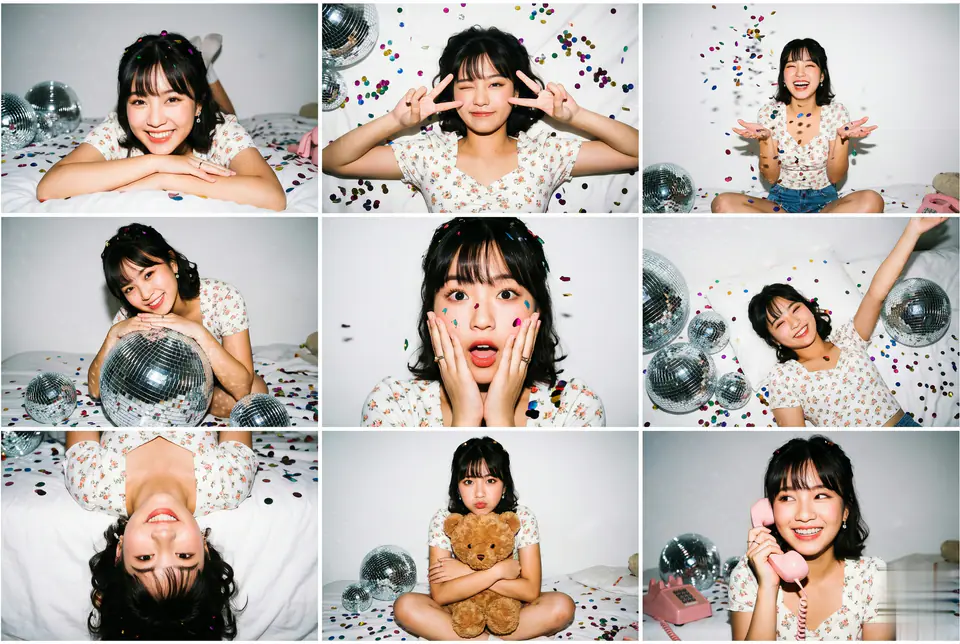
Visuelles Beispiel für AI Foto Collage Maker Bild Prompt
BildBild BearbeitungappearanceReferenz Bild
Eingabe
Ersetze die Platzhalter in Klammern und passe Kamera, Licht, Format und Ausgabegrenzen an den Kanal an.
"3x3 Photo Collage / 9-Panel Grid.", "layout": "Nine vertical portrait images arranged in a square grid.", "consistency": "Same subject, same outfit, same lighting and same character as the upload photo across all 9 panels." }, "aesthetic_style": { "theme": "Gen Z Home Party / 'Maiden Pavilion' Photoshoot.", "lighting_technique": "Direct On-Camera Flash (Hard Light).", "visuals": "High contrast, sharp shadows, chaotic fun, vibrant colors against a white background." }, "environment_and_props": { "background": "White wall with taped photos, white bed sheets.", "decor": "Silver disco balls (various sizes), colorful metallic confetti scattered everywhere, brown teddy bear, pink retro corded phone." }, "panel_pose_breakdown": { "1_top_left": "Lying on stomach (prone), resting chin on crossed arms, looking at camera. Confetti in hair.", "2_top_center": "Top-down view lying on back, winking one eye, making a peace sign near face. Hair fanned out.", "3_top_right": "Sitting sideways, knees bent, laughing candidly while throwing a handful of confetti in the air.", "4_middle_left": "Leaning upper body over a large silver disco ball, looking intensely at the camera.", "5_middle_center": "Close-up portrait. Hands touching cheeks in a 'surprised' or 'shy' gesture. Confetti stuck to cheeks.", "6_middle_right": "Lying on back amongst the disco balls, one arm reaching up towards the ceiling/camera.", "7_bottom_left": "Upside-down perspective (head at bottom of frame), playful expression, hair cascading down.", "8_bottom_center": "Sitting cross-legged (Lotus position), hugging the brown teddy bear tight, pouting slightly.", "9_bottom_right": "Sitting up, holding the pink retro telephone receiver to ear, looking sideways as if listening to gossip." }, "camera_technical_values": { "focal_length": "35mm (Versatile environmental portrait lens).", "aperture": "f/5.6 (Ensures subject and props are in focus).", "shutter_speed": "1/200s (Flash sync to freeze confetti motion).", "iso": "ISO 200.", "lighting": "Hard flash creates a distinct drop shadow behind the subject on the white wall and specular highlights on the disco balls." } }, "midjourney_string": "3x3 photo grid collage of a cute Asian girl at a home party, wearing white floral top and
Am besten geeignet für
AI Foto Collage Maker variants
Referenz guided edits
Reusable Bild workflows
Modell-Startpunkte
GPT Image 2Nano Banana 2Seedream 4Seedream 4.5

Ähnliche Vorlagen

Die Kampagne weiterführen

Nutze diese benachbarten Eingabemuster, wenn dieselbe Kampagne ein weiteres Asset-Format braucht.

AI Patch Prompt generator Bild Prompt Beispiel
BildmerchText Prompt
AI Patch Prompt generator Bild
Produktionsreife Vorlage für AI Patch Prompt generator Bild, geeignet für AI Patch Generator variants und Text to Bild starts und klare VisioArt-Workflows.
Vorlage öffnen
AI Age Change Filter Prompt Bild Prompt Beispiel
BildBild Bearbeitungappearance
AI Age Change Filter Prompt Bild
Produktionsreife Vorlage für AI Age Change Filter Prompt Bild, geeignet für AI Age Change Filter variants und Referenz guided edits und klare VisioArt-Workflows.
Vorlage öffnen

AI Body Editor Prompt Bild Prompt Beispiel
BildBild Bearbeitungappearance
AI Body Editor Prompt Bild
Produktionsreife Vorlage für AI Body Editor Prompt Bild, geeignet für AI Body Editor variants und Referenz guided edits und klare VisioArt-Workflows.
Vorlage öffnen

FAQ

AI Foto Collage Maker Bild FAQ

Klare Antworten zu Workflows, Modellwahl, Preisen und Produktions-Fit.

Produktionsreife Vorlage für AI Foto Collage Maker Bild, geeignet für AI Foto Collage Maker variants und Referenz guided edits und klare VisioArt-Workflows.

Ja. Ersetze die Platzhalter in eckigen Klammern und passe Kamera, Licht, Format, Details und Ausgaberegeln an den Kanal an.

Starte mit dem empfohlenen Tool auf der Seite. Wenn Bewegung, Realismus oder Stil andere Modellstärken brauchen, teste die benachbarten Modellpfade.

Nutze diese Vorlage in VisioArt.

Öffne das empfohlene Tool, füge die Eingabe ein, ersetze die Platzhalter und teste den stärksten Modellpfad.

Empfohlenes Tool öffnenVorlagen durchsuchen