Skip to content

Prompt-Vorlage

AI-Video-Prompt-Vorlage: AI Out of Frame Effekt Video Prompt

Produktionsreife Vorlage für AI Out of Frame Effekt Video, geeignet für AI Out of Frame Effekt clips und entertainment effects und klare VisioArt-Workflows.
Jetzt erstellenPreise ansehen
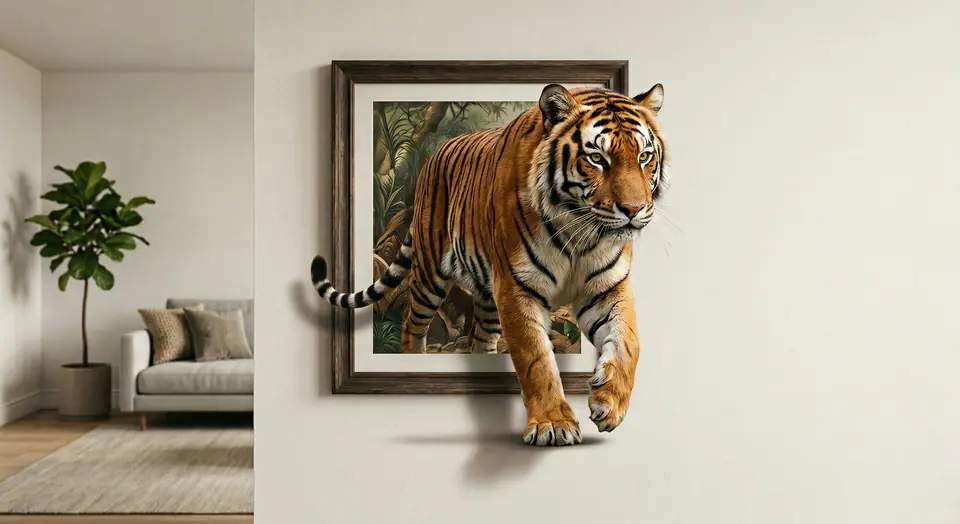
Visuelles Beispiel für AI Out of Frame Effekt Video Prompt
VideoVideo EffektentertainmentBild to Video
Eingabe
Ersetze die Platzhalter in Klammern und passe Kamera, Licht, Format und Ausgabegrenzen an den Kanal an.
Use the input image as the FIRST FRAME and keep it consistent. LOCK the camera completely (no zoom, no pan, no tilt). Keep the background, lighting, and environment perfectly static across the entire video. Replace the frame rule with an AUTO-FIT FRAME rule: the picture frame MUST always fully contain the entire subject at the start, no matter how large or tall the subject is. If needed, the frame automatically expands or adjusts its aspect ratio to fit the whole subject inside WITHOUT cropping. The frame MUST remain a rigid, perfectly rectangular frame (no bending, no warping, no melting), fixed on the wall, same material and style throughout. The frame can only resize ONCE at the very beginning (0-10%) to fit the subject, then stays completely unchanged afterward. The subject MUST remain exactly the same as the input (same identity, texture, colors, proportions). No stylization. No redesign. No duplicates. Animation: the subject slowly climbs OUT of the frame while the frame stays on the wall. 0-25%: the subject leans forward and places ONE limb/edge over the bottom frame border, clearly in front of the frame. 25-55%: a second contact point crosses the frame edge; the torso/upper body moves forward with natural anatomy. 55-85%: more of the subject emerges while the frame remains behind it; add realistic contact shadows where the subject touches the wall surface and the frame edge. 85-100%: the subject pauses half-out, looking toward camera, still attached to the framed image (do NOT fully leave the frame). Clean edges, stable background, no scene change, no transitions.
Am besten geeignet für
AI Out of Frame Effekt clips
entertainment effects
Reusable Video workflows
Modell-Startpunkte
Seedance 2 Fast

Ähnliche Vorlagen

Die Kampagne weiterführen

Nutze diese benachbarten Eingabemuster, wenn dieselbe Kampagne ein weiteres Asset-Format braucht.

Produkt Reveal Prompt Beispiel
E-CommerceProdukt VideoPaid Social
Produkt Reveal
Produktionsreife Vorlage für Produkt Reveal, geeignet für Produkt launches und Paid Social tests und klare VisioArt-Workflows.
Vorlage öffnen

Portraet Hook Prompt Beispiel
PortraetSocial contentcreator
Portraet Hook
Produktionsreife Vorlage für Portraet Hook, geeignet für Creator posts und Founder content und klare VisioArt-Workflows.
Vorlage öffnen

Lookbook Motion Prompt Beispiel
ModeLookbookBild to Video
Lookbook Motion
Produktionsreife Vorlage für Lookbook Motion, geeignet für Mode drops und Lookbooks und klare VisioArt-Workflows.
Vorlage öffnen

FAQ

AI Out of Frame Effekt Video FAQ

Klare Antworten zu Workflows, Modellwahl, Preisen und Produktions-Fit.

Produktionsreife Vorlage für AI Out of Frame Effekt Video, geeignet für AI Out of Frame Effekt clips und entertainment effects und klare VisioArt-Workflows.

Ja. Ersetze die Platzhalter in eckigen Klammern und passe Kamera, Licht, Format, Details und Ausgaberegeln an den Kanal an.

Starte mit dem empfohlenen Tool auf der Seite. Wenn Bewegung, Realismus oder Stil andere Modellstärken brauchen, teste die benachbarten Modellpfade.

Nutze diese Vorlage in VisioArt.

Öffne das empfohlene Tool, füge die Eingabe ein, ersetze die Platzhalter und teste den stärksten Modellpfad.

Empfohlenes Tool öffnenVorlagen durchsuchen