Skip to content

Prompt-Vorlage

AI-Video-Prompt-Vorlage: AI Eye Zoom Prompt Video Prompt

Produktionsreife Vorlage für AI Eye Zoom Prompt Video, geeignet für AI Eye Zoom clips und appearance effects und klare VisioArt-Workflows.
Jetzt erstellenPreise ansehen
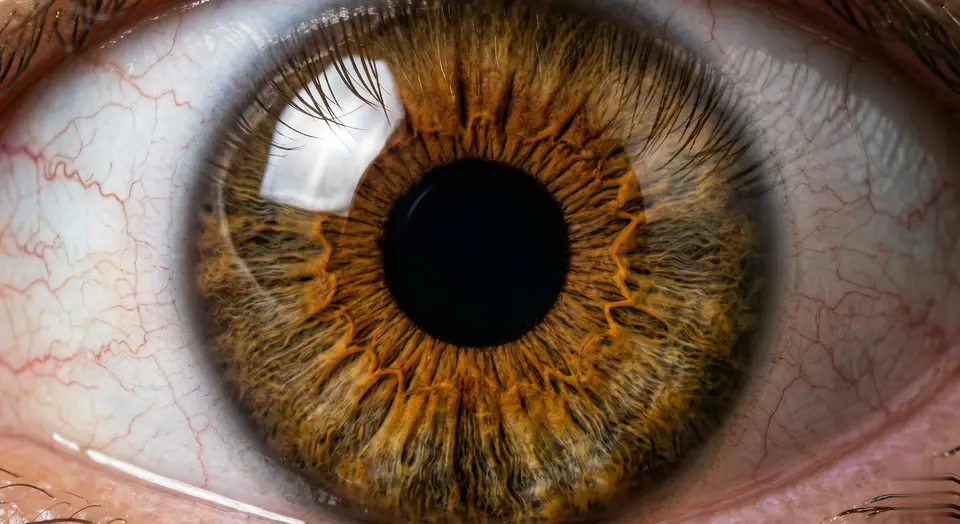
Visuelles Beispiel für AI Eye Zoom Prompt Video Prompt
VideoVideo EffektappearanceBild to Video
Eingabe
Ersetze die Platzhalter in Klammern und passe Kamera, Licht, Format und Ausgabegrenzen an den Kanal an.
Videos are generated from user-uploaded close-up photos of a single person to create hyper-realistic eye zooms. Start with a natural eye framing (eyelids, eyelashes, facial contours, lifelike). Then transition to a seamless, ultra-smooth zoom - linear motion, no speed changes/jumps, like a gentle breath. Hyper-realistic textures are preserved: clear iris striations, thin eyelashes (hair follicles are clearly visible), faint scleral veins, eyelid curves - all sharp and clear, no blur. Surrounding features (brows, cheeks) naturally recede without distortion. Final focus: pupil details are sharp and clear. As the zoom progresses, the pupil is centered in the frame. At the climax of the zoom, the pupil comes into focus - iris patterns, pupil edges, and corneal highlights are sharp and clear (no blur, perfect sharpness). Motion rules: Each frame is seamless (no noticeable cuts), and the motion curve is continuous (like liquid flow). Lighting/shadows are automatically adjusted based on zoom (e.g. corneal highlights move naturally, no sudden changes in brightness). Make sure every detail (even tiny textures) is sharp during the zoom, especially in the last frame centered on the pupil. Avoid: Unnatural motion (jumps, speed spikes), distorted facial features, blurred textures (especially at the end). Prioritize pupil-centered clarity and ultra-realistic, smooth zooms without any artifacts. The effect should feel like a slow, hypnotic dive into the core of the eyeball, eventually focusing on a single pupil in sharp and detailed focus - no blur, perfectly centered.
Am besten geeignet für
AI Eye Zoom clips
appearance effects
Reusable Video workflows
Modell-Startpunkte
Seedance

Ähnliche Vorlagen

Die Kampagne weiterführen

Nutze diese benachbarten Eingabemuster, wenn dieselbe Kampagne ein weiteres Asset-Format braucht.

Produkt Reveal Prompt Beispiel
E-CommerceProdukt VideoPaid Social
Produkt Reveal
Produktionsreife Vorlage für Produkt Reveal, geeignet für Produkt launches und Paid Social tests und klare VisioArt-Workflows.
Vorlage öffnen

Portraet Hook Prompt Beispiel
PortraetSocial contentcreator
Portraet Hook
Produktionsreife Vorlage für Portraet Hook, geeignet für Creator posts und Founder content und klare VisioArt-Workflows.
Vorlage öffnen

Lookbook Motion Prompt Beispiel
ModeLookbookBild to Video
Lookbook Motion
Produktionsreife Vorlage für Lookbook Motion, geeignet für Mode drops und Lookbooks und klare VisioArt-Workflows.
Vorlage öffnen

FAQ

AI Eye Zoom Prompt Video FAQ

Klare Antworten zu Workflows, Modellwahl, Preisen und Produktions-Fit.

Produktionsreife Vorlage für AI Eye Zoom Prompt Video, geeignet für AI Eye Zoom clips und appearance effects und klare VisioArt-Workflows.

Ja. Ersetze die Platzhalter in eckigen Klammern und passe Kamera, Licht, Format, Details und Ausgaberegeln an den Kanal an.

Starte mit dem empfohlenen Tool auf der Seite. Wenn Bewegung, Realismus oder Stil andere Modellstärken brauchen, teste die benachbarten Modellpfade.

Nutze diese Vorlage in VisioArt.

Öffne das empfohlene Tool, füge die Eingabe ein, ersetze die Platzhalter und teste den stärksten Modellpfad.

Empfohlenes Tool öffnenVorlagen durchsuchen