Skip to content

Prompt-Vorlage

AI-Video-Prompt-Vorlage: AI Attractiveness Test Prompt Bild Prompt

Produktionsreife Vorlage für AI Attractiveness Test Prompt Bild, geeignet für AI Attractiveness Test variants und Referenz guided edits und klare VisioArt-Workflows.
Jetzt erstellenPreise ansehen
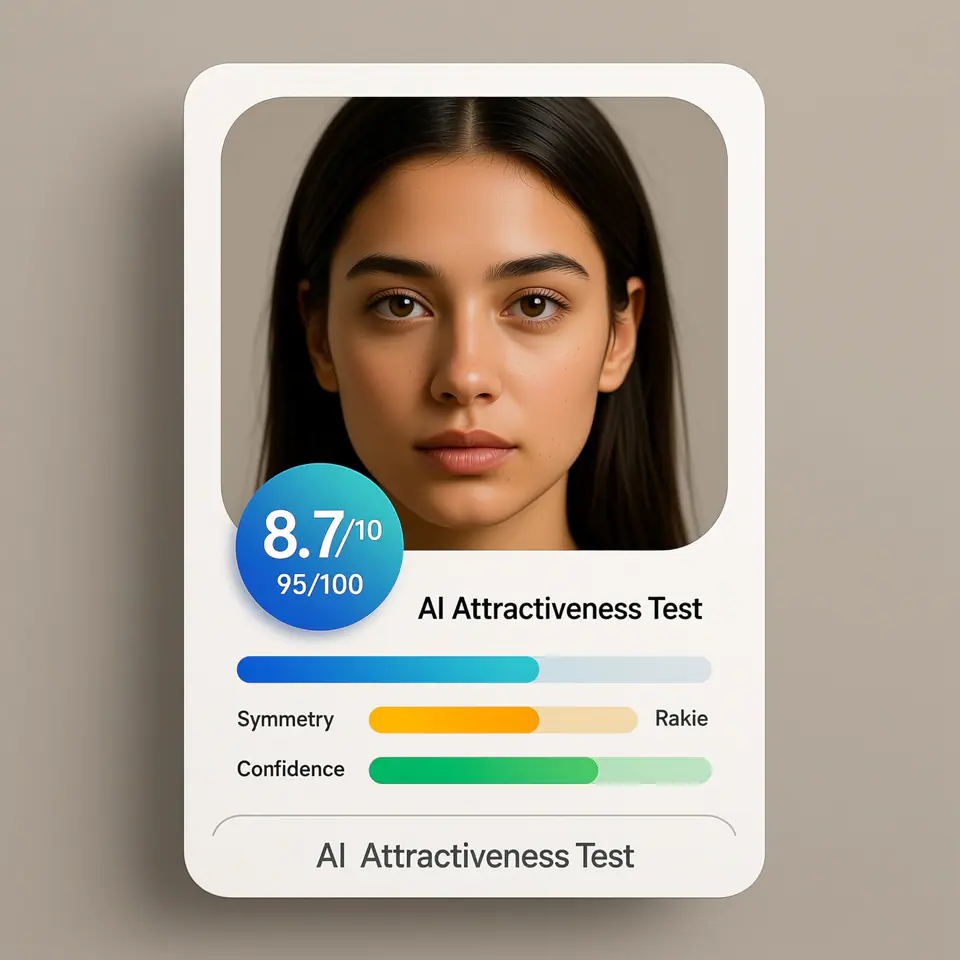
Visuelles Beispiel für AI Attractiveness Test Prompt Bild Prompt
BildBild BearbeitungappearanceReferenz Bild
Eingabe
Ersetze die Platzhalter in Klammern und passe Kamera, Licht, Format und Ausgabegrenzen an den Kanal an.
Create a modern AI attractiveness test result card UI using the uploaded photo as the subject. The image should look like a real web app product interface screenshot, not a standalone portrait. Subject: - Use the uploaded photo as the analyzed face - Preserve the same identity, facial structure, and proportions - Natural appearance, no over-beautification, no face reshaping Layout & Composition: - Square (1:1) ratio - Clean, modern SaaS UI card design - Portrait photo placed inside a rounded rectangle frame - UI elements clearly separated from the face Score Display: - Prominent overall score badge (e.g. 8.7 / 10 or 95 / 100) - Horizontal progress bars for the following attributes: - Symmetry - Golden Ratio - Confidence - Use modern UI colors (blue, green, soft gradients) Text Style: - Clean sans-serif font - Professional product UI typography - Clear hierarchy (score > labels > details) - No handwritten or decorative fonts Branding / Footer: - If any branding text is shown, use ONLY the product name: "AI Attractiveness Test" - Branding should appear subtle and minimal, similar to a web app title or footer label - Do NOT show analyst names, system names, timestamps, or generation dates Background & Card Style: - Light gradient or soft neutral background - Rounded corners and subtle shadows - Web app / SaaS dashboard aesthetic Lighting & Photo Style: - Neutral studio lighting - Soft, even illumination - No dramatic or cinematic effects Overall Look: - AI analysis report interface - Beauty test app result card - Professional, trustworthy, shareable - Looks like a real AI product UI Do NOT: - Do not add text such as "Analysis by", "Generated by", dates, or system credits - Do not overlay text directly on the face - Do not create a fashion or beauty photoshoot - Do not exaggerate facial perfection - Do not use poster-style typography
Am besten geeignet für
AI Attractiveness Test variants
Referenz guided edits
Reusable Bild workflows
Modell-Startpunkte
Qwen ImageGPT Image 2Seedream 4Seedream 4.5

Ähnliche Vorlagen

Die Kampagne weiterführen

Nutze diese benachbarten Eingabemuster, wenn dieselbe Kampagne ein weiteres Asset-Format braucht.

AI Patch Prompt generator Bild Prompt Beispiel
BildmerchText Prompt
AI Patch Prompt generator Bild
Produktionsreife Vorlage für AI Patch Prompt generator Bild, geeignet für AI Patch Generator variants und Text to Bild starts und klare VisioArt-Workflows.
Vorlage öffnen
AI Age Change Filter Prompt Bild Prompt Beispiel
BildBild Bearbeitungappearance
AI Age Change Filter Prompt Bild
Produktionsreife Vorlage für AI Age Change Filter Prompt Bild, geeignet für AI Age Change Filter variants und Referenz guided edits und klare VisioArt-Workflows.
Vorlage öffnen

AI Body Editor Prompt Bild Prompt Beispiel
BildBild Bearbeitungappearance
AI Body Editor Prompt Bild
Produktionsreife Vorlage für AI Body Editor Prompt Bild, geeignet für AI Body Editor variants und Referenz guided edits und klare VisioArt-Workflows.
Vorlage öffnen

FAQ

AI Attractiveness Test Prompt Bild FAQ

Klare Antworten zu Workflows, Modellwahl, Preisen und Produktions-Fit.

Produktionsreife Vorlage für AI Attractiveness Test Prompt Bild, geeignet für AI Attractiveness Test variants und Referenz guided edits und klare VisioArt-Workflows.

Ja. Ersetze die Platzhalter in eckigen Klammern und passe Kamera, Licht, Format, Details und Ausgaberegeln an den Kanal an.

Starte mit dem empfohlenen Tool auf der Seite. Wenn Bewegung, Realismus oder Stil andere Modellstärken brauchen, teste die benachbarten Modellpfade.

Nutze diese Vorlage in VisioArt.

Öffne das empfohlene Tool, füge die Eingabe ein, ersetze die Platzhalter und teste den stärksten Modellpfad.

Empfohlenes Tool öffnenVorlagen durchsuchen