Skip to content

قالب مطالبة

قالب مطالبة فيديو AI: مطالبة AI Eye Zoom مطالبة فيديو

قالب جاهز للإنتاج لـ AI Eye Zoom مطالبة فيديو، مناسب لـ AI Eye Zoom clips وappearance effects مع بنية مطالبة واضحة داخل VisioArt.
ابدأ الإنشاءعرض الأسعار
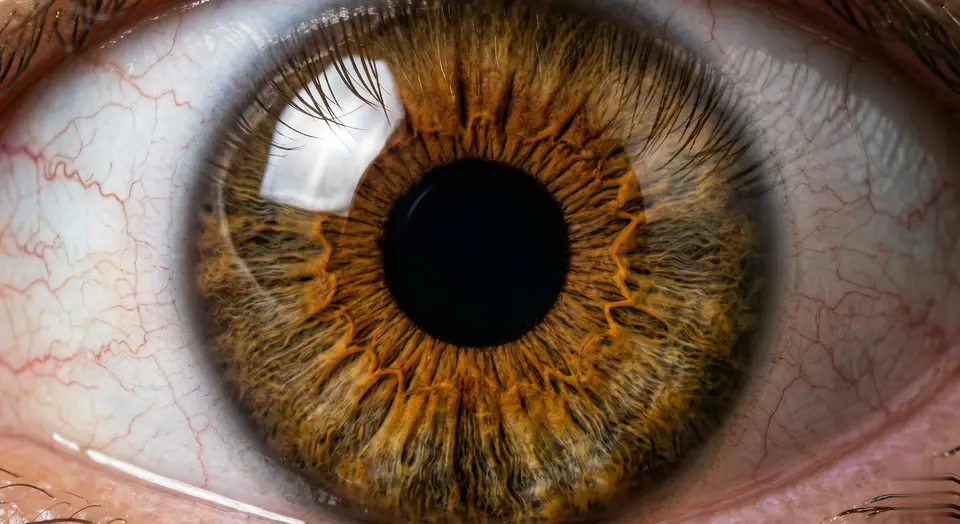
مثال مرئي لقالب مطالبة AI Eye Zoom مطالبة فيديو
فيديوفيديو تأثيرappearanceصورة to فيديو
المطالبة
استبدل العناصر بين الأقواس، ثم اضبط الكاميرا والإضاءة والتنسيق وقيود الإخراج حسب القناة.
Videos are generated from user-uploaded close-up photos of a single person to create hyper-realistic eye zooms. Start with a natural eye framing (eyelids, eyelashes, facial contours, lifelike). Then transition to a seamless, ultra-smooth zoom - linear motion, no speed changes/jumps, like a gentle breath. Hyper-realistic textures are preserved: clear iris striations, thin eyelashes (hair follicles are clearly visible), faint scleral veins, eyelid curves - all sharp and clear, no blur. Surrounding features (brows, cheeks) naturally recede without distortion. Final focus: pupil details are sharp and clear. As the zoom progresses, the pupil is centered in the frame. At the climax of the zoom, the pupil comes into focus - iris patterns, pupil edges, and corneal highlights are sharp and clear (no blur, perfect sharpness). Motion rules: Each frame is seamless (no noticeable cuts), and the motion curve is continuous (like liquid flow). Lighting/shadows are automatically adjusted based on zoom (e.g. corneal highlights move naturally, no sudden changes in brightness). Make sure every detail (even tiny textures) is sharp during the zoom, especially in the last frame centered on the pupil. Avoid: Unnatural motion (jumps, speed spikes), distorted facial features, blurred textures (especially at the end). Prioritize pupil-centered clarity and ultra-realistic, smooth zooms without any artifacts. The effect should feel like a slow, hypnotic dive into the core of the eyeball, eventually focusing on a single pupil in sharp and detailed focus - no blur, perfectly centered.
الأفضل لـ
AI Eye Zoom clips
appearance effects
Reusable فيديو workflows
نقاط بدء النماذج
Seedance

قوالب ذات صلة

واصل بناء الحملة

استخدم أنماط المطالبات القريبة عندما تحتاج الحملة نفسها إلى صيغة إضافية للأصل.

مثال مطالبة منتج كشف
تجارة إلكترونيةمنتج فيديومدفوع اجتماعي
منتج كشف
قالب جاهز للإنتاج لـ منتج كشف، مناسب لـ منتج launches ومدفوع اجتماعي tests مع بنية مطالبة واضحة داخل VisioArt.
افتح القالب

مثال مطالبة بورتريه خطاف
بورتريهاجتماعي contentcreator
بورتريه خطاف
قالب جاهز للإنتاج لـ بورتريه خطاف، مناسب لـ Creator posts ومؤسس content مع بنية مطالبة واضحة داخل VisioArt.
افتح القالب

مثال مطالبة Lookbook حركة
أزياءLookbookصورة to فيديو
Lookbook حركة
قالب جاهز للإنتاج لـ Lookbook حركة، مناسب لـ أزياء drops وLookbooks مع بنية مطالبة واضحة داخل VisioArt.
افتح القالب

الأسئلة الشائعة

أسئلة AI Eye Zoom مطالبة فيديو الشائعة

إجابات واضحة حول سير العمل، اختيار النماذج، الأسعار، وملاءمة الإنتاج.

قالب جاهز للإنتاج لـ AI Eye Zoom مطالبة فيديو، مناسب لـ AI Eye Zoom clips وappearance effects مع بنية مطالبة واضحة داخل VisioArt.

نعم. استبدل العناصر بين الأقواس، ثم عدل الكاميرا والإضاءة والنسبة والتفاصيل حسب القناة والنموذج.

ابدأ بالأداة الموصى بها في الصفحة، ثم اختبر مسارات النماذج القريبة عندما تحتاج إلى حركة أو واقعية أو أسلوب مختلف.

استخدم هذا القالب داخل VisioArt.

افتح الأداة الموصى بها، الصق المطالبة، استبدل العناصر النائبة، ثم اختبر أقوى مسار للنموذج.

افتح الأداة الموصى بهاتصفح القوالب